




 here!
I’m your shopping assistant for PC builds, upgrades, and everything tech.
Got questions? Ask away!
Start a conversation
here!
I’m your shopping assistant for PC builds, upgrades, and everything tech.
Got questions? Ask away!
Start a conversationShipped by Hebei XG Technology Co., Ltd.


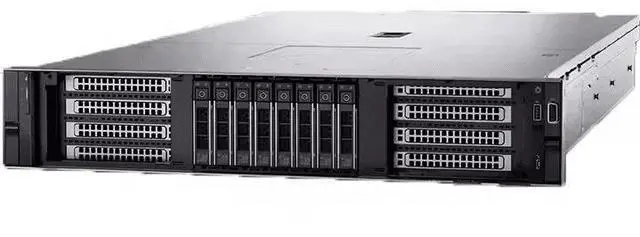
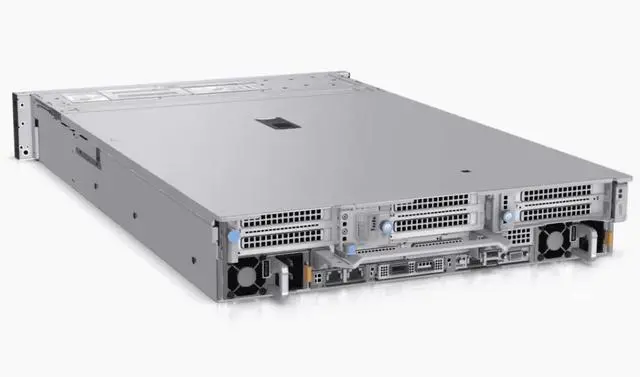
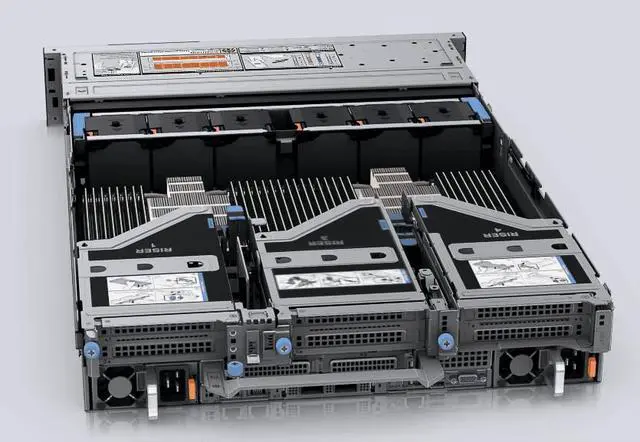
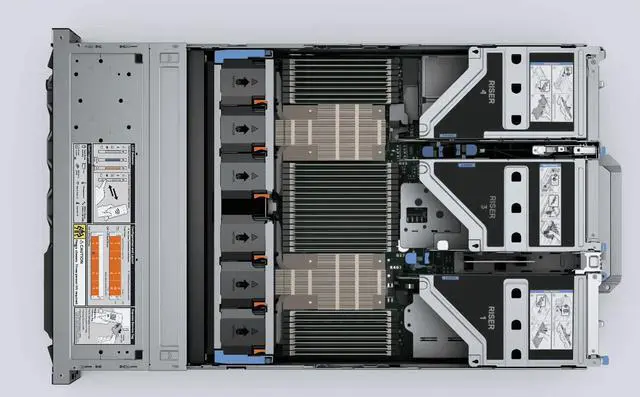



Any questions? Ask CelesteSM will help you find out quickly.
1. Highly Customizable:Without pre - installed CPU, heatsink, disk, RAID card, and power supply, users can freely configure the server according to their needs. They can choose components like 3rd Gen Intel Xeon Scalable processors to build a setup suitable for workloads such as virtualization and software - defined storage.
2. Potential for Powerful Computing Performance:Supports up to 2 3rd Gen Intel Xeon Scalable processors, with each processor having up to 32 cores. This can provide robust computing power to meet the demands of complex computational tasks.
3. High - speed Memory:Equipped with 16 DDR4 DIMM slots, supporting up to 1TB of RDIMM with a memory speed of up to 3200MT/s. It can accelerate memory - intensive workloads and enhance the overall system performance.
4. Flexible Storage Configuration:The front panel can be configured with up to 12 3.5 - inch SAS/SATA hard drives or 16 2.5 - inch SAS/SATA hard drives. It can also support 8 NVMe drives. The rear panel supports up to 2 2.5 - inch SAS/SATA/NVMe hard drives, with a maximum storage capacity of up to 184.32TB, meeting different storage requirements.
5. Efficient I/O Performance:Features up to 5 PCIe Gen4 slots, supports OCP 3.0 and SNAP I/O, providing high - speed data transfer. It can easily connect high - speed network cards, graphics cards, and other expansion devices.
6. Convenient Management:Through tools like iDRAC9 and OpenManage Systems Management, functions such as remote management, BIOS updates, and system monitoring can be achieved. This simplifies the management of IT infrastructure and improves operational efficiency.
7. Reliable Security:Supports features such as secure component verification and secure boot. It has a security architecture built - in at every stage of the product life cycle, from the silicon root of trust to signed firmware, ensuring the secure operation of the server.
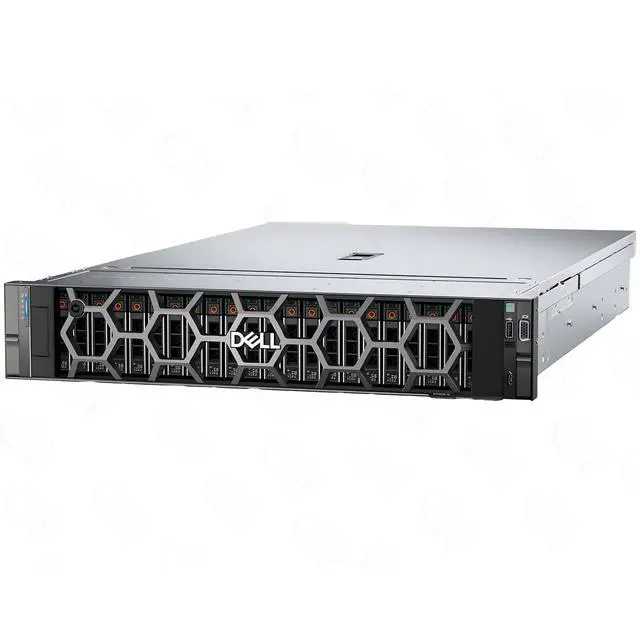
The Dell PowerEdge R750xs barebones server is a 2U rack platform for IT teams and system integrators who want to build a dual-socket 3rd Gen Intel Xeon system for virtualization, software-defined storage, or general data center workloads with flexible component selection.
| Attribute | Value |
|---|---|
| Best For | System builders and IT teams needing a configurable 2U barebones enterprise server for virtualization, software-defined storage, and dense compute/storage expansion, based on support for dual 3rd‑Gen Intel Xeon Scalable CPUs and multiple drive/PCIe configurations |
| Chassis And Storage | 2U rack chassis sold as a barebones unit (diskless, no CPUs, no heatsinks, no RAID card, no power supplies); front bay configurable for up to 12x 3.5-inch SAS/SATA or 16x 2.5-inch SAS/SATA or up to 8 NVMe drives; rear supports up to 2x 2.5-inch SAS/SATA/NVMe; maximum total capacity up to 184.32TB |
| Processor And Core Count | Supports up to 2 3rd Gen Intel Xeon Scalable processors, with up to 32 cores per processor |
| Memory Configuration | 16 DDR4 DIMM slots; supports up to 1TB RDIMM at up to 3200 MT/s |
| Expansion And I O | Up to 5 PCIe Gen4 slots and support for OCP 3.0 and SNAP I/O for high-speed network, accelerator, and other expansion cards |
| Management And Software | iDRAC9 and OpenManage Systems Management for remote management and BIOS updates |
| Power And Configuration Notes | Sold without power supplies and without heatsinks; includes no preinstalled CPUs, disks, or RAID card (barebones configuration intended for custom component installation) |
| Model Identifiers | Dell R750XS (2U) — Server Barebones |
Q: Dell PowerEdge R750xs vs R750: which one should I choose?
A: Choose the Dell PowerEdge R750xs when you want a 2U dual-socket server for mainstream virtualization, software-defined storage, or general business workloads and you do not need the broader expansion and memory headroom of the standard R750. Dell positions the R750xs as a right-sized platform for growing scale-out environments, while the R750 is the more full-featured model for demanding workloads. In practice, the R750xs supports up to 2 x 3rd Gen Intel Xeon Scalable CPUs with up to 32 cores each, 16 DDR4 DIMM slots, and up to 5 PCIe Gen4 slots, whereas the R750 adds more memory slots and greater I/O and NVMe flexibility. The trade-off is straightforward: R750xs is the better fit for cost-conscious, balanced deployments; R750 is the better fit when you expect denser memory footprints, heavier accelerator use, or more storage and expansion growth. ([i.dell.com](https://i.dell.com/sites/csdocuments/Product_Docs/en/R750xs-specsheet.pdf?utm_source=openai))
Q: Dell PowerEdge R750xs vs R650xs: is 2U worth it over 1U?
A: Choose the R750xs over the R650xs when you want the same general 'xs' design philosophy but need more internal drive capacity and easier expansion in a 2U chassis. Dell positions both as right-sized systems for virtualization and scale-out use, but the 2U R750xs is the more practical choice for storage-heavy VM clusters, software-defined storage nodes, or builds that need more room for PCIe devices and front-bay flexibility. Choose the R650xs instead when rack density matters more and your deployment favors a compact 1U footprint over maximum local storage. The main trade-off is density versus expansion: R650xs saves space, while R750xs is better when storage and serviceability are higher priorities. ([infohub.delltechnologies.com](https://infohub.delltechnologies.com/en-us/p/poweredge-xs-vs-standard-vs-xa-servers/?utm_source=openai))
Q: Dell PowerEdge R750xs vs R760xs: should I buy the newer generation?
A: Choose the R760xs if you want a newer platform with 4th Gen Intel Xeon Scalable support, DDR5 memory, and PCIe Gen5 bandwidth. Choose the R750xs if a 3rd Gen Xeon platform is sufficient for your workload and you are prioritizing platform familiarity, DDR4-era compatibility, or a lower-cost build path. Dell positions both systems similarly as balanced 2U servers for VDI, VMs, and software-defined storage, but the R760xs moves the platform forward with newer CPU and memory technology. The trade-off is mainly generation and budget: R760xs is the stronger long-term choice for new deployments, while R750xs still makes sense when the workload does not require the newer I/O and memory stack. ([i.dell.com](https://i.dell.com/sites/csdocuments/Merchandizing_Documents/en/us/poweredge-r760xs-spec-sheet.pdf?utm_source=openai))
Q: Dell PowerEdge R750xs vs R740: is the newer model a worthwhile upgrade?
A: The R750xs is the better upgrade when you want newer CPU support, PCIe Gen4 connectivity, faster DDR4-3200 memory, and newer platform management, especially for refreshed virtualization or storage nodes. Compared with the R740, the R750xs moves from 2nd Gen to 3rd Gen Intel Xeon Scalable processors and adds newer I/O options, including NVMe-focused configurations. The main trade-off is that the R740 can offer more DIMM slots in some configurations, so memory layout requirements should be checked carefully. For most buyers replacing older general-purpose infrastructure, the R750xs is the cleaner choice when the goal is newer compute and I/O capabilities rather than preserving legacy configuration patterns. ([shoppable-dev.s3.ap-southeast-1.amazonaws.com](https://shoppable-dev.s3.ap-southeast-1.amazonaws.com/products/bfc87ad1-8bf4-4bec-9673-55b5a9da3bf4.pdf?utm_source=openai))
Q: Is the Dell PowerEdge R750xs a better fit than a GPU-focused server like the R750xa?
A: Choose the R750xs when your priority is mainstream CPU-centric infrastructure such as virtualization, SDS, and general enterprise applications. Choose a GPU-oriented model like the R750xa when the workload is built around accelerators, such as AI training, inferencing, or graphics-heavy VDI. Dell separates these product roles clearly: the 'xs' line is designed as a balanced, right-sized server, while 'xa' models are built for intensive GPU use. The trade-off is specialization: R750xs is the better fit for broad server consolidation, while a GPU-first system is the better fit only when accelerator capacity is central to the deployment. ([infohub.delltechnologies.com](https://infohub.delltechnologies.com/en-us/p/poweredge-xs-vs-standard-vs-xa-servers/?utm_source=openai))
Q: Does this server come ready to run, or do I need to add core parts first?
A: You need to add core parts before this server can be deployed. This listing is a barebones configuration with no CPU, no heatsink, no storage drives, no RAID card, and no power supply included. It is best for buyers who already know their required build and want to choose the processors, memory, storage, and power configuration themselves.
Q: Who is this barebones server suitable for?
A: This server is suitable for IT teams, integrators, labs, and experienced buyers who want to customize a rack server for virtualization, software-defined storage, or other infrastructure workloads. It is not a simple plug-and-play option for general office use, because key compute, cooling, storage, and power components must be selected and installed separately.
Q: Is this a good choice if I want control over storage and expansion?
A: Yes, if customization is the priority. The product data indicates support for multiple front drive layouts, rear drive options, up to 8 NVMe drives, and up to 5 PCIe Gen4 slots. That makes it a practical fit for buyers who need to choose their own storage mix, networking, or add-in cards. The trade-off is that expansion parts are not included, so total build cost and compatibility planning matter.
Q: Do I need to think carefully about power and cooling with this model?
A: Yes. Because this unit ships without CPUs, heatsinks, and power supplies, power and thermal planning are part of the purchase decision. That is especially important if you plan to install dual processors, large memory capacity, multiple drives, or several PCIe cards. This is a better fit for buyers who want to design the final configuration, not for buyers expecting a fixed, pre-balanced system.
Q: Is this a good buy for someone trying to save upfront cost?
A: It can be, but only if you already have a clear build plan. A barebones server can avoid paying for unwanted preinstalled parts, which is useful for custom deployments. However, this listing excludes several essential components, so the real deployed cost depends on the CPUs, memory, drives, RAID, power supplies, and other options you add afterward.
Q: Who is this Dell R750XS barebones server suitable for?
A: This model is best for experienced buyers who want to choose their own CPU, memory, storage, RAID or HBA setup, and power supplies. It fits virtualization, Proxmox, and storage-heavy builds better than buyers who want a ready-to-run server, because this listing does not include a CPU, heatsink, disks, RAID card, or PSU.
Q: Is this a good choice for Proxmox or virtualization?
A: Yes, if you plan to configure it properly. The platform supports up to two 3rd Gen Intel Xeon Scalable CPUs, large DDR4 memory capacity, and flexible storage, which makes it suitable for virtualization. The main decision point is storage design: many Proxmox users discuss using HBA mode or software-defined storage such as ZFS instead of relying on a traditional hardware RAID setup.
Q: What are the main trade-offs of buying this barebones R750XS listing?
A: The trade-off is flexibility versus total build effort and cost. You can tailor the server to your workload, but you must source major parts separately, including processor(s), heatsink(s), storage, RAID or HBA, and power supply units. That makes it more suitable for buyers who already understand Dell server compatibility and want control over the final configuration.
Q: Is this a good buy for a homelab?
A: It can be a good homelab choice for users who want enterprise features, expansion, and newer server hardware, but it is not the simplest or cheapest path for beginners. Community discussion around Dell rack servers often highlights good parts availability and broad homelab use, while also warning that enterprise systems can use more power and require more planning than small-form-factor alternatives.
Q: Is the R750XS a reasonable option if noise matters?
A: Potentially yes, but it depends on your final components and environment. In homelab discussion, some users describe the R750XS as relatively quiet for an enterprise rack server, but it is still a 2U datacenter-class system, so buyers should not expect desktop-level acoustics.


