




 here!
I’m your shopping assistant for PC builds, upgrades, and everything tech.
Got questions? Ask away!
Start a conversation
here!
I’m your shopping assistant for PC builds, upgrades, and everything tech.
Got questions? Ask away!
Start a conversationShipped by Hebei XG Technology Co., Ltd.





Any questions? Ask CelesteSM will help you find out quickly.
1. Configuration Flexibility:The option of having no pre - installed CPU gives users the freedom to choose a processor that best suits their performance needs, whether for light - duty office applications or more demanding tasks.
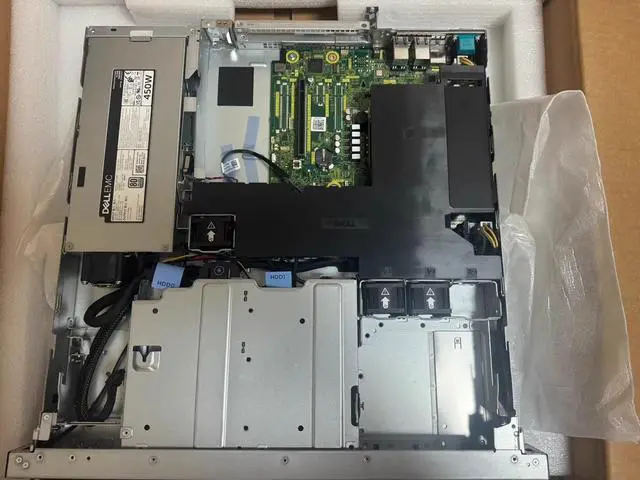
2. Storage Adaptability:With no disk included, users can customize the storage solution. The 2 bays for 3.5 - inch drives offer the potential to install high - capacity HDDs for large - scale data storage or high - performance SSDs for faster access.
3. Power Efficiency:Equipped with a 450W single power supply, it provides reliable power for the server. This power supply is designed to offer efficient energy consumption, helping to reduce operational costs.
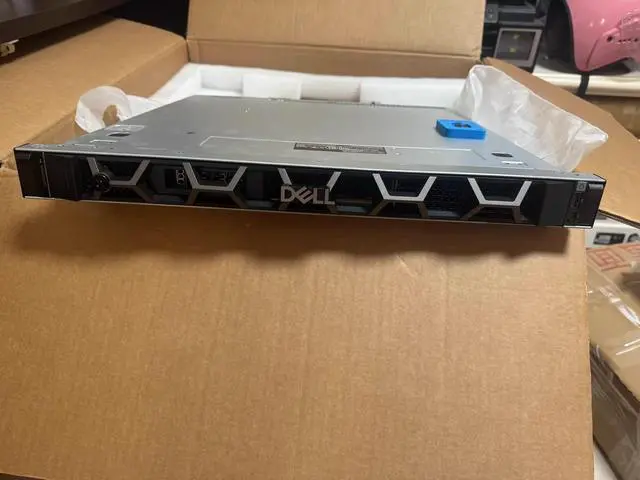
4. Space - Saving Design:The Dell R260's form factor, especially with the 2 - bay 3.5 - inch configuration, is compact and space - saving, making it suitable for data centers or office setups with limited space.
5. Processor Option:The E2414 option indicates a potential high - performance processor choice for those who decide to opt for it. It can provide a good balance of performance and cost - effectiveness for various server - based operations.
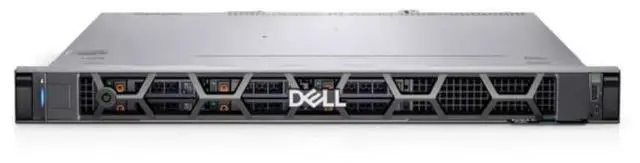
The Dell R260 is a configurable barebones rack server with two 3.5-inch drive bays, a 450W single power supply, and no preinstalled CPU or storage, making it suitable for IT teams and businesses that want to build a compact server around their own processor and drive choices.
| Attribute | Value |
|---|---|
| Best For | Buyers needing a barebones Dell R260 chassis that lets them choose the CPU and storage, and for space-conscious rack or office deployments where a compact, 2-bay 3.5-inch design is preferred |
| Storage And Expansion | Two internal 3.5-inch drive bays with no disks included — allows installation of high-capacity HDDs or 3.5-inch SSDs to customize capacity and performance |
| Processor And CPU Support | Shipped without a CPU (barebones) with an available E2414 processor option for customer installation |
| Power And Supply | Single 450W power supply (single‑PSU configuration) intended to provide the server's power with an emphasis on energy efficiency |
| Configuration Notes | Barebones configuration: no preinstalled CPU and no disks so buyers can select processor and storage components to match their workloads |
| Model Identifiers | Dell R260 Server — 2-bay 3.5" variant (E2414 option; no CPU; no disk; 450W single PSU); categorized as DELL / Server Barebones; PDP URL available |
Q: Should I choose the Dell PowerEdge R260 or PowerEdge T160 for a small business server?
A: Choose the PowerEdge R260 when you want a rackmount server for a shallow rack, centralized server-room deployment, or denser installations. Dell positions the R260 as a short-depth 1U platform for near-edge and SMB use, while the T160 is the tower alternative for the same general class of workloads. Performance can be similar when both use the same Xeon E-2400 CPU, but professional testing shows the R260 can pull ahead in some workloads depending on memory and thermal configuration. Choose the T160 when you prefer a freestanding tower format and do not need rack installation.
Q: Is the Dell R260 a better fit than the older PowerEdge R250?
A: The R260 is the better choice if you want the newer platform generation, DDR5 memory support, and current Xeon E-2400 or Xeon 6300 series CPU options. The older R250 is still relevant for basic single-socket 1U roles, but it is based on the previous Xeon E-2300 generation and older memory platform. Choose the R250 mainly when compatibility with an existing fleet or lower acquisition cost matters more than platform longevity.
Q: Should I buy this 2-bay 3.5-inch R260 or a more storage-focused R260 configuration?
A: Choose the 2-bay 3.5-inch R260 when you want a simpler build with large-capacity drives, modest local storage needs, or a clean base for OS-on-boot-device plus a small data set. Choose a higher-storage R260 configuration when you need more drive count, more flexible RAID options, or better fit for virtualization and mixed SSD/HDD layouts. Dell's official specs show that the R260 platform also comes in configurations with up to 6 x 2.5-inch bays and additional NVMe options, so the main trade-off is storage density and flexibility versus a simpler large-drive layout.
Q: Is a barebones Dell R260 with no CPU and no disk a smart choice versus a preconfigured server?
A: A barebones R260 is the better choice when you already know your CPU, storage, and RAID plan and want to control the build around a specific workload or budget. It is especially practical for IT teams standardizing parts, adding their own approved drives, or sizing the system for light virtualization, branch applications, or infrastructure roles. A preconfigured server is the better fit when you want faster deployment, validated component matching, and less build planning.
Q: Should I choose the Dell R260 or move up to a larger 1U server like the PowerEdge R360?
A: Choose the R260 when shallow depth, lower platform complexity, and entry server roles are the priority. Move up to the R360 when you need a broader expansion envelope within Dell's 1U rack line. Both are single-socket 1U systems in current Dell documentation, but the R260 is positioned as the compact short-depth option for edge and SMB deployments. In practice, the R260 is the better fit for constrained rack space, while a larger 1U model makes more sense when your deployment values expansion headroom over compact depth.
Q: Does this server include a CPU or hard drives out of the box?
A: No. This configuration is a barebones system that ships without a CPU and without any disks installed. It is best for buyers who already know which processor and storage they want to add, and it is not the quickest option for someone who needs a ready-to-run server on day one.
Q: Who is this Dell R260 suitable for?
A: This server is most suitable for IT buyers, system integrators, and small business users who want to choose their own CPU and drives instead of paying for preinstalled parts they may replace. It is less suitable for first-time buyers who want a preconfigured server with operating system and storage ready to use.
Q: Can I start with one drive and add another later?
A: In practical buying terms, a 2-bay diskless server is often chosen because it allows staged storage upgrades. This Dell R260 has two 3.5-inch bays, so it is positioned for buyers who may start with one drive and expand later, but the exact supported drive combinations and RAID behavior should be confirmed from the platform documentation before purchase.
Q: What kind of storage should I plan for with this model?
A: You should plan around user-supplied 3.5-inch drive storage, since this unit has two 3.5-inch bays and ships without disks. The main decision is usually capacity versus speed: larger-capacity HDDs fit storage-heavy workloads better, while SSD-based setups favor faster access if the system and chosen carriers support them.
Q: What is the main trade-off of buying this barebones configuration?
A: The main trade-off is flexibility versus convenience. You get more control over processor and storage selection, which can reduce wasted spend on unwanted preinstalled parts, but you also take on compatibility checking, parts sourcing, assembly, and a longer path to deployment.
Q: Who is the Dell R260 2-bay 3.5-inch barebones server suitable for?
A: It is best for buyers who already know their CPU and storage plan and want a current-generation 1U server as a base system. The 2 x 3.5-inch layout fits simple file, backup, branch-office, and light infrastructure roles better than dense virtualization or storage-heavy builds. Because this listing has no CPU and no disks, it is more suitable for IT buyers, integrators, or experienced homelab users than for beginners who want a ready-to-run server.
Q: Is this a good choice if I want to add my own drives later?
A: Yes, if your goal is a simple 2-drive build and you want control over storage cost. The main trade-off is expansion: this chassis only gives you 2 x 3.5-inch bays, so it is better for basic mirrored storage or modest-capacity deployments than for large RAID sets or future storage growth. Buyers discussing Dell servers often focus on drive compatibility, trays, and controller limits, so storage planning matters before purchase.
Q: Is the Dell R260 2-bay version worth buying over a more expandable server?
A: It is worth buying if you want a compact, newer 1U platform and only need a low-drive-count configuration. It is less compelling if your priority is maximum storage flexibility, many drive bays, or broad upgrade headroom, because the 2-bay 3.5-inch design is intentionally limited. In practice, this is a better fit for focused infrastructure tasks than for buyers trying to build one server that does everything.
Q: What are the main trade-offs of buying this barebones R260 with no CPU and no disk?
A: The advantage is configuration control: you can choose the processor and storage that match your workload and budget. The trade-offs are higher setup complexity, extra parts sourcing, and the need to verify CPU support, drive type, caddies, and RAID or controller requirements before deployment. This makes the listing practical for buyers replacing parts or standardizing a build, but less convenient for anyone expecting a complete server out of the box.


