


 Holiday Shipping Details & Extended Holiday Returns


* All videos and images on this page shot with a DJI Neo 2 have been professionally produced and edited to varying degrees in strict accordance with local laws and regulations. All videos and images are for illustrative purposes only; the actual shooting results shall prevail. Please ensure you understand the relevant local laws and regulations, and that your aircraft has the necessary certifications and airspace clearances before flying.
** All parameters listed on this page were measured on the mass-produced DJI Neo 2 drone under controlled testing conditions. Results may vary depending on the external environment, usage, and firmware version. Please refer to your actual experience for accuracy.
*** All images, videos, and screen content related to the product on this page are for illustrative purposes only. The actual product appearance (including but not limited to appearance, color, and size) and screen display content (including but not limited to background, UI, and illustrations) may differ from the actual product. Please refer to the actual product.
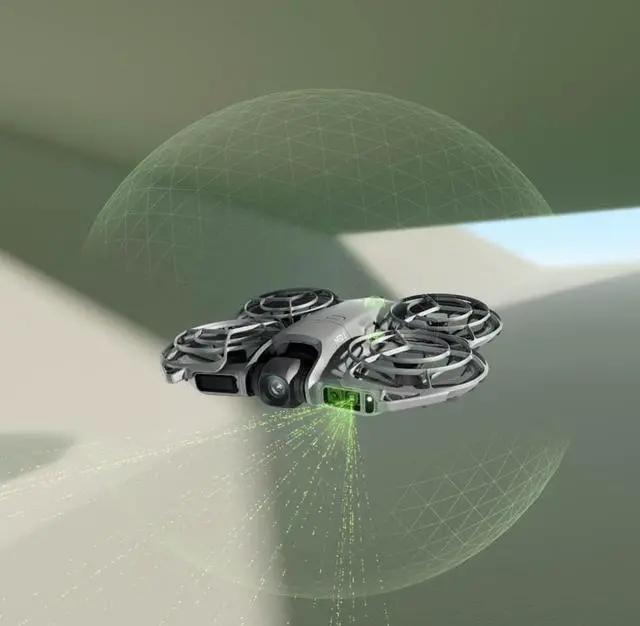
1. As of October 2025, the DJI Neo 2 is the smallest drone among DJI's released drone products with omnidirectional obstacle avoidance capabilities.
2. The omnidirectional obstacle avoidance function only provides safety assistance under limited conditions and cannot replace human judgment and control. During flight, always pay attention to the surrounding environment and relevant warnings in the DJI Fly app, maintain control of the aircraft at all times, and be responsible for your actions. The optimal operating altitude for the visual positioning system in the absence of satellite positioning is 0.5 to 10 meters. Flying above or below this range may result in decreased visual positioning performance, requiring caution. The visual system may not function properly on water; therefore, when the landing function is triggered, the aircraft may not be able to actively avoid the water below. It is recommended to maintain control of the aircraft at all times and judge actions based on the surrounding environment, avoiding excessive reliance on the visual system. The visual system cannot recognize the following objects and surfaces: large hollow and linear objects (such as tower cranes, high-voltage transmission towers, high-voltage transmission lines, cable-stayed bridges, etc.), surfaces with no texture or sparse texture, surfaces with highly repetitive textures (such as small checkered tiles of the same color), solid-color surfaces (such as pure black, pure white, pure red, pure green), highly reflective or reflective surfaces (such as ice surfaces, road signs), water surfaces or transparent surfaces, moving object surfaces (such as above crowds, above bushes or grass swaying in strong winds), moving obstacles (such as pedestrians or vehicles), scenes with drastic changes in lighting, surfaces with extremely dark (less than 1 lux) or extremely bright (greater than 100,000 lux) lighting, surfaces of materials that strongly absorb or reflect infrared light (such as mirrors, glass, road signs, asphalt pavements), small obstacles (such as fences, branches, wires), and small rod-shaped objects (such as utility poles, streetlights, etc.). Do not obstruct or interfere with the sensing system in any way, and ensure the lens is clear, free of blemishes, and scratches. After prolonged storage, the vision system may require recalibration. The DJI Fly app will prompt you, and the aircraft will automatically perform the calibration procedure. Do not fly in rain, fog, or environments with visibility less than 100 meters. Before takeoff, please inspect the sensor system's surface glass: remove any films, stickers, and other obstructions; if there are water droplets, fingerprints, or stains, clean with a lint-free cloth, do not use alcohol or other organic solvents; if the surface glass is detached, broken, scratched, or worn, please send it for factory repair. For other details, please refer to the product user manual.
3. Gesture Control Function Usage Conditions and Precautions: When using this function, ensure a safe surrounding environment, avoiding moving people, animals, or vehicles. The aircraft cannot avoid small obstacles (such as power lines or small branches), transparent objects (such as glass or water surfaces), or solid-colored objects (such as white walls) when using this function; please avoid using it in such scenarios. It is recommended to use this function in an environment with suitable lighting conditions. Gesture control will not work in extremely dark (less than 5 lux) or extremely bright (greater than 100,000 lux) ambient light. Gesture control is only supported in focus or follow mode and is not applicable when using a remote controller or motion control. It is recommended to maintain a distance of approximately 2 to 5 meters between the operator and the aircraft. When using this function, fingers must be fully extended. Thick gloves or mittens do not currently support gesture control, and the target must be fully visible in the frame to avoid obstruction. When landing by following the palm, the horizontal distance between the drone and the hand should be between 2 and 5 meters, and the vertical distance should not exceed 2 meters. If there is no response during close-range hand-held landing, you can adjust the aircraft's position using hand gestures, or move yourself to avoid blind spots and try again. When recalling with one arm extended to the side, the horizontal distance between the aircraft and your arm should be within 10 meters. Your arm must be fully extended when raised; do not raise both arms simultaneously, otherwise the aircraft will not be recalled.
4. It is recommended to use the intelligent follow function in open environments. For shooting scenarios that are not supported or may interrupt recording, please refer to the user manual. In complex environments with many obstacles, please use the automatic mode with caution to ensure flight safety and personnel safety.
5. When using the palm-operated takeoff and landing system, please follow these guidelines: It is recommended to operate in a windless environment; keep your palm horizontal and still to avoid scratching your fingers by touching the propeller blades; do not grab the aircraft with your hands while it is in flight.
6. "All-domain flight" means the DJI Neo 2 can fly both indoors and outdoors, with significantly improved performance on water and snow compared to its predecessor. Please familiarize yourself with local laws and regulations, ensuring compliance/certification requirements and obtaining the necessary airspace clearance before flying. Flight performance may be affected when the satellite positioning signal is weak, or when flying close to solid-color, transparent, or textureless surfaces. Please ensure you fly cautiously in well-lit conditions. When flying over water, maintain a height of at least 1 meter for safety. For further details, please refer to the product manual.
7. The highest resolution in portrait mode is 2.7K.
8. Requires the use of flight goggles (DJI Flight Goggles N3 or DJI Flight Goggles 3) and a flyby stick (DJI FPV Remote Controller 3). When using the DJI Neo 2, please comply with local laws and regulations and pay attention to flight safety.
9. Only Chinese and English are supported.
10. DJI Neo 2 requires a Wi-Fi connection to the phone to enable this feature.
11. You can check your phone's compatibility by visiting
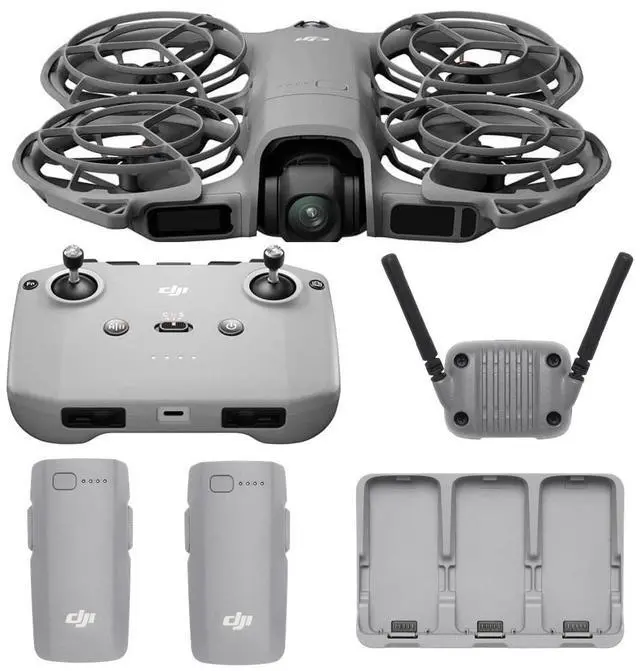
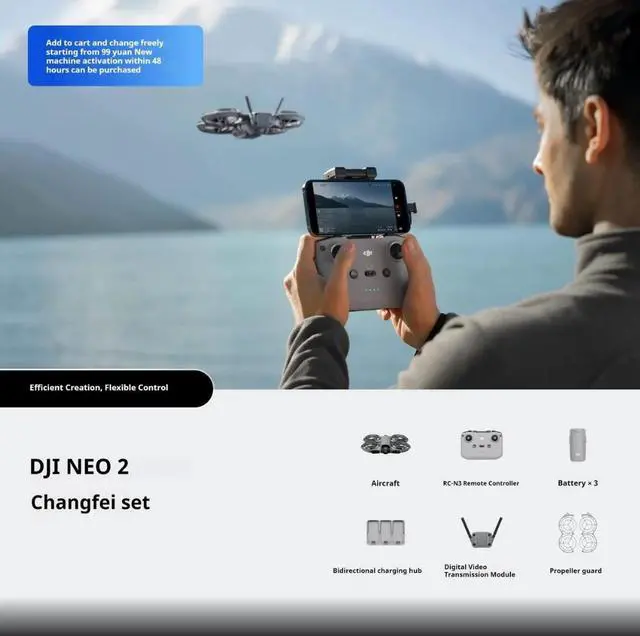
12. Motion control and remote control require the DJI Neo 2 digital image transmission module, and the necessary equipment can be obtained by purchasing a specific kit or by purchasing a specific remote control and flight goggles separately.
13. The 10km image transmission distance is only achievable under the FCC standard. Mainland China uses the SRRC standard, with a maximum image transmission distance of 6km. The above data was measured in an open, unobstructed outdoor environment, using a remote controller or flight goggles. These represent the maximum communication distance for image transmission functions under each standard. In actual flight scenarios, the maximum communication distance is limited by the aircraft's maximum range. Please pay attention to the return-to-home prompts on the image transmission interface during actual flight.
14. The maximum speed measured by the aircraft when it takes off from 0 meters above sea level in an open, windless environment is for reference only.
15. 4K/100fps slow-motion video recording is only supported when using motion controls or remote control.
16. The stabilization switch is only available when used with aviator goggles. When stabilization is off, recorded video footage supports Gyroflow offline stabilization.
17. The number of batteries that can be charged simultaneously depends on the charger's wattage. A charger with a wattage greater than 45 watts can charge three batteries simultaneously, a charger with a wattage between 30 and 45 watts can only charge two batteries simultaneously, and a charger with a wattage less than 30 watts can only charge batteries sequentially from highest to lowest capacity. Please refer to the charging protocol supported by your charger.
18. This data was measured in a low-interference laboratory environment in a country or region that supports dual-band 2.4 GHz/5.8 GHz. Actual download speeds may vary depending on your actual experience.
19. Measured in a windless environment, without the DJI Neo 2 digital image transmission module installed, with camera parameters adjusted to 1080p/30fps, video recording mode turned off, at an altitude of 20 meters, flying forward at a constant speed of 4 meters per second until the remaining battery was zero. Results may vary to some extent under different external environments, usage methods, and firmware versions; please refer to actual experience.
20. After DJI Neo 2 is activated, the battery is fully charged. The data was measured with the drone in default settings, using the orbit, skyward, and distance shooting modes. This data is for reference only.
21. Weight does not include the DJI Neo 2 digital video transmission module. Product weight may vary due to different batches of materials, etc. Please refer to the actual product.
22. Product weight may vary due to different batches of materials, etc. Please refer to the actual product weight.
23. The measurement was taken in a windless environment with the camera settings adjusted to 1080p/30fps, video recording mode turned off, and the aircraft flying forward at a constant speed of 2 m/s at an altitude of 20 meters until its remaining battery was zero. Results may vary depending on external environment, usage, and firmware version; please refer to your actual experience.
24. Measured in an open, interference-free environment under FCC standards. Actual transmission distance may vary depending on the usage environment, mobile device performance, and regulations in different countries and regions. Please refer to your actual experience.