Your Browsing History
- Free 30-day Returns
$32.96
Ships from China.
Meet Your Seller
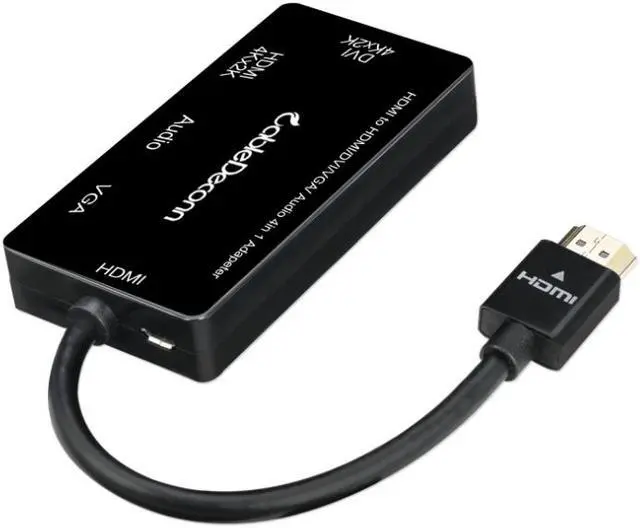
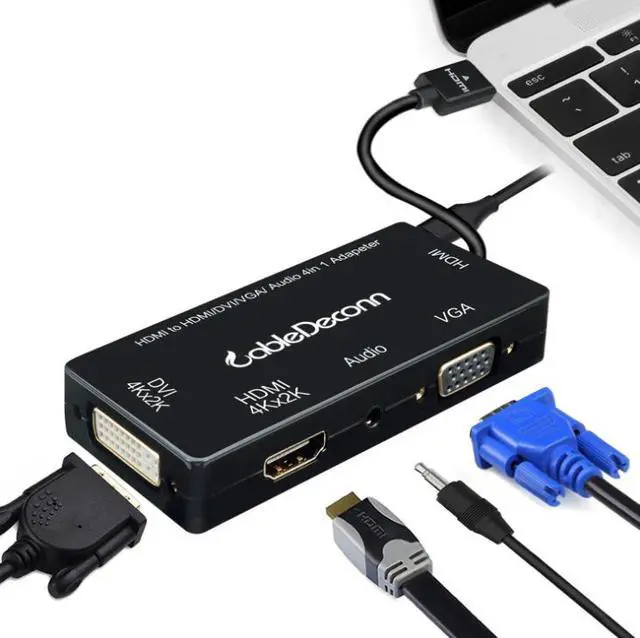
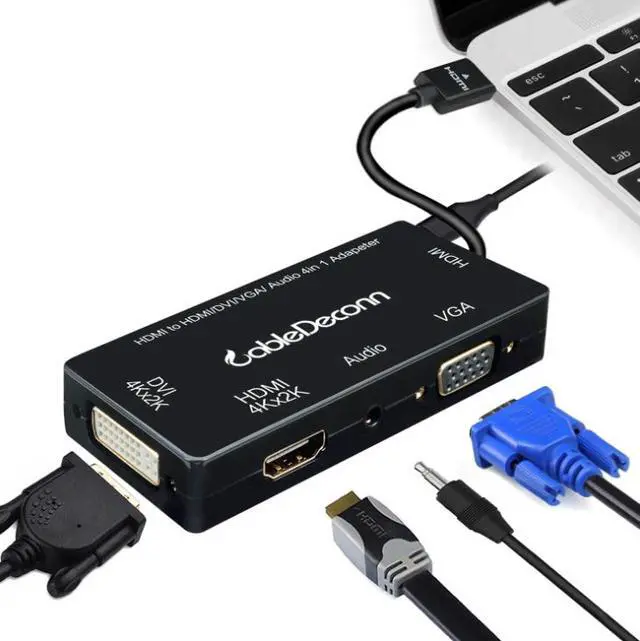
HDMI to dvi 4Kvga hdmi4K Audio display different display band audio four-in-one adapter cable
- product features:
- ?Convert complete digital analog signal to digital analog or signal output
- ?Support conversion from digital signal to analog signal
- ?Support HDCP 1.0/1.1/1.2
- ?Quick installation, simple operation, no need to set
- ?Built-in conversion chip, support hot swap.
- ?HDMI video input format: 480i/576i/480p/576p/720p/1080i/1080p/2k/4K
- ?VGA video output format: 480i/576i/480p/576p/720p/1080i/1080p/2k/4K
- HDMI four-in-one HDMI DVI supports 4K resolution and different displays
+
+
Overview
Specs
Reviews
Any questions? Our AI beta will help you find out quickly.
Try me now
product features:? Convert complete digital analog signal to digital analog or signal output? Support conversion from digital signal to analog signal? Support HDCP 1.0 / 1.1 / 1.2? Quick installation, simple operation, no need to set? Built-in conversion chip, support hot swap.?
HDMI video input format: 480i/576i/480p/576p/720p/1080i/1080p/2k/4K?
VGA video output format: 480i/576i/480p/576p/720p/1080i/1080p/2k/4K HDMI four-in-one HDMI DVI supports 4K resolution and different displays Need to tune out the voice. Look here!! The input end HDMI is connected to the output end HDMI, the TV can set the sound, and the monitor needs an external small speaker to have the sound output. The HDMI input is connected to the DVI output. If you need sound output, you need to connect a small speaker to the input device to have the sound output. The input HDMI is connected to the output VGA. If you need sound output, you need to connect a small speaker to the converter to have sound output All sounds come from input devices, such as computers, tablets, adapters Because the interface of DVI and VGA itself will not have the function of sound only video, so these two displays usually do not have sound, we need our input with audio hole, and HDMI itself comes with sound and video Output, so as long as there is a speaker device will produce sound. Attention!!! When plugging in the small speaker, be sure to supply power to the small speaker, otherwise there will be no sound

HDMI video input format: 480i/576i/480p/576p/720p/1080i/1080p/2k/4K?
VGA video output format: 480i/576i/480p/576p/720p/1080i/1080p/2k/4K HDMI four-in-one HDMI DVI supports 4K resolution and different displays Need to tune out the voice. Look here!! The input end HDMI is connected to the output end HDMI, the TV can set the sound, and the monitor needs an external small speaker to have the sound output. The HDMI input is connected to the DVI output. If you need sound output, you need to connect a small speaker to the input device to have the sound output. The input HDMI is connected to the output VGA. If you need sound output, you need to connect a small speaker to the converter to have sound output All sounds come from input devices, such as computers, tablets, adapters Because the interface of DVI and VGA itself will not have the function of sound only video, so these two displays usually do not have sound, we need our input with audio hole, and HDMI itself comes with sound and video Output, so as long as there is a speaker device will produce sound. Attention!!! When plugging in the small speaker, be sure to supply power to the small speaker, otherwise there will be no sound
Warranty & Returns
Warranty, Returns, And Additional Information
Warranty
- Please contact the Seller directly for warranty information. Warranty information may also be found on the Manufacturer's website.
- CONTACT
Return Policies
- Return for refund within: 30 days
- Return for replacement within: non-replaceable
- This item is covered by ZerKorr Power Return Policy
Manufacturer Contact Info
- For a directory of all our manufacturers, please click below.
- Manufacturers Directory
LOADING...