

Your Browsing History
- Free 30-day Returns
$148.99


Meet Your Seller

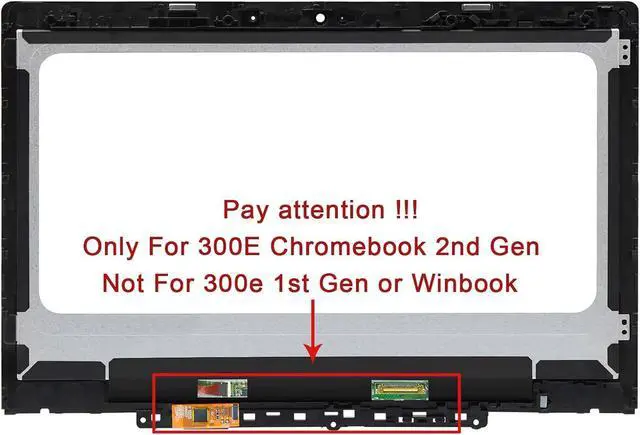

Original New Screen Replacement for Lenovo 300E Chromebook 2nd Gen AST MTK LCD Module Display Touch Screen Digitizer 5D10Y67266 5D10Y97713 5D10T79505 5D11B01178 5D10T95195 81MB 82CE 81QC
- Compatible Model : for Lenovo 300E Chromebook 2nd Gen AST MTK 5D10Y67266 5D10N24832 5D10Y97713 5D10T79505 5D11B01178 5D10T95195 81MB 82CE 81QC 81MB0003US LCD screen replacement display assembly panel (Not for 300e 1st Gen or Winbook)
- Screen Resolution : 1366x768; Packing&Shipping : 11.6" LCD panel+Touch galss+Touch digitizer board+Bezel+Touch Control Board
- It will be tested and packed carefully before shipping. Please turn off the power before assembly. And we provide a 3-month warranty for quality problems.
- Note : When opening the package, please confirm that the package is complete, this product is fragile, please operate carefully to avoid damage.
- Before purchasing, please reconfirm whether the product you choose is the model you need, if you have any doubts, please contact us in time.
+
+
Overview
Specs
Reviews

Any questions? Our AI mode will help you find out quickly.
Try me now
Purchase instructions:
1. You must verify that your specific laptop model is listed in our title or description. Buying the wrong model can damage your laptop;
2. You must verify your parameters (including maximum resolution: UHD, QHD, FHD or HD; Whether it has touch function; The connector is either 30pin or 40pin; Refresh rate 60Hz, 120Hz, 144Hz, 165Hz, 240HZ or other. After double checking the above information, you will receive the correct product.
3. The following is a method to query the maximum resolution
My Laptop - Display - Maximum Resolution
4. The following is a method for querying refresh rates
Please Check PC Refresh Rate: Right click on your desktop > Go to the Display settings > Click Advanced display settings > Display information - Refresh rate (Hz)
1. You must verify that your specific laptop model is listed in our title or description. Buying the wrong model can damage your laptop;
2. You must verify your parameters (including maximum resolution: UHD, QHD, FHD or HD; Whether it has touch function; The connector is either 30pin or 40pin; Refresh rate 60Hz, 120Hz, 144Hz, 165Hz, 240HZ or other. After double checking the above information, you will receive the correct product.
3. The following is a method to query the maximum resolution
My Laptop - Display - Maximum Resolution
4. The following is a method for querying refresh rates
Please Check PC Refresh Rate: Right click on your desktop > Go to the Display settings > Click Advanced display settings > Display information - Refresh rate (Hz)
Warranty & Returns
Warranty, Returns, And Additional Information
Warranty
- Please contact the Seller directly for warranty information. Warranty information may also be found on the Manufacturer's website.
- CONTACT
Return Policies
- Return for refund within: 30 days
- Return for replacement within: 30 days
- This item is covered by Fix-Repairer Return Policy
Manufacturer Contact Info
- For a directory of all our manufacturers, please click below.
- Manufacturers Directory
LOADING...