




![Main image of [New Version] 4 Pack Joycon Joystick Replacement 3D Joystick Analog Left/Right Thumb Sticks Sensor Caps for Nintendo Switch Joy Con Controller, Joycon Repair Kit, NS Repair Tool 33 PCS](https://c1.neweggimages.com/productimage/nb640/C691D2604220AFD9J54.jpg)
![Alt view image 2 of 7 - [New Version] 4 Pack Joycon Joystick Replacement 3D Joystick Analog Left/Right Thumb Sticks Sensor Caps for Nintendo Switch Joy Con Controller, Joycon Repair Kit, NS Repair Tool 33 PCS](https://c1.neweggimages.com/productimage/nb640/C691D2604220AFDB234.jpg)
![Alt view image 3 of 7 - [New Version] 4 Pack Joycon Joystick Replacement 3D Joystick Analog Left/Right Thumb Sticks Sensor Caps for Nintendo Switch Joy Con Controller, Joycon Repair Kit, NS Repair Tool 33 PCS](https://c1.neweggimages.com/productimage/nb640/C691D2604220AFDCAD9.jpg)
![Alt view image 4 of 7 - [New Version] 4 Pack Joycon Joystick Replacement 3D Joystick Analog Left/Right Thumb Sticks Sensor Caps for Nintendo Switch Joy Con Controller, Joycon Repair Kit, NS Repair Tool 33 PCS](https://c1.neweggimages.com/productimage/nb640/C691D2604220AFDDF8D.jpg)
![Alt view image 5 of 7 - [New Version] 4 Pack Joycon Joystick Replacement 3D Joystick Analog Left/Right Thumb Sticks Sensor Caps for Nintendo Switch Joy Con Controller, Joycon Repair Kit, NS Repair Tool 33 PCS](https://c1.neweggimages.com/productimage/nb640/C691D2604220AFDGN4C.jpg)
![Alt view image 6 of 7 - [New Version] 4 Pack Joycon Joystick Replacement 3D Joystick Analog Left/Right Thumb Sticks Sensor Caps for Nintendo Switch Joy Con Controller, Joycon Repair Kit, NS Repair Tool 33 PCS](https://c1.neweggimages.com/productimage/nb640/C691D2604220AFDIQ4E.jpg)
![Alt view image 7 of 7 - [New Version] 4 Pack Joycon Joystick Replacement 3D Joystick Analog Left/Right Thumb Sticks Sensor Caps for Nintendo Switch Joy Con Controller, Joycon Repair Kit, NS Repair Tool 33 PCS](https://c1.neweggimages.com/productimage/nb640/C691D2604220AFDUF6B.jpg)


- Use the Y screwdriver to remove 4 screws on the joycon.
- Use the X screwdriver to remove the screws from the joycon.
- Take down the small iron with the tweezers
- Then take the original lock buckle out carefully.
- Then put the spring into the metal lock buckle.
- Put the metal lock buckle into the joycon and press the spring into the slot.
- Finally, put back the small iron and the screw. Close the joycon case back.

Joycon Joystick Replacement
- Material: ABS, Metal
- Package Size: 150*70*20mm
- Weight: 90g
- Not original, third party products
Note: Light shooting and different displays may cause the color of the item in the picture a little different from the real thing. The measurement allowed error is +/- 1-3cm.

Universal Compatible
Complete Premium Nintendo repair tool kits specially designed for repairing your Nintendo Switch Joycon

Metal lock buckles
The left and right lock buckle are different.Be careful not to reverse them.
Compare the taken out buckle with ours to confirm which one to put in.

Be careful and slowly
Be careful about the orange flat wire between the top and bottom of Joy Con case.So you need to open the Joy Con case carefully


Package Contents
- 4 * joycon joystick replacement
- 2 * Alloy Siider lock Buckles
- 8 * screws Y
- 4 * screws +
- 2 * green pry piece
- 1 * Cleaning Cloth
- 1 * tweezer
- 1 * Triangle paddle
- 1 * suction cup
- 1 * cleaning brush
- 4 * Thumb Stick Cap
- 1 * pry tool
- 1 * Magnetic 2.0 screwdriver Y
- 1 * Magnetic 1.5 screwdriver Y
- 1 * Magnetic 2.0 screwdriver +


- We are a manufacturer founded in April, 2007. We offer the lowest prices on the market for rechargeable laptop batteries, DVD burners, baby monitors, and wireless security cameras.
- We have a complete engineering facility for battery testing. This allows us to implement the most up-to-date testing maneuvers for your consumer electronic needs. We only sell quality products produced by quality suppliers.
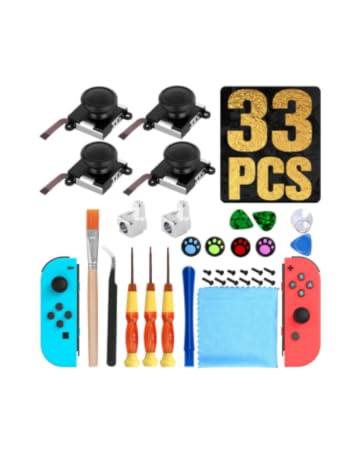
4 Pack Joycon Joystick Replacement
ASIN: B078X4YWCG
- Use the Y screwdriver to remove 4 screws on the joycon.
- Use the X screwdriver to remove the screws from the joycon.
- Take down the small iron with the tweezers
- Then take the original lock buckle out carefully.
- Then put the spring into the metal lock buckle.
- Put the metal lock buckle into the joycon and press the spring into the slot.
- Finally, put back the small iron and the screw. Close the joycon case back.
Joycon Joystick Replacement
- Material: ABS, Metal
- Package Size: 150*70*20mm
- Weight: 90g
- Not original, third party products
Note: Light shooting and different displays may cause the color of the item in the picture a little different from the real thing. The measurement allowed error is +/- 1-3cm.
Universal Compatible
Complete Premium Nintendo repair tool kits specially designed for repairing your Nintendo Switch Joycon
Metal lock buckles
The left and right lock buckle are different.Be careful not to reverse them.
Compare the taken out buckle with ours to confirm which one to put in.
Be careful and slowly
Be careful about the orange flat wire between the top and bottom of Joy Con case.So you need to open the Joy Con case carefully
Package Contents
- 4 * joycon joystick replacement
- 2 * Alloy Siider lock Buckles
- 8 * screws Y
- 4 * screws +
- 2 * green pry piece
- 1 * Cleaning Cloth
- 1 * tweezer
- 1 * Triangle paddle
- 1 * suction cup
- 1 * cleaning brush
- 4 * Thumb Stick Cap
- 1 * pry tool
- 1 * Magnetic 2.0 screwdriver Y
- 1 * Magnetic 1.5 screwdriver Y
- 1 * Magnetic 2.0 screwdriver +
- We are a manufacturer founded in April, 2007. We offer the lowest prices on the market for rechargeable laptop batteries, DVD burners, baby monitors, and wireless security cameras.
- We have a complete engineering facility for battery testing. This allows us to implement the most up-to-date testing maneuvers for your consumer electronic needs. We only sell quality products produced by quality suppliers.
4 Pack Joycon Joystick Replacement
ASIN: B078X4YWCG