Your Browsing History
- Free 30-day Returns
$88.99
Meet Your Seller
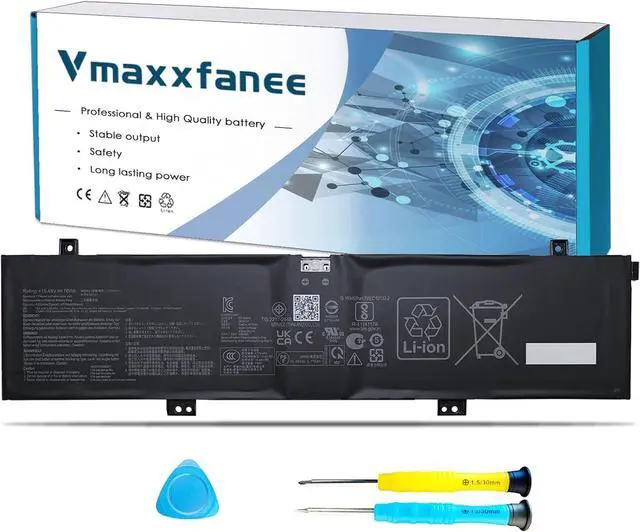
C41N2101 Laptop Battery Replacement for Asus ROG Zephyrus G14 GA402 GA402R GA402RJ TUF Dash F15 FX517 Zenbook Pro 14 UM6702RA Duo VivoBook Pro 15X OLED K6501ZM Series 0B200-04110100
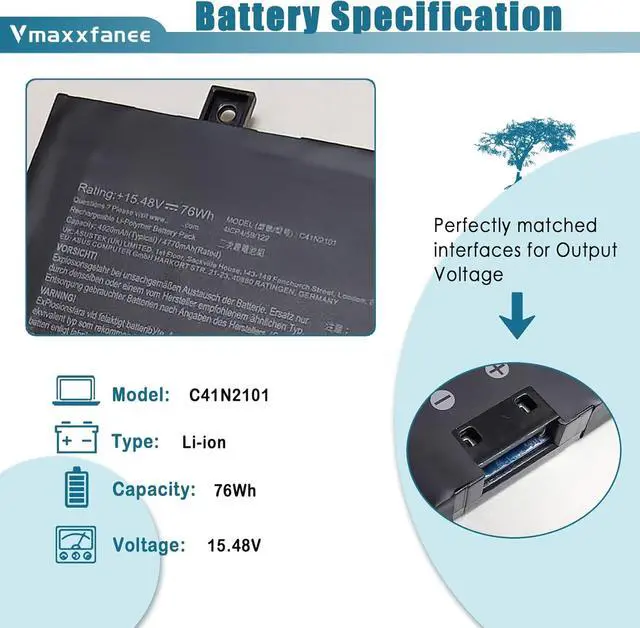
- ASUS C41N2101 battery Specifications Model: C41N2101 . Voltage: 15.48V. Capacity: 76Wh . Color: Black Condition: 100% brand New .
- For ASUS ROG Zephyrus G14 GA402 Seriesfor ASUS ROG Zephyrus G14 GA402, GA402R,GA402RJ. Zenbook Pro 17 UM6702RA,UM6702RC. ASUS Zenbook Pro 14 Duo OLED UX8402ZA,UX8402ZE series.ROG Zephyrus G14 GA402RK,TUF Dash F15 FX517,FX517ZC,FX517ZM.
- ASUS C41N2101 Compatible P/NC41N2101 0B200-04110000 0B200-04110100.
- Quality & Security Quality: grade A cells ensure fast charges and low power consumption. Safety: All of our products are Certified by UL/CE/FCC/RoHS for safety. Strict guidelines for compatibility, strict quality control standards to ensure the true capacity, stable current and low self-discharge and standards compliance for environment safety.
- After-sale serviceWe guarantee 30 days return/exchange policy and 12-month warranty; 24 x 7 email support.
+
+
Overview
Specs
Reviews
Any questions? Our AI beta will help you find out quickly.
Try me now
for ASUS TUF Dash F15 FX517 Series.
for ASUS TUF Dash F15 FX517ZC Series: FX517ZC-HN059W FX517ZC-HN174W
for ASUS TUF Dash F15 FX517ZE Series.
for ASUS TUF Dash F15 FX517ZM Series: FX517ZM-AS73
for ASUS ROG Zephyrus G14 GA402 GA402R Series.
for ASUS ROG Zephyrus G14 GA402RK Series: GA402RK-012W GA402RK-L8148WS
for ASUS ROG Zephyrus G14 GA402RJ Series: GA402RJ-L4076W
for ASUS ROG Zephyrus G14 GA402NI GA402NJ GA402NU GA402NV Series.
for ASUS ROG Zephyrus G14 GA402XI GA402XU GA402XV GA402XY GA402XZ Series.
for ASUS VivoBook Pro 15X OLED K6501ZM M6501RR Series.
for ASUS ZenBook Pro 17 UM6702 UX6404 UX8402 Series.
for ASUS Zenbook Pro UX8402ZA UX8402ZE UX8402VV Series.
for ASUS Zenbook Pro 17 UM6702RA Series: UM6702RA-DB71
for ASUS Zenbook Pro 17 UM6702RC Series: UM6702RC-DS94T UM6702RC-XB91UM6702RC-M2115X
If the new battery is not recognized during the initial installation, please reinstall and check if the interface is fully connected.
Discharge the new battery to 5%-10% (not 0%), then charge and cycle 3-4 times to wake up the new battery.
The important point is to perform a full discharge charge every other month to extend battery life.
Don't connect adapter for a long time while using the battery. It may damage the battery.
Avoid artificial shocks, disassembly, crush or puncture. Don't dispose of the battery in fire or water.Avoid using the battery in an environment where the temperature is too high or too low.
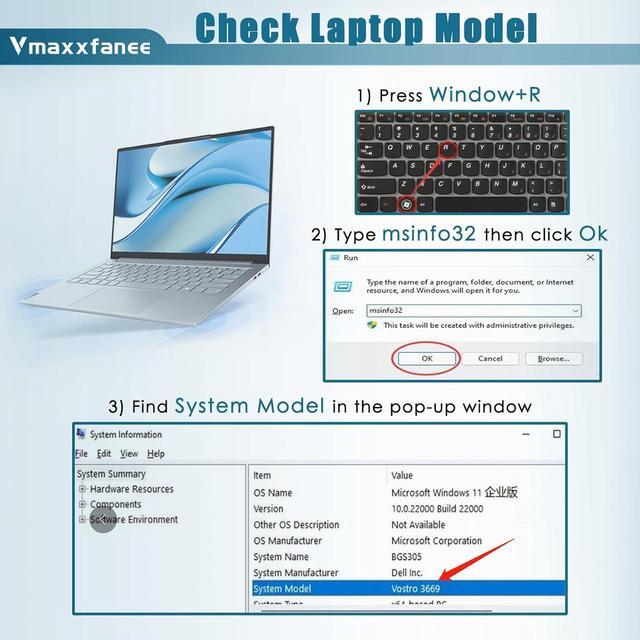
We strongly recommend you to check and confirm your laptop model, original battery model and appearance before placing your order, compare it with our battery images to make sure it is the one you need.
We guarant-ee 30 days return/exchange policy and 12-month warrant-y; 24 x 7 email support. If you have any questions, please contact-us at your convenience and we will do our best to solve your problem!
Under normal use, most batteries last about 3 hours. Some high-capacity batteries can last up to 5-8 hours.
Battery life depends on the laptop's CPU processor speed, applications, screen brightness, external ports for wireless devices, and the life of the battery itself, so the actual battery life may differ from your original model. If you find that your new battery only lasts a short time or drops out quickly, please consult us and we will help you until the problem is solved.
Please look at the physical characteristics of the battery correctly. Battery itself is a consumable product, it will be affected by the number of times the battery is used, the user's habits, the temperature of the environment and other factors and gradually shorten its own use time.
Typically, you receive a new battery with approximately 50% charge to keep the battery active. During long-distance transportation and storage in warehouses, the battery may be naturally depleted. Please fully charge the battery before use, then discharge it to 10%-20% and cycle it 3-4 times.
Compatible Laptop Models (Use "Ctrl+F to find your model quickly) Vmaxxfanee after-sales service How long does the battery last when fully charged? Tips How to charge and discharge a new battery ?

for ASUS TUF Dash F15 FX517ZC Series: FX517ZC-HN059W FX517ZC-HN174W
for ASUS TUF Dash F15 FX517ZE Series.
for ASUS TUF Dash F15 FX517ZM Series: FX517ZM-AS73
for ASUS ROG Zephyrus G14 GA402 GA402R Series.
for ASUS ROG Zephyrus G14 GA402RK Series: GA402RK-012W GA402RK-L8148WS
for ASUS ROG Zephyrus G14 GA402RJ Series: GA402RJ-L4076W
for ASUS ROG Zephyrus G14 GA402NI GA402NJ GA402NU GA402NV Series.
for ASUS ROG Zephyrus G14 GA402XI GA402XU GA402XV GA402XY GA402XZ Series.
for ASUS VivoBook Pro 15X OLED K6501ZM M6501RR Series.
for ASUS ZenBook Pro 17 UM6702 UX6404 UX8402 Series.
for ASUS Zenbook Pro UX8402ZA UX8402ZE UX8402VV Series.
for ASUS Zenbook Pro 17 UM6702RA Series: UM6702RA-DB71
for ASUS Zenbook Pro 17 UM6702RC Series: UM6702RC-DS94T UM6702RC-XB91UM6702RC-M2115X
If the new battery is not recognized during the initial installation, please reinstall and check if the interface is fully connected.
Discharge the new battery to 5%-10% (not 0%), then charge and cycle 3-4 times to wake up the new battery.
The important point is to perform a full discharge charge every other month to extend battery life.
Don't connect adapter for a long time while using the battery. It may damage the battery.
Avoid artificial shocks, disassembly, crush or puncture. Don't dispose of the battery in fire or water.Avoid using the battery in an environment where the temperature is too high or too low.
We strongly recommend you to check and confirm your laptop model, original battery model and appearance before placing your order, compare it with our battery images to make sure it is the one you need.
We guarant-ee 30 days return/exchange policy and 12-month warrant-y; 24 x 7 email support. If you have any questions, please contact-us at your convenience and we will do our best to solve your problem!
Under normal use, most batteries last about 3 hours. Some high-capacity batteries can last up to 5-8 hours.
Battery life depends on the laptop's CPU processor speed, applications, screen brightness, external ports for wireless devices, and the life of the battery itself, so the actual battery life may differ from your original model. If you find that your new battery only lasts a short time or drops out quickly, please consult us and we will help you until the problem is solved.
Please look at the physical characteristics of the battery correctly. Battery itself is a consumable product, it will be affected by the number of times the battery is used, the user's habits, the temperature of the environment and other factors and gradually shorten its own use time.
Typically, you receive a new battery with approximately 50% charge to keep the battery active. During long-distance transportation and storage in warehouses, the battery may be naturally depleted. Please fully charge the battery before use, then discharge it to 10%-20% and cycle it 3-4 times.
Compatible Laptop Models (Use "Ctrl+F to find your model quickly) Vmaxxfanee after-sales service How long does the battery last when fully charged? Tips How to charge and discharge a new battery ?
Warranty & Returns
Warranty, Returns, And Additional Information
Warranty
- Please contact the Seller directly for warranty information. Warranty information may also be found on the Manufacturer's website.
- CONTACT
Return Policies
- Return for refund within: 30 days
- Return for replacement within: 30 days
- This item is covered by E-Transit Limited Return Policy
Manufacturer Contact Info
- For a directory of all our manufacturers, please click below.
- Manufacturers Directory
LOADING...