1. Li-ion batteries: Have no "memory effect," so you dont need to fully discharge them before charging. Overcharging (keeping them at 100% for long periods) can degrade their health.
2. Avoid full charges and discharges: Keep the battery level between 20% and 80% as much as possible. Studies show that Li-ion batteries degrade faster when frequently charged to 100% or drained below 20%.
3. Unplug When Not Needed. Dont leave your laptop plugged in indefinitely after it reaches full charge.
4. Avoid Extreme Temperatures(ideally between 10°C and 30°C).
1. Charge your laptop in a cool, well-ventilated environment. High temperatures (e.g., leaving it in a hot car) can damage the battery even while charging.
2. In daily life, manage power settings. On Windows: Go to Settings > System > Power & battery and adjust the power plan to prioritize battery life (e.g., set the screen to dim after a short period, enable "Battery saver"). On macOS: Go to System Preferences > Battery and use "Low Power Mode" when running on battery.
3. Reduce power consumption, close unused apps.
1. Calibrate the Battery (Occasionally)
Some laptops may need periodic calibration to ensure the battery level indicator is accurate.
How to calibrate: Discharge the battery to around 10%, then charge it to 100% without interrupting the process. Do this once every 36 months (no need to do it frequently).
2. Check Battery Health
On Windows: Use the command powercfg /batteryreport to generate a battery report and view its capacity and wear level.
On macOS: Go to System Preferences > Battery > Battery Health to see if your battery needs replacement.
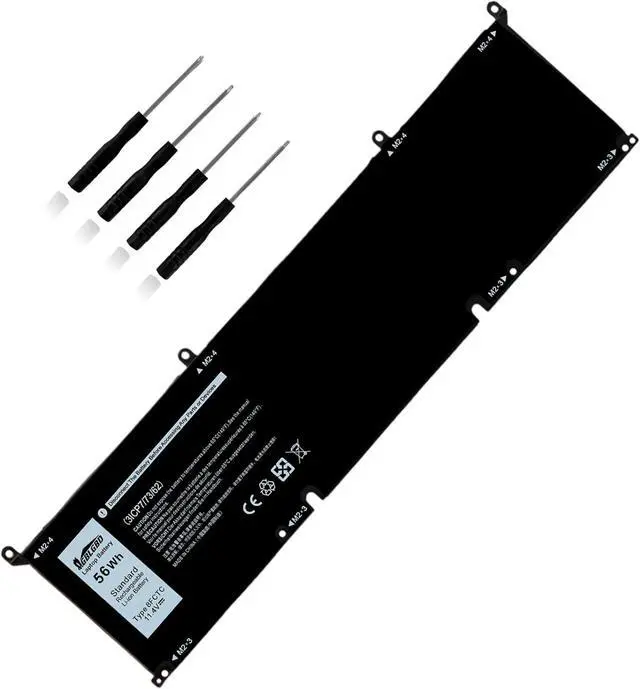
Yes, all of our laptop battery is li-ion or lithium-polymer battery, definitely rechargeable, but be sure to charge with the original AC adapter.
Compatible with Laptop Models:
(1)Dell Alienwar M15 R3 Series;
(2)Dell Alienwar M15 R3 2020 Series;
(3)Dell Alienwar M15 R4 Series;
(4)Dell Alienwar M15 R4 2021 Series;
(5)Dell Alienwar M15 R5 Series;
(6) Dell Alienwar M15 Ryzen Edition R5Series;
(7)Dell Alienwar M15 R6 Series;
(8)Dell Alienwar M15 R7 Series;
(9)Dell Alienwar M15 R7 AMD Series;
(10)Dell Alienwar M15 2020 ALW15M-5758W Series;
(11)Dell Alienwar M16 R1 Series;
(12)Dell Alienwar M16 R1 AMD Series;
(13)Dell Alienwar M17 R3 2020 Series;
(14)Dell Alienwar M17 R3 P45E Series;
(15)Dell Alienwar M17 R4 Series;
(16)Dell Alienwar M17 R4 2021 Series;
(17)Dell Precision 5550 Series;
(18)Dell Precision 5560 Series;
(19)Dell Precision 5570 Series;
(20)Dell Precision 5550 2020 Series;
(21)Dell XPS 15 9500 Series;
(22)Dell XPS 15 9510 Series;
(23)Dell XPS 15 9520 Series;
(24)Dell XPS 15 9530 Series;
(25)Dell XPS 15 9500 2020 Series;
(26)Dell XPS 15 9500 Core i7 4K UHD Series;
(27)Dell Alienware M15 2020 ALW15M-5758W Series;
(28)Dell G15 5510 Series;
(29)Dell G15 5511 Series;
(30)Dell G15 5520 Series;
(31)Dell G15 5525 Series;
(32)Dell G15 5530 Series;
(33)Dell G15 5535 Series;
(34)Dell G15 5515 Ryzen Edition Series;
(35)Dell G15 5521 Special Edition Series;
(36)Dell G16 7620 Series;
(37)Dell G16 7630 Series;
(38)Dell G7 15 7500 Series;
(39)Dell G7 15 7500 i7-10750H RTX 2060 Series;
(40)Dell Inspiro 15 7510 Series;
(41)Dell Inspiro 16 5620 Series;
(42)Dell Inspiro 16 7610 Series;
(43)Dell Inspiro 16 Plus 7620 Series;
(44)Dell Inspiro 16 Plus 7630 Series;
(45)Dell Inspiro 16 7630 2-in-1 Series;
(46)Dell Inspiro 16 7635 2-in-1 Series;
(47)Dell Vostro 15 7510 Series;
(48)Dell Vostro 7620 Series;
(49)Dell P91F P91F001 Series;
(50)Dell P45E P45E001 P45E002 Series;
(51)Dell P87F P87F002 P87F003 Series;
(52)Dell P100F P100F001 Series.
Replacement for Battery Original Part Numbers:
69KF2, 8FCTC, 08FCTC, 070N





 here!
here!