

Your Browsing History
Best Sellers
- $76.19
- + FREE SHIPPING
- $79.99
- + FREE SHIPPING

Meet Your Seller

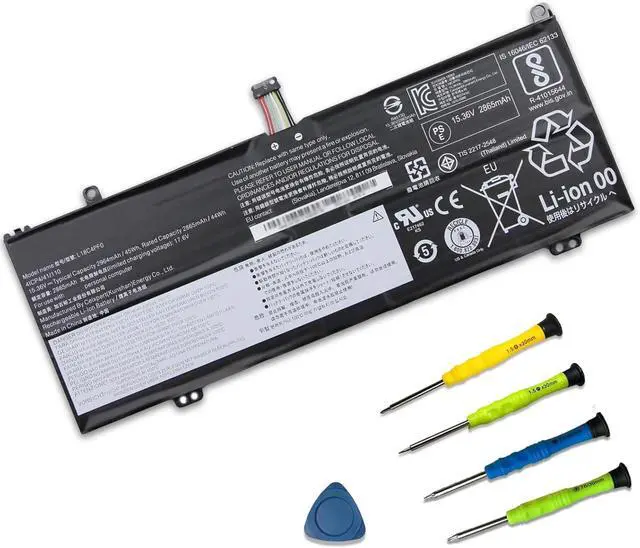
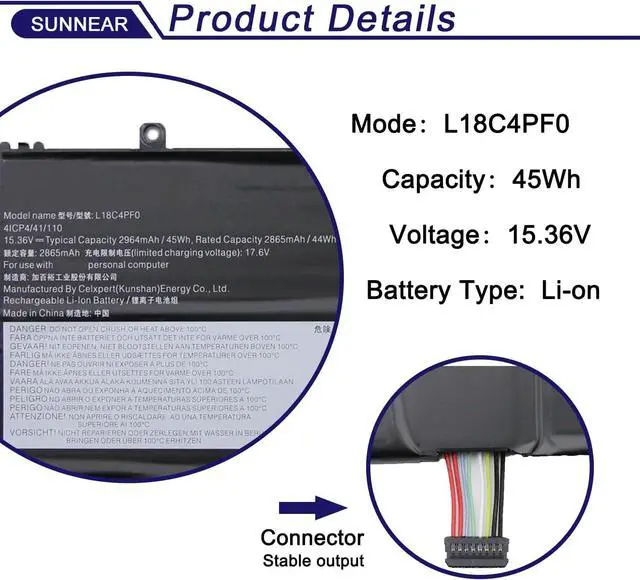


L18C4PF0 L18M4PF0 L18D4PF0 Laptop Battery Replacement for Lenovo ThinkBook 13s-IML 13s-IWL 14s-IML 14s-IWL Series 20RR 20RS 20RM 20R9 5B10S73501 5B10S73499 5B10W67315 5B10S73500 45Wh
Limited time offer, ends 08/13 By Gearsonicx
- SpecificationsModel: L18C4PF0 Capacity: 45Wh/2964mAh Voltage:15.36V Battery type: Li-ion. Also comes with installation tools
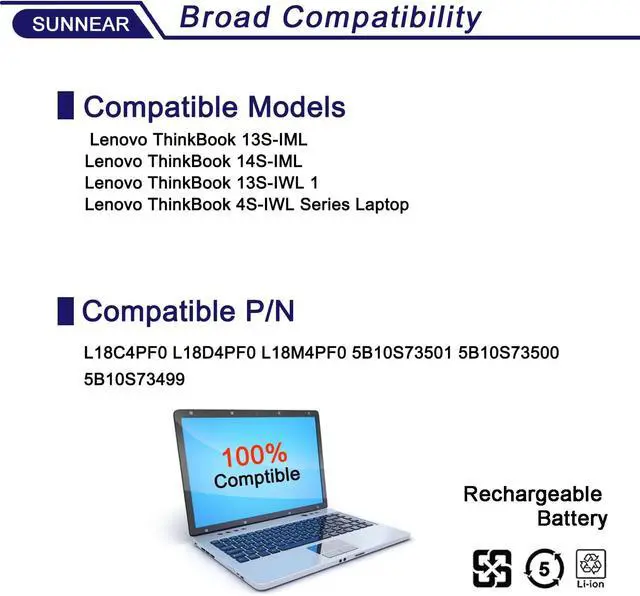
- Replacement For LaptopReplacement for Lenovo ThinkBook 13S-IML 20RR, ThinkBook 14S-IML 20RS, ThinkBook 13S-IWL 20R9, ThinkBook 14S-IWL 20RM Series
- Compatible Part NumberL18C4PF0 / L18M4PF0 / L18D4PF0 / 5B10S73499 / 5B10S73500 / 5B10S73501 / 5B10W67315 / 5B10W67334 / 5B10W67399
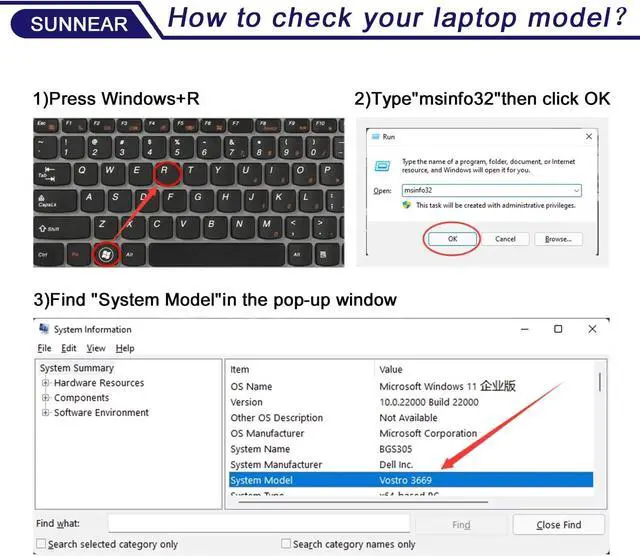
- Purchasing Note: Due to the complexity of laptop battery models, you may not be able to accurately determine the model you need to purchase,Please open the back cover of the laptop to confirm the original battery model number
- TipsIf the new battery is not recognized during the initial installation, please reinstall and check if the interface is fully connected. Run the new battery down to 5% (not 0%), then top up its power and complete 3-4 power cycles to wake up the new battery.
+
+
Overview
Specs
Reviews

Any questions? Our AI beta will help you find out quickly.
Try me now
SpecificationsModel: L18C4PF0 Capacity: 45Wh/2964mAh Voltage:15.36V Battery type: Li-ion. Also comes with installation tools
Replacement For LaptopReplacement for Lenovo ThinkBook 13S-IML 20RR, ThinkBook 14S-IML 20RS, ThinkBook 13S-IWL 20R9, ThinkBook 14S-IWL 20RM Series
Compatible Part NumberL18C4PF0 / L18M4PF0 / L18D4PF0 / 5B10S73499 / 5B10S73500 / 5B10S73501 / 5B10W67315 / 5B10W67334 / 5B10W67399
Purchasing Note: Due to the complexity of laptop battery models, you may not be able to accurately determine the model you need to purchase,Please open the back cover of the laptop to confirm the original battery model number
TipsIf the new battery is not recognized during the initial installation, please reinstall and check if the interface is fully connected. Run the new battery down to 5% (not 0%), then top up its power and complete 3-4 power cycles to wake up the new battery.
Replacement For LaptopReplacement for Lenovo ThinkBook 13S-IML 20RR, ThinkBook 14S-IML 20RS, ThinkBook 13S-IWL 20R9, ThinkBook 14S-IWL 20RM Series
Compatible Part NumberL18C4PF0 / L18M4PF0 / L18D4PF0 / 5B10S73499 / 5B10S73500 / 5B10S73501 / 5B10W67315 / 5B10W67334 / 5B10W67399
Purchasing Note: Due to the complexity of laptop battery models, you may not be able to accurately determine the model you need to purchase,Please open the back cover of the laptop to confirm the original battery model number
TipsIf the new battery is not recognized during the initial installation, please reinstall and check if the interface is fully connected. Run the new battery down to 5% (not 0%), then top up its power and complete 3-4 power cycles to wake up the new battery.
Warranty & Returns
Warranty, Returns, And Additional Information
Warranty
- Please contact the Seller directly for warranty information. Warranty information may also be found on the Manufacturer's website.
- CONTACT
Return Policies
- Return for refund within: 30 days
- Return for replacement within: 30 days
- This item is covered by Gearsonicx Return Policy
Manufacturer Contact Info
- For a directory of all our manufacturers, please click below.
- Manufacturers Directory
LOADING...
LOADING...