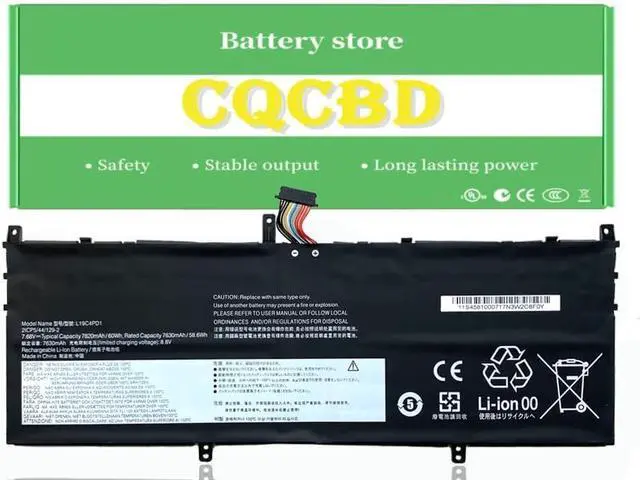
Compatible Laptop/Notebook Models:
For Lenovo Yoga C640-13IML Series:
Yoga C640 13IML 81XL0004AU, Yoga C640 13IML, Yoga C640 13IML 81XLCTO1WW, Yoga C640 13IML 81UE0013AU, Yoga C640 13IML 81UECTO1WW, Yoga C640 13IML 81XL0001AU, Yoga C640 13IML 81XL000EAU, Yoga C640 13IML 81UE000EAU,
Yoga C640 13, Yoga C640 13IML,Yoga C640-13IML(81UE), Yoga C640-13IML(81XL000VGE), Yoga C640-13IML(81XL0007GE), Yoga C640-13IML(81UE0003GE), Yoga C640-13IML(81UE0010GE), Yoga C640-13IML(81UE0055GE), Yoga C640 13IML(81UE0014AU),
Yoga C640-13IML(81XL000VGE), Yoga C640-13IML(81XL), Yoga C640-13IML(81XL000UGE), Yoga C640-13IML(81XL0007GE), Yoga C640 13IML(81XL000EAU), Yoga C640 13IML(81XL0000AU), Yoga C640 13IML(81XL0001AU), Yoga C640 13IML(81XL0004AU), Yoga C640 13IML(81XLCTO1WW)
For Lenovo Ideapad Yoga 6-13ARE05 82FN Series:
Yoga 6 13ARE05 82FN, Yoga 6 13ARE05 82FN000TGE, Yoga 6 13ARE05 82FN000WGE Yoga 6 13ARE05 82FN002WGE, Yoga 6 13ARE05 82FN003AGE, Yoga 6 13ARE05 82FN0046AU, Yoga 6 13ARE05 82FN0047AU, Yoga 6 13ARE05 82FN000JAU, Yoga 6 13ARE05 82FN0013KR, Yoga 6 13ARE05 82FN001LKR, Yoga 6 13ARE05 82FN0023TA, Yoga 6 13ARE05 82FN002MMX, Yoga 6 13ARE05 82FN0039GE, Yoga 6 13ARE05 82FN003SUE, Yoga 6 13ARE05 82FN004CKR, Yoga 6 13ARE05 82FN004VFE,Yoga 6 13ARE05 82FN005CTA, Yoga 6 13ARE05 82FN0000US, Yoga 6 13ARE05 82FN005UAX, Yoga 6 13ARE05 82FN000UGE, Yoga 6 13ARE05 82FN001DSB, Yoga 6 13ARE05 82FN001VMJ, Yoga 6 13ARE05 82FN002EMH, Yoga 6 13ARE05 82FN002YJP, Yoga 6 13ARE05 82FN003KMH, Yoga 6 13ARE05 82FN0043BM, Yoga 6 13ARE05 82FN004MMX, Yoga 6 13ARE05 82FN0055JP, Yoga 6 13ARE05 82FN005MSC, Yoga 6 13ARE05 82FN000BMX, Yoga 6 13ARE05 82FN000LPH, Yoga 6 13ARE05 82FN0016UK, Yoga 6 13ARE05 82FN001NKR, Yoga 6 13ARE05 82FN0025SB, Yoga 6 13ARE05 82FN002PSB, Yoga 6 13ARE05 8
For Lenovo Ideapad Yoga 6-13ALC6 (Model 82ND006VUS 82ND006SUS) Series:
Yoga 6 13ALC6 82ND003FYA, Yoga 6 13ALC6 82ND0045CY, Yoga 6 13ALC6 82ND0033VN, Yoga 6 13ALC6 82ND007TSB, Yoga 6 13ALC6 82ND003KMJ, Yoga 6 13ALC6 82ND003JYA, Yoga 6 13ALC6 82ND003DYA, Yoga 6 13ALC6 82ND00AQPH, Yoga 6 13ALC6 82ND0009US, Yoga 6 13ALC6 82ND00A1MJ, Yoga 6 13ALC6 82ND003LMJ,
Yoga 6 13ALC6 82ND002UPH, Yoga 6 13ALC6 82ND002GID, Yoga 6 13ALC6 82ND004GIN, Yoga 6 13ALC6 82ND002KID, Yoga 6 13ALC6 82ND007UIN, Yoga 6 13ALC6 82ND000SMZ, Yoga 6 13ALC6 82ND000VSB, Yoga 6 13ALC6 82ND001HFR, Yoga 6 13ALC6 82ND009TTW, Yoga 6 13ALC6 82ND0067RK,
For Lenovo Yoga C640-13IML LTE Series
For Lenovo Ideapad Yoga 6-13ARE05 Series
For Optimal Use battery:
New battery received, discharge the battery to 5% (not 0%) for the fist use, then charge and cycle 3-4 times to wake up the new battery.
The important point is to perform a full discharge and charge every other month to extend the battery life.
Do not connect adapter for a long time while using the battery.It may damage the battery.
Avoid artificial shocks, disassembly, crush or puncture.Do not dispose of it in fire or water.
How to install a new battery:
1.emove the old battery, carefully install the new battery on the battery box, tighten the screws, and then connect the wires of the new battery.
2. If you have questions about installing a new battery, you can search for the installation of laptop/tablet models on YouTube.
This method may help you.
If the new battery is not recognized during the initial installation
1.please reinstall and check if the interface is fully connected.
Please disconnect the old battery, and hold down the power button for 20 seconds, then connect the new battery. This drains the residual or flea power and once the laptop is reassembled the battery will function properly.
2. Battery cannot be identified by your laptop or it doesn't seem to work. That may be caused by different situations. Please check by yourself first as below steps.
Could be caused by battery loose. Remove the battery and try to reinstall more than once





 here!
here!