Price alert

Best Sellers

5 (1 total rating)
  • $75.99
  • + FREE SHIPPING
Shop it at NeweggBusiness.

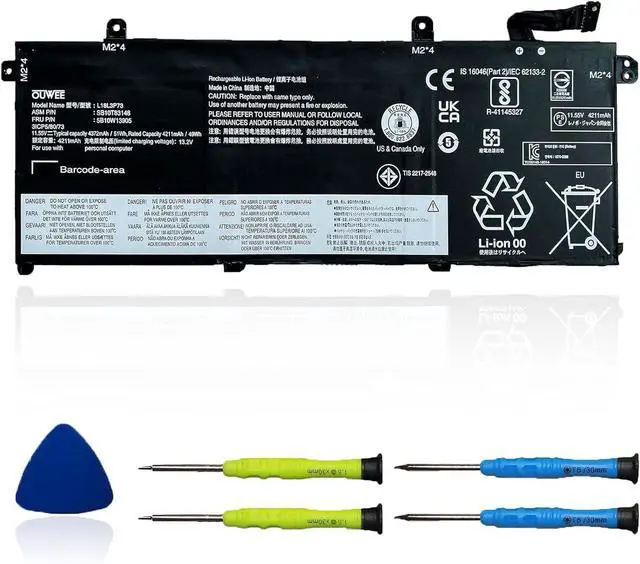
L18L3P73 L18M3P73 L18M3P74 Laptop Battery Compatible with Lenovo ThinkPad T490 T495 P43S Series SB10K97645 02DL007 L18M4P73 SB10K97646 L18C3P72 L18M4P74 L18C3P71 SB10K97648 11.52V 51Wh 4345mAh

Limited time offer, ends 07/06 By SiMoPiJuXiangBaoShangDian

  • Specifications Replacement Battery for Lenovo laptop Replacement Battery, Type: Li-ion;Our AP20A7N Battery Replacement for Lenovo Standard Rechargeable li-ion battery. Voltage: 15.48V; Capacity:60Wh; Cells:4 cells; Color: Black;Condition: New; Battery lasts: 3-6 hours, Packages includes: 1x AP20A7N Battery,2 x Free Screwdrivers,1x Instruction for Laptop battery
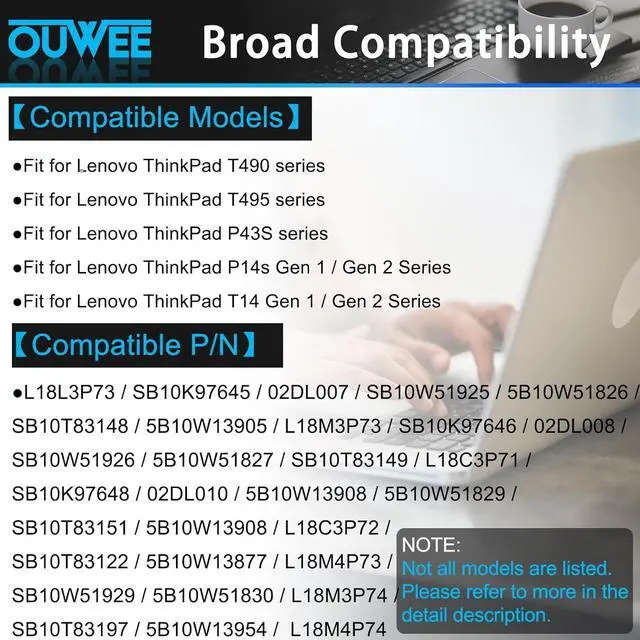
  • Compatible Part NumberL18C3P72 SB10T83122 5B10W13877 02DL007 L18L3P73 SB10K97645 02DL010 L18C3P71 SB10K97648 02DL008 L18M3P73 SB10K97646 02DL009 L18M4P74 SB10K97647 5B10W13905 5B10W13906 5B10W13907 5B10W13908 5B10W13954 L18M4P73
  • Replacement For Laptopfor Lenovo ThinkPad T490 (Type 20N2 20N3 20Q9 20QH 20RY 20RX) series; for Lenovo ThinkPad T495 (Type 20Q9 20QH 20NJ 20NK) series; for Lenovo ThinkPad P43S (Type 20RH 20RJ) series; for Lenovo ThinkPad P14s Gen 1 (type 20S4 20S5 20Y1 20Y2) Series; for Lenovo ThinkPad P14s Gen 2 (Type 20VX 20VY 21A0 21A1) Series; for Lenovo ThinkPad T14 Gen 1 (type 20UD 20UE 20S0 20S1 20S2 20S
+
+
Overview
Reviews
avatar

Any questions? Our AI beta will help you find out quickly.

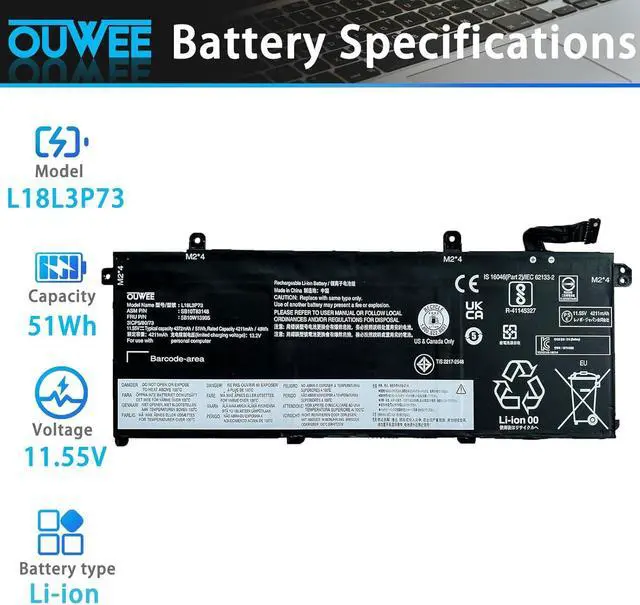
ModelL18L3P73Capacity51WhVoltage11.55VTypeLi-ionColorBlackConditionBrand New Fit for Lenovo ThinkPad T490 series
Fit for Lenovo ThinkPad T495 series
Fit for Lenovo ThinkPad P43S series
Fit for Lenovo ThinkPad P14s Gen 1 series
Fit for Lenovo ThinkPad P14s Gen 2 series
Fit for Lenovo ThinkPad T14 Gen 1 series
Fit for Lenovo ThinkPad T14 Gen 2 Series

Replacement for Part Number:
L18L3P73 / SB10K97645 / 02DL007 / SB10W51925 / 5B10W51826 / SB10T83148 / 5B10W13905 / L18M3P73 / SB10K97646 / 02DL008 / SB10W51926 / 5B10W51827 / SB10T83149 / L18C3P71 / SB10K97648 / 02DL010 / 5B10W13908 / 5B10W51829 / SB10T83151 / 5B10W13908 / L18C3P72 / SB10T83122 / 5B10W13877 / L18M4P73 / SB10W51929 / 5B10W51830 / L18M3P74 / SB10T83197 / 5B10W13954 /L18M4P74
Why your laptop can't detect the battery or display the battery level properly after installing the battery? It may be caused by a loose battery. Please check if the battery cable is installed correctly. It may be due to the damage of the conductive material caused by the laptop motherboard and the battery positive contact position, you can try to use the original battery to confirm. Check if the battery driver is normal, if not, please download the appropriate driver software to update.
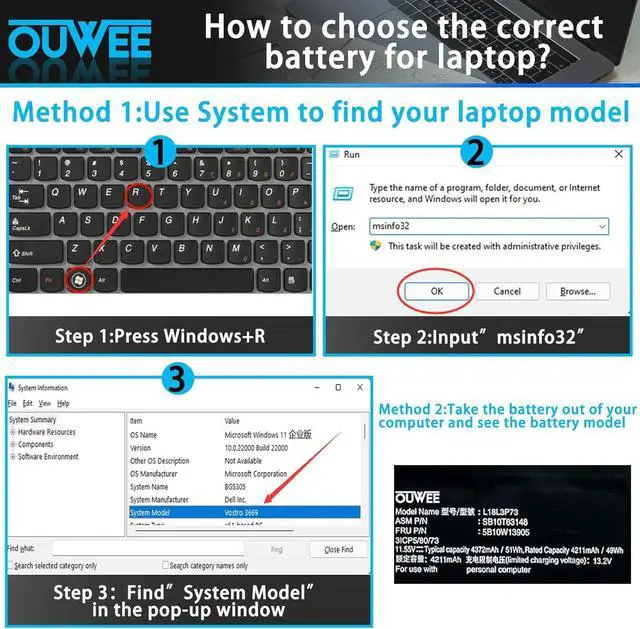
Product information Compatible Models (use "Ctrl+F to find your model quickly") Common Troubleshooting Methods

Warranty & Returns

Warranty, Returns, And Additional Information

Warranty

  • Please contact the Seller directly for warranty information. Warranty information may also be found on the Manufacturer's website.
  • CONTACT

Return Policies

Manufacturer Contact Info

LOADING...
LOADING...