

Your Browsing History
- Free 30-day Returns
$101.99

Meet Your Seller


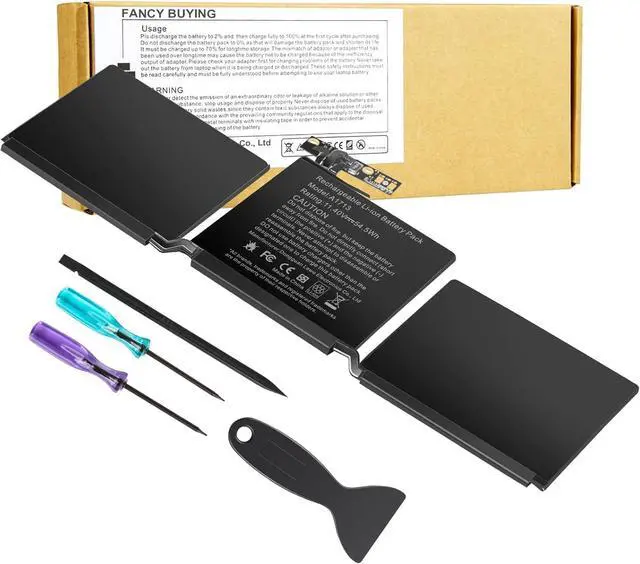


Fancy Buying Battery A1713 A2171 for MacBook Pro 13 Inch A2159 (2019) A2289 (2020) A2338 (2020), A1708 Late 2016 Mid 2017 (EMC 2978 3164), MPXQ2LL/A MLL42LL/A MLUQ2LL/A MPXR2LL/A MPXU2LL/A MPXT2LL/A
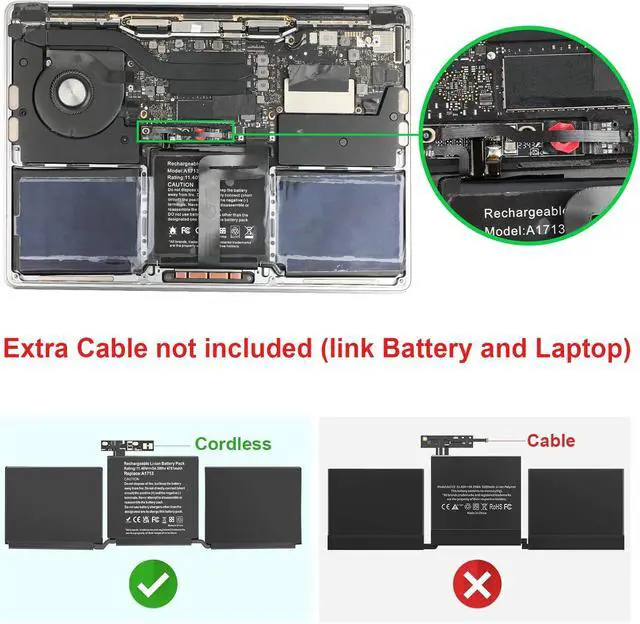
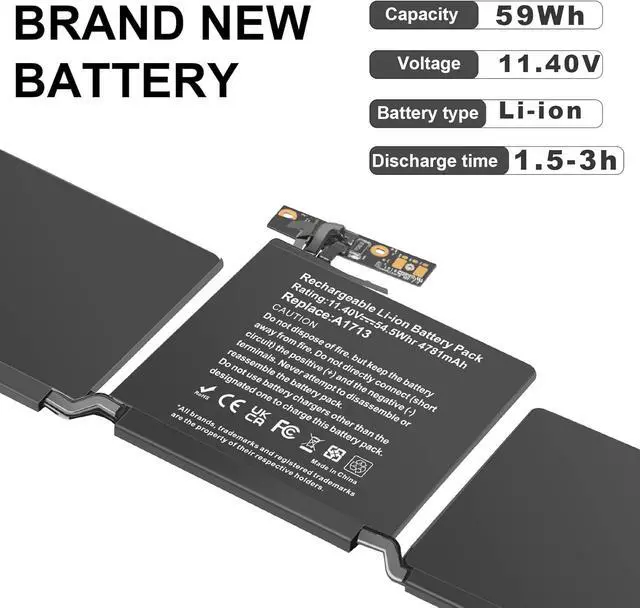
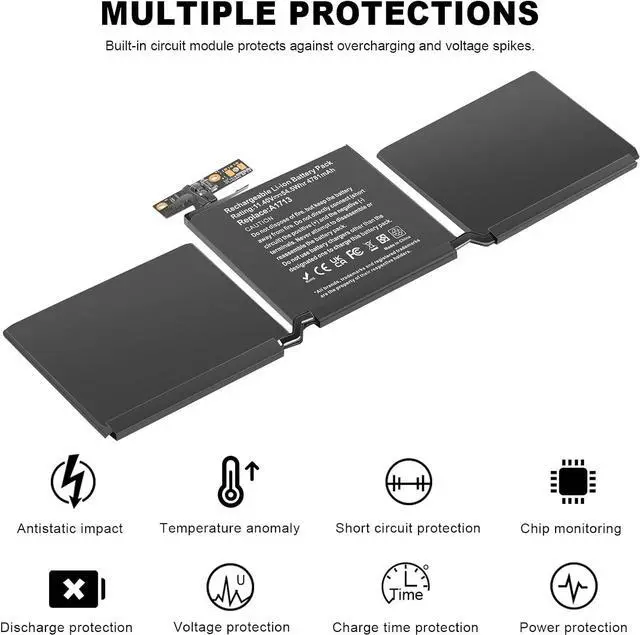
- Note: Our product does not included extra cable that link battery and the laptop. Battery type: Li-ion Voltage:11.4V Capacity: 4781mAh Cells3cell recharge cycles: 500
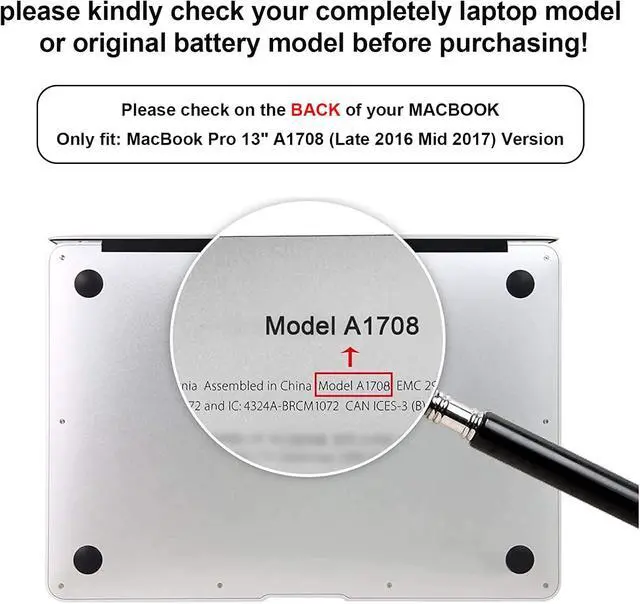
- Part Number for A1708 , A1713 , A1708 (EMC 3164) , A1708 (EMC 2978) , 020-00946. Tips: You can check the back of your MacBook to confirm the model.
- Replacement for MacBook Pro 13-inch model A1708 (Late 2016, Mid 2017 year) version MLL42 MLL42LL/A MPXQ2 MPXQ2LL/A MLUQ2 MLUQ2LL/A MPXR2 MPXR2LL/A MPXU2 MPXU2LL/A MPXT2 MPXT2LL/A MacBookPro13,1 MacBookPro14,1.
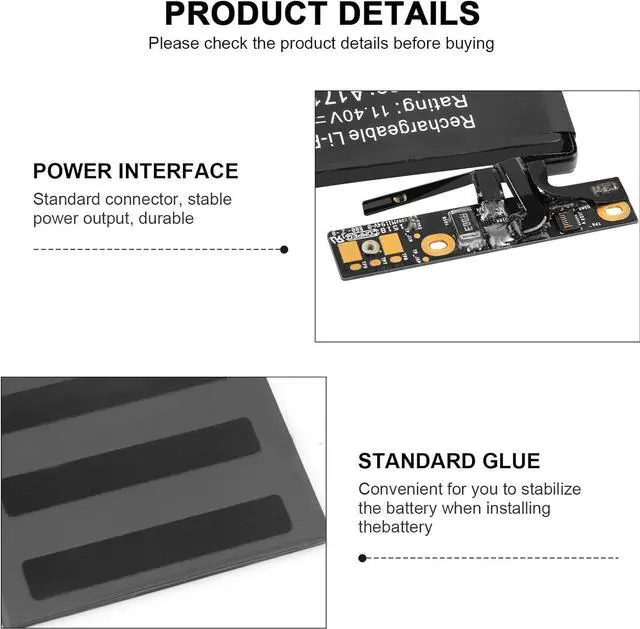
- Grade A cells ensure fast charges and low power consumption; Built-in circuit protection ensures both safety and stability.
- What you get: 1*A1708 /A1713 battery, 2*screwdrivers.
+
+
Overview
Specs
Reviews

Any questions? Our AI mode will help you find out quickly.
Try me now
Part Number: for A1708 , A1713 , A1708 (EMC 3164) , A1708 (EMC 2978) , A2159, A2289, A2338, A2171, 020-00946.
Fits for Laptop Model: MacBook pro 13 inch A1708 (Late 2016, Mid 2017) & A2159 (2019) & A2289 (2020) & A2338 (2020).
Compatible Laptop/Notebook Model Details -- MacBook pro 13 inch A1708 (Late 2016, Mid 2017):
MacBook Pro 13-Inch "Core i5" 2.0 Late 2016, MacBookPro13,1. EMC2978 (MLL42xx/A, MLUQ2xx/A)
MacBook Pro 13-Inch "Core i7" 2.4 Late 2016, MacBookPro13,1. EMC2978 (MLL42xx/A, MLUQ2xx/A)
MacBook Pro 13-Inch "Core i5" 2.3 Mid-2017, MacBookPro14,1. EMC3164 (MPXQ2xx/A, MPXR2xx/A, MPXT2xx/A, MPXU2xx/A)
MacBook Pro 13-Inch "Core i7" 2.5 Mid-2017, MacBookPro14,1. EMC3164 (MPXQ2xx/A, MPXR2xx/A, MPXT2xx/A, MPXU2xx/A)
Compatible Laptop/Notebook Model Details -- MacBook pro 13 inch A2159 (2019):
MacBook Pro 13-Inch "Core i5" 1.4 Touch/2019 2 TB 3, MacBookPro15,4. EMC3301 (MUHN2xx/A, MUHP2xx/A, MUHQ2xx/A, MUHR2xx/A, MUHR2xx/B)
MacBook Pro 13-Inch "Core i7" 1.7 Touch/2019 2 TB 3, MacBookPro15,4. EMC3301 (MUHN2xx/A, MUHP2xx/A, MUHQ2xx/A, MUHR2xx/A, MUHR2xx/B)
Compatible Laptop/Notebook Model Details -- MacBook pro 13 inch A2289 (2020):
MacBook Pro 13-Inch "Core i5" 1.4 2020 2 TB 3 (Scissor), MacBookPro16,3. EMC3456 (MXK32xx/A, MXK52xx/A, MXK62xx/A, MXK72xx/A)
MacBook Pro 13-Inch "Core i7" 1.7 2020 2 TB 3 (Scissor), MacBookPro16,3. EMC3456 (MXK32xx/A, MXK52xx/A, MXK62xx/A, MXK72xx/A)
Compatible Laptop/Notebook Model Details -- MacBook pro 13 inch A2338 (2020):
MacBook Pro 13-Inch "M1" 8-Core 3.2 (2020), MacBookPro17,1. EMC3578 (MYDA2LL/A*)
Install A New Battery:
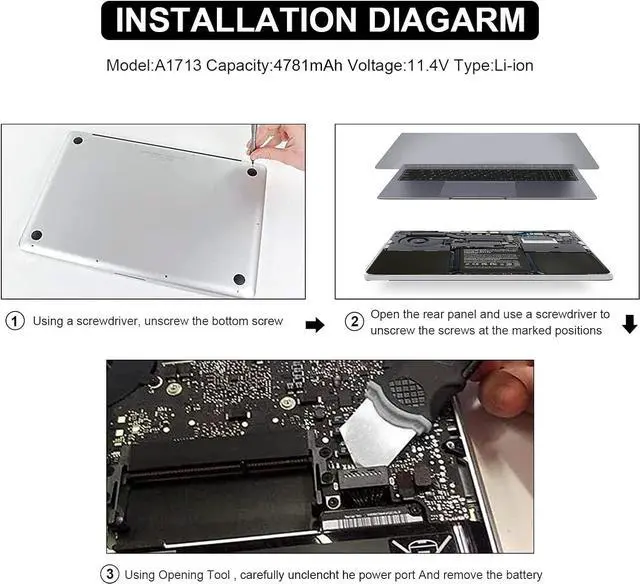
You need to turn off your laptop and disconnect the power.
Remove the old battery, carefully install the new battery on the battery case, and connect the wiring of the new battery.
If you don't understand the above steps, you can search for the video about laptop battery installation on YouTube. Maybe it will help you.
Laptop Maintenance Tips:
New battery: For use a new battery, youd better try a few cycles of discharging to 5%. then charging up to 95%. So that it can be activated completely
Overuse: Do not always run out of a battery to 0%, this would make it damaged or usage life shortened
Charging sequence: when charging, first install the battery, then turn on the power, when fully charged, first cut off the power, then pull the power plug.
Long-term storage:Please store the unused battery fully charged.(Charge it once a month) Do not store at low power to prevent reduce the lifespan of a battery
Charger: Do not replace the laptop adapter casually. If the original adapter cannot be applied due to malfunction or damage, please replace the models, so as not to reduce the service life of the battery due to incompatibility.
Overload protection
Over-current protection
Over-voltage protection
High voltage protection
Short circuit protection
Over-temperature protection
MacBook pro 13 inch battery -- A1713 & A2171 (54.5Wh / 4781mAh 11.4V Li-ion battery)
Fits for Laptop Model: MacBook pro 13 inch A1708 (Late 2016, Mid 2017) & A2159 (2019) & A2289 (2020) & A2338 (2020).
Compatible Laptop/Notebook Model Details -- MacBook pro 13 inch A1708 (Late 2016, Mid 2017):
MacBook Pro 13-Inch "Core i5" 2.0 Late 2016, MacBookPro13,1. EMC2978 (MLL42xx/A, MLUQ2xx/A)
MacBook Pro 13-Inch "Core i7" 2.4 Late 2016, MacBookPro13,1. EMC2978 (MLL42xx/A, MLUQ2xx/A)
MacBook Pro 13-Inch "Core i5" 2.3 Mid-2017, MacBookPro14,1. EMC3164 (MPXQ2xx/A, MPXR2xx/A, MPXT2xx/A, MPXU2xx/A)
MacBook Pro 13-Inch "Core i7" 2.5 Mid-2017, MacBookPro14,1. EMC3164 (MPXQ2xx/A, MPXR2xx/A, MPXT2xx/A, MPXU2xx/A)
Compatible Laptop/Notebook Model Details -- MacBook pro 13 inch A2159 (2019):
MacBook Pro 13-Inch "Core i5" 1.4 Touch/2019 2 TB 3, MacBookPro15,4. EMC3301 (MUHN2xx/A, MUHP2xx/A, MUHQ2xx/A, MUHR2xx/A, MUHR2xx/B)
MacBook Pro 13-Inch "Core i7" 1.7 Touch/2019 2 TB 3, MacBookPro15,4. EMC3301 (MUHN2xx/A, MUHP2xx/A, MUHQ2xx/A, MUHR2xx/A, MUHR2xx/B)
Compatible Laptop/Notebook Model Details -- MacBook pro 13 inch A2289 (2020):
MacBook Pro 13-Inch "Core i5" 1.4 2020 2 TB 3 (Scissor), MacBookPro16,3. EMC3456 (MXK32xx/A, MXK52xx/A, MXK62xx/A, MXK72xx/A)
MacBook Pro 13-Inch "Core i7" 1.7 2020 2 TB 3 (Scissor), MacBookPro16,3. EMC3456 (MXK32xx/A, MXK52xx/A, MXK62xx/A, MXK72xx/A)
Compatible Laptop/Notebook Model Details -- MacBook pro 13 inch A2338 (2020):
MacBook Pro 13-Inch "M1" 8-Core 3.2 (2020), MacBookPro17,1. EMC3578 (MYDA2LL/A*)
Install A New Battery:
You need to turn off your laptop and disconnect the power.
Remove the old battery, carefully install the new battery on the battery case, and connect the wiring of the new battery.
If you don't understand the above steps, you can search for the video about laptop battery installation on YouTube. Maybe it will help you.
Laptop Maintenance Tips:
New battery: For use a new battery, youd better try a few cycles of discharging to 5%. then charging up to 95%. So that it can be activated completely
Overuse: Do not always run out of a battery to 0%, this would make it damaged or usage life shortened
Charging sequence: when charging, first install the battery, then turn on the power, when fully charged, first cut off the power, then pull the power plug.
Long-term storage:Please store the unused battery fully charged.(Charge it once a month) Do not store at low power to prevent reduce the lifespan of a battery
Charger: Do not replace the laptop adapter casually. If the original adapter cannot be applied due to malfunction or damage, please replace the models, so as not to reduce the service life of the battery due to incompatibility.
Overload protection
Over-current protection
Over-voltage protection
High voltage protection
Short circuit protection
Over-temperature protection
MacBook pro 13 inch battery -- A1713 & A2171 (54.5Wh / 4781mAh 11.4V Li-ion battery)
Warranty & Returns
Warranty, Returns, And Additional Information
Warranty
- Please contact the Seller directly for warranty information. Warranty information may also be found on the Manufacturer's website.
- CONTACT
Return Policies
- Return for refund within: 30 days
- Return for replacement within: 30 days
- This item is covered by Deep Source Trading Shop Return Policy
Manufacturer Contact Info
- For a directory of all our manufacturers, please click below.
- Manufacturers Directory
LOADING...