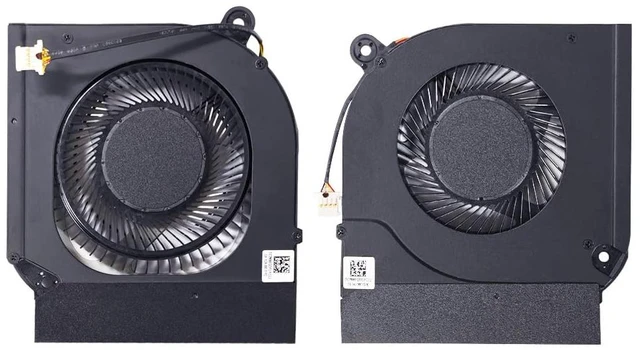
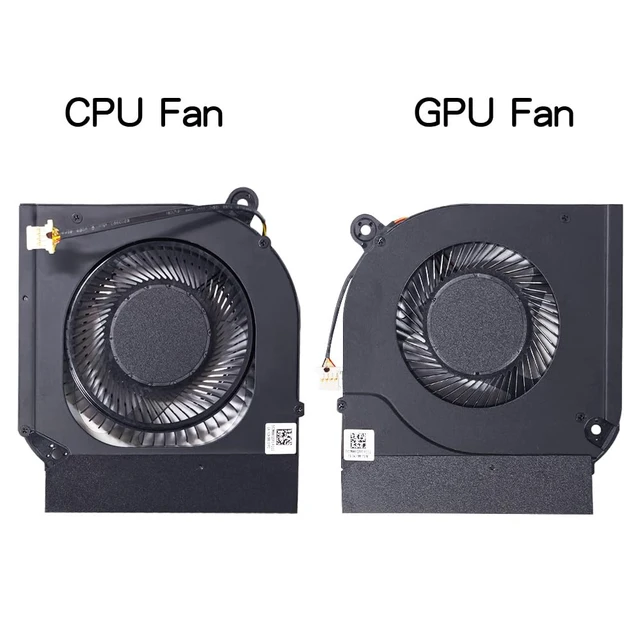
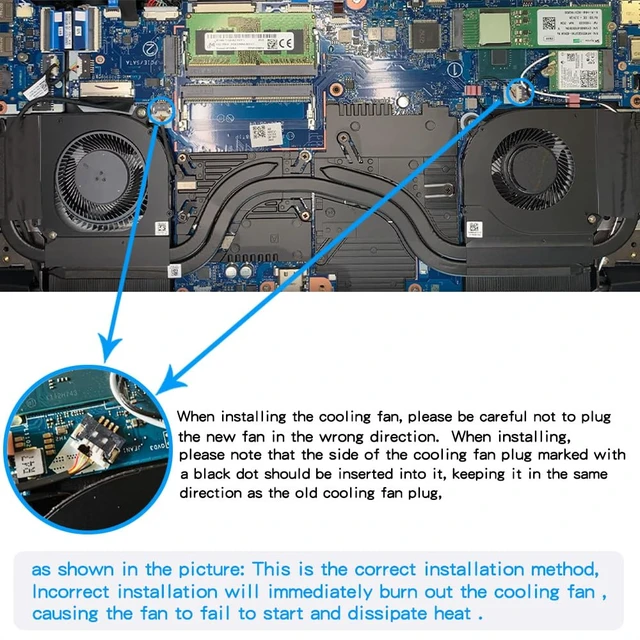
- Location diagram of laptop cooling fan.
- When using a laptop normally, the one on the left is the CPU cooling fan, and the one on the right is the GPU cooling fan.
- Compatible laptop models:
- for Acer Nitro 5 (2020) N20C1 AN515-55 AN515-45 AN517-52 AN517-41 AN515-56 AN515-57 AN515-57-55RY AN515-55-50V2 AN515-55-72ST AN515-55-75BM AN515-55-59TA AN515-45-R7WA AN515-55-53AG AN515-55-53AG AN515- 57-53J4 AN515-44 AN515-44-r99q AN515-55-54AS AN515-55-59KS AN515-55-53AG AN515-44-R3XF AN515-55-779U AN515-55-70SS AN515-55-770N AN515-55-72N6 AN515-55-77QU AN515-55-70H2 AN515-55-78NC AN515-55-73W5 AN515-55-57D6 AN515-55-568E AN515-55-53TJ AN515-55-547E AN515-55-52Y9 AN515-44-R81W laptop series.
- Please note :It cannot be used for Acer Nitro 5(2022) AN515-58 N22C1 DC 12V Series Fan ! ! !
- Replacing your old CPU and GPU cooling fans will result in a quiet office environment.
- Replacing the cooling fan with a new one can solve the problem:
- Using a computer is quiet, comfortable, and no longer troubled by noise.
- The temperature of the laptop is no longer too high, and it runs faster and more comfortably at low temperatures.
- When the computer is turned on, it no longer prompts "fan error", making office use smoother.
- Laptops of the same model may have different cooling fans. You can compare the part numbers of the internal cooling fans of your laptop and the voltage on the back of the cooling fans before purchasing , Thank you!

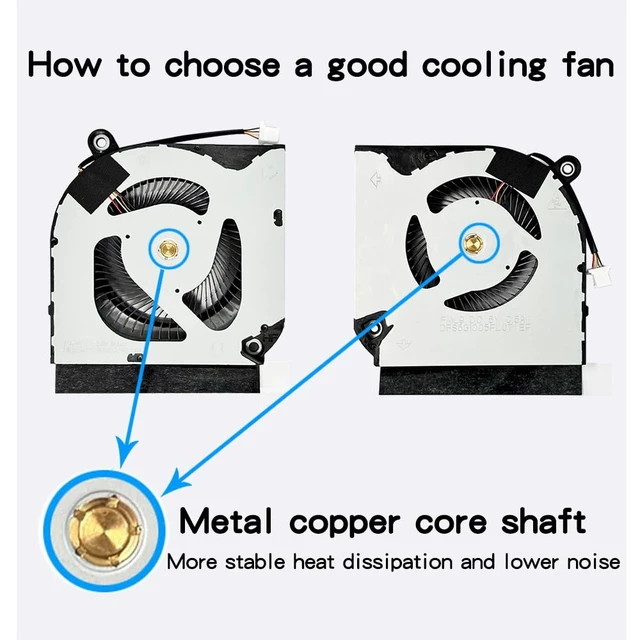
- Advantages of Metal Copper Core Shaft:
- Metal copper core shaft More stable heat dissipation and lower noise.
- The axis of the cooling fan is made of metal, which has low operating sound, high air volume, and is durable and long-lasting .
- Using a computer is quiet, comfortable, and no longer troubled by noise.
- Solve the error, abnormal noise, and high temperature of your laptop fan, so that your laptop fan can operate normally again!
- Metal copper core cooling fans are more sturdy, durable, stable, and quieter than cheap plastic core cooling fans.
- How to identify low-quality products:
- Those low-priced cooling fans, whose fans are not made of metal copper core shaft sleeves, often use plastic instead. As a result, the cooling fans have high operating noise, low air volume, short service life, and poor cooling effect .
- Their product page description does not match the actual goods you received:
- The fan plug they sent you is black, not the white plug of the original machine, and the order of the fan plug wires will also be inconsistent .
- The fan they sent you is not a copper core shaft sleeve, but a non durable plastic shaft sleeve.
- Reminder : When the cooling fan is dissipating heat at full speed, there will be a certain amount of airflow sound, which is a normal phenomenon. When the temperature of the laptop drops, the airflow sound will disappear.
- Some laptops prompt 'Fan error', which may not necessarily be a problem with the cooling fan. If a new cooling fan still prompts' Fan error ', it means it is not a problem with the cooling fan, but rather the motherboard or other issues.
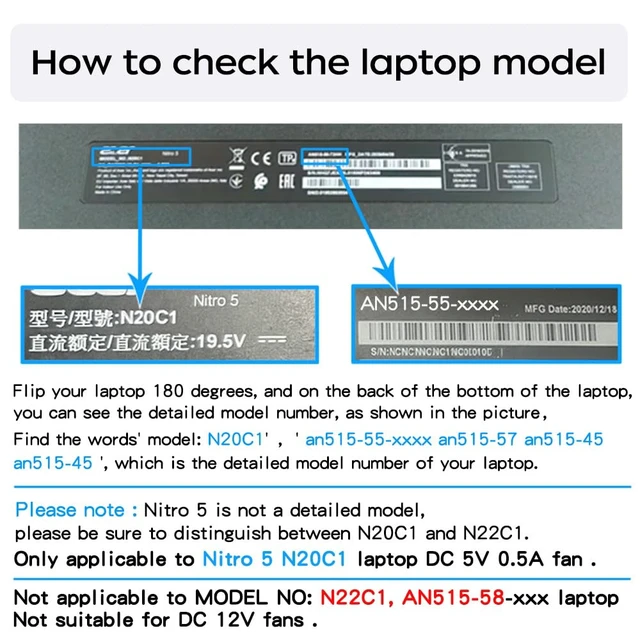
How to find a laptop model ?
- How to determine a compatible cooling fan for your laptop ?
- Flip your laptop 360 degrees, and on the back of the bottom of the laptop,you can see the detailed model number, as shown in the picture,Find the words' model: N20C1' ,' an515-55-xxxx , an515-57-xxxx , an515-45-xxxx , an515-44-xxxx' which is the detailed model number of your laptop.
- fter disassembling the machine, remove your own cooling fan and compare whether the part number of your cooling fan matches the part number description of our cooling fan product.
- After disassembling the machine, remove your own cooling fan and send me the part number on your cooling fan. We will help you check it.
- Please note :It cannot be used for Acer Nitro 5(2022) AN515-58 N22C1 DC 12V Series Fan ! ! !
- Laptops of the same model may have different cooling fans. You can compare the part numbers of the cooling fans in our product description,Thank you!

- How to check the voltage of your cooling fan ?
- Take off the cooling fan of your laptop. On the back of the cooling fan, there is a label or steel stamp that can show the specific voltage of your cooling fan.
- After removing the cooling fan from your laptop, you can see the part number of the cooling fan. Compare it with the part number described in our product description to see if there is a common one.
- This fan is only suitable for Acer Nitro 5(2020) N20C1 AN515-55 AN515-45 AN515-44 AN517-52 AN517-41 AN515-45 DC 5V Fan !!!
- Please note :It cannot be used for Acer Nitro 5(2022) AN515-58 N22C1 DC 12V Series Fan ! ! !

- Precautions for Installing Laptop Cooling Fans:
- This cooling fan is DC5V and is not suitable for 12V laptop cooling fans. Please check that your cooling fan voltage is DC 5V before installation to avoid fan burnout.
- When installing the cooling fan, be careful not to plug the cooling fan plug incorrectly, otherwise it will immediately burn out the fan,You can refer to the above picture to install the cooling fan plug.
- Please make sure to turn off the power and disconnect the built-in battery plug when disassembling the machine. Take anti-static measures to avoid other malfunctions after disassembly.

This is the front of the CPU fan. The voltage of the cooling fan is DC5V. When using a computer normally, the cooling fan is installed on the left side of the keyboard, which is the cooling fan below the F1 button.
- The white plug cooling fan is the best, and the fan has a metal copper core shaft sleeve.

This is the front of the GPU fan, and the voltage of the cooling fan is DC5V. When using a computer normally, the cooling fan is installed on the right-hand side of the keyboard, which is the cooling fan below the F12 button.
- The white plug cooling fan is the best, and the fan has a metal copper core shaft sleeve.





 here!
here!