Your Browsing History
Meet Your Seller
ROOFULL External CD DVD Drive with Carrying Case for Laptop, USB 3.0 Type-C
- Decade-Proven External CD/DVD DriveIf you are looking for an absolutely reliable choice, this CD DVD drivewhich has been in continuous production and sales since 2016 and is well-loved by most usersis a worthy consideration. It is not only incredibly simple to use but also robustly stable. Whether you are playing movie DVDs or music CDs, you can also use it to burn videos, photos, or music to blank discs, copy content from commercial CDs/DVDs, view photo CDs, install software or systems, play game disks, and back up data for long-term storage. Supports all common CD and DVD formats (except Blu-ray & 4K discs)
- As Simple as an Internal Optical DriveNo driver installation or complicated setup required! Just plug the USB 3.0 data cable into your computer directly or a self-powered USB hub, and it will be recognized automatically (on Mac, a disc icon appears on the desktop once a disc is inserted). You can then use your preferred software to read, burn, or rip discs easily, just like usi
+
+
Overview
Specs
Reviews
Any questions? Our AI mode will help you find out quickly.
Try me now
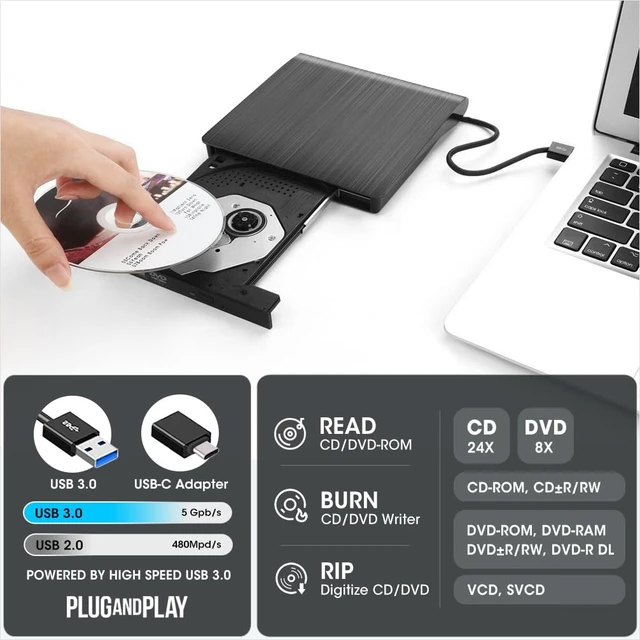
Decade-Proven External CD/DVD DriveIf you are looking for an absolutely reliable choice, this CD DVD drivewhich has been in continuous production and sales since 2016 and is well-loved by most usersis a worthy consideration. It is not only incredibly simple to use but also robustly stable. Whether you are playing movie DVDs or music CDs, you can also use it to burn videos, photos, or music to blank discs, copy content from commercial CDs/DVDs, view photo CDs, install software or systems, play game disks, and back up data for long-term storage.
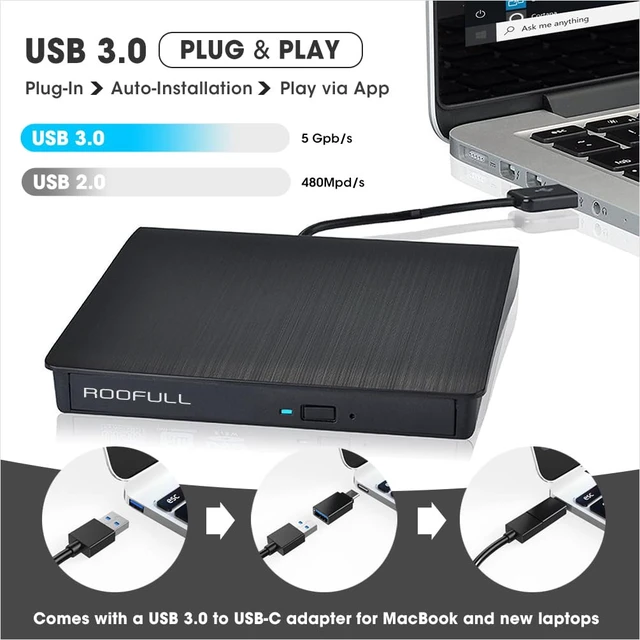
Supports all common CD and DVD formats (except Blu-ray & 4K discs) ^^ As Simple as an Internal Optical DriveNo driver installation or complicated setup required! Just plug the USB 3.0 data cable into your computer directly or a self-powered USB hub, and it will be recognized automatically (on Mac, a disc icon appears on the desktop once a disc is inserted). You can then use your preferred software to read, burn, or rip discs easily, just like using an internal optical drive. (Scroll down for detailed setup guide and recommended software.
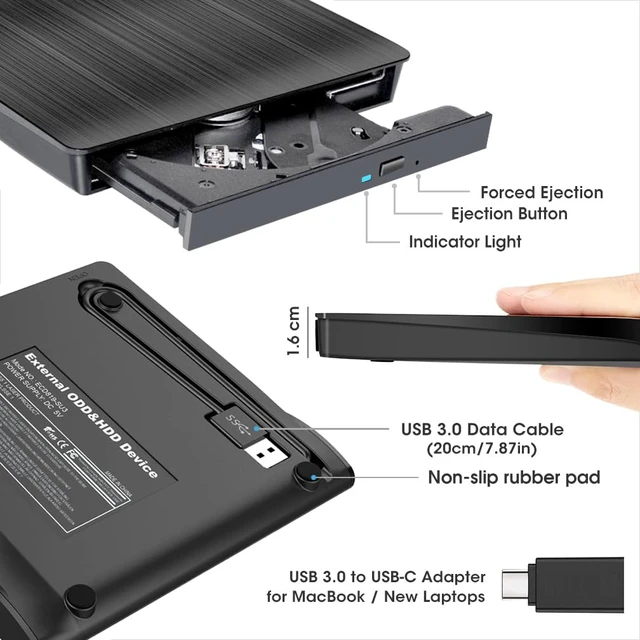
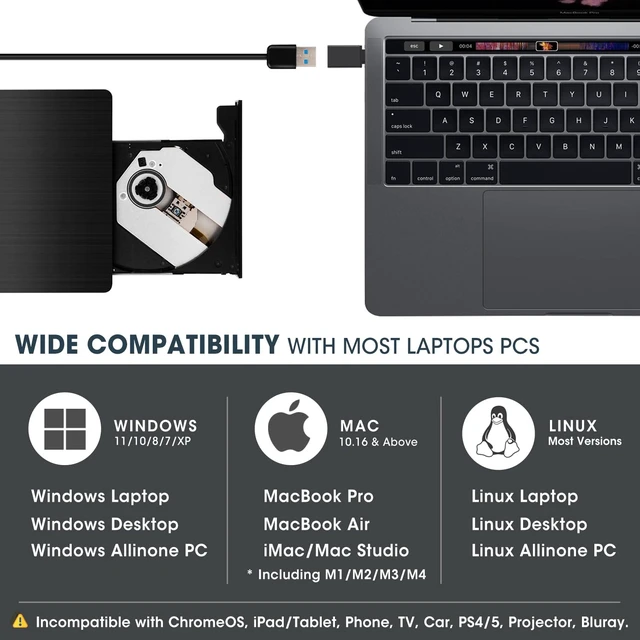
) ^^ Powered by USB 3.0 High SpeedEnhanced USB 3.0 not only delivers ultra-fast data transfers up to 5 Gbps (625MB/s) 10 faster than USB 2.0 with DVD 8X and CD 24X maximum read/write speeds, but also ensures smooth, stable, and reliable operation with strong error correction, minimal noise, and long-lasting durability. For modern ultra-slim laptops with only USB-C ports, a USB 3.0 to USB-C adapter is included, allowing seamless and hassle-free connection with most computers, old and new ^^ Wide CompatibilityThis ROOFULL external DVD drive works with a wide range of systems, including Windows (11/10/ 8.1 /7/Vista/XP), Linux, and macOS 10.16 and above.
Its perfect for laptops, desktops, and all-in-one computers from major brands like HP, Dell, Lenovo, ASUS, and Apple MacBook Pro/Air/iMac.
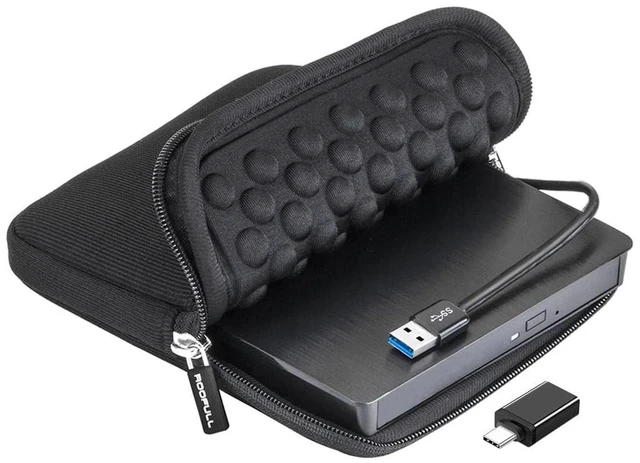
Please note: this drive doesnt support Blu-ray or 4K discs, Chromebooks, phones, iPads, tablets, TVs, cars, gaming consoles (PS4/PS5/Xbox), projectors, or some Surface models ^^ Compact, Portable & Gift-ReadyThis slim and lightweight external CD/DVD drive is easy to carryperfect for use at home, in the office, or on the go. It includes a durable, padded carrying case that protects the drive from dust, water, and accidental drops. Ideal for anyone who still enjoys CDs and DVDs, it also makes a thoughtful gift for collectors and media enthusiasts. ^^ 2-Year Warranty & Worry-free Purchase Since 2015, ROOFULL has specialized in reliable external optical drives for 11 years. Built with brand-new parts and anti-interference tech, our drives ensure quiet, smooth operation. Every unit includes 2 years of service. If you need any assistance, please
message us for: Patient
Support: One-on-one guidance or troubleshooting for disc playback.
Direct Resolution: A brand-new replacement or complete financial reimbursement, without the need to return the old one. ^^ Best Thing to Know Before Buying On Mac, the tray button wont eject the disc after playing or burning due to macOS restrictions. Right-click the disc icon on the desktop and select "Eject, " or use "File" > "Eject. " If the disc icon doesn't appear on your Mac desktop, please go to "Finder" > "Settings" (or "Preferences") > "General" and ensure "External disks" is checked to allow it to display. Plug-and-play means no driver needed, but you must install proper software before playing or burning discs. For desktop PCs, if the drive doesnt work properly, please connect it to a rear USB port for better power supply.

Supports all common CD and DVD formats (except Blu-ray & 4K discs) ^^ As Simple as an Internal Optical DriveNo driver installation or complicated setup required! Just plug the USB 3.0 data cable into your computer directly or a self-powered USB hub, and it will be recognized automatically (on Mac, a disc icon appears on the desktop once a disc is inserted). You can then use your preferred software to read, burn, or rip discs easily, just like using an internal optical drive. (Scroll down for detailed setup guide and recommended software.
) ^^ Powered by USB 3.0 High SpeedEnhanced USB 3.0 not only delivers ultra-fast data transfers up to 5 Gbps (625MB/s) 10 faster than USB 2.0 with DVD 8X and CD 24X maximum read/write speeds, but also ensures smooth, stable, and reliable operation with strong error correction, minimal noise, and long-lasting durability. For modern ultra-slim laptops with only USB-C ports, a USB 3.0 to USB-C adapter is included, allowing seamless and hassle-free connection with most computers, old and new ^^ Wide CompatibilityThis ROOFULL external DVD drive works with a wide range of systems, including Windows (11/10/ 8.1 /7/Vista/XP), Linux, and macOS 10.16 and above.
Its perfect for laptops, desktops, and all-in-one computers from major brands like HP, Dell, Lenovo, ASUS, and Apple MacBook Pro/Air/iMac.
Please note: this drive doesnt support Blu-ray or 4K discs, Chromebooks, phones, iPads, tablets, TVs, cars, gaming consoles (PS4/PS5/Xbox), projectors, or some Surface models ^^ Compact, Portable & Gift-ReadyThis slim and lightweight external CD/DVD drive is easy to carryperfect for use at home, in the office, or on the go. It includes a durable, padded carrying case that protects the drive from dust, water, and accidental drops. Ideal for anyone who still enjoys CDs and DVDs, it also makes a thoughtful gift for collectors and media enthusiasts. ^^ 2-Year Warranty & Worry-free Purchase Since 2015, ROOFULL has specialized in reliable external optical drives for 11 years. Built with brand-new parts and anti-interference tech, our drives ensure quiet, smooth operation. Every unit includes 2 years of service. If you need any assistance, please
message us for: Patient
Support: One-on-one guidance or troubleshooting for disc playback.
Direct Resolution: A brand-new replacement or complete financial reimbursement, without the need to return the old one. ^^ Best Thing to Know Before Buying On Mac, the tray button wont eject the disc after playing or burning due to macOS restrictions. Right-click the disc icon on the desktop and select "Eject, " or use "File" > "Eject. " If the disc icon doesn't appear on your Mac desktop, please go to "Finder" > "Settings" (or "Preferences") > "General" and ensure "External disks" is checked to allow it to display. Plug-and-play means no driver needed, but you must install proper software before playing or burning discs. For desktop PCs, if the drive doesnt work properly, please connect it to a rear USB port for better power supply.
Warranty & Returns
Warranty, Returns, And Additional Information
Warranty
- Please contact the Seller directly for warranty information. Warranty information may also be found on the Manufacturer's website.
- CONTACT
Return Policies
- Return for refund within: 30 days
- Return for replacement within: 30 days
- This item is covered by SmartJoy Shop Return Policy
Manufacturer Contact Info
- For a directory of all our manufacturers, please click below.
- Manufacturers Directory
LOADING...