Your Browsing History
- Free 30-day Returns
$60.99
Meet Your Seller
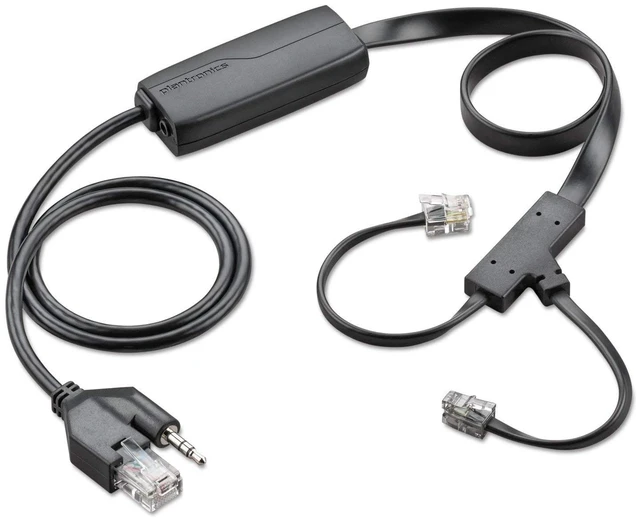
Plantronics - APC-43 EHS Cable for CS500 series
- Sold as 1 Each. Part#38350-13 - replaced the APC-42
- Electronic hook switch cable for remote desk phone call control (answer/end).
- Eliminates the need for a HL10 Handset Lifter.
- APC-43 works with Cisco desk phones.
+
+
Overview
Specs
Reviews
Any questions? Ask CelesteSM will help you find out quickly.
Try me now
Compatible with the following phones: Cisco 6945, 7821, 7841, 7861, 7942G, 7945G, 7962G, 7965G, 7975G, 8841, 8845, 8851, 8861, 8865
Connects with the following headsets: CS500
Series: CS510, CS520, CS530, CS540, and all -XD variants Phone verification The phone must be set for Wireless Headset Hookswitch Control = Enabled Press the settings button on the phone (Checkbox Icon). Select Device Configuration >> Select Media Configuration If Wireless Headset Hookswitch Control is Disabled, follow the instructions below. Enabling Wireless Headset Hookswitch Control Access the server administrator with a browser. Select Device>Phone through the drop down menus. Click Find with no selection criteria to obtail a list of all phones Open the desired phone. Scroll down to Wireless Headset Hookswitch Control Set to Enabled Click Apply. Wait for the dialog box to appear, then reset the phone by clicking the reset button. Expansion Modules If the phone is equipped with a model 7914/7915/7916 expansion module: The Expansion module will be plugged into the telephone AUX connector Connect the APC-4 (APC-43) control connection into the expansion module Use a 40287-05 adapter to extend the APC-4 (APC-43) audio input to reach the headset jack on the phone
Connects with the following headsets: CS500
Series: CS510, CS520, CS530, CS540, and all -XD variants Phone verification The phone must be set for Wireless Headset Hookswitch Control = Enabled Press the settings button on the phone (Checkbox Icon). Select Device Configuration >> Select Media Configuration If Wireless Headset Hookswitch Control is Disabled, follow the instructions below. Enabling Wireless Headset Hookswitch Control Access the server administrator with a browser. Select Device>Phone through the drop down menus. Click Find with no selection criteria to obtail a list of all phones Open the desired phone. Scroll down to Wireless Headset Hookswitch Control Set to Enabled Click Apply. Wait for the dialog box to appear, then reset the phone by clicking the reset button. Expansion Modules If the phone is equipped with a model 7914/7915/7916 expansion module: The Expansion module will be plugged into the telephone AUX connector Connect the APC-4 (APC-43) control connection into the expansion module Use a 40287-05 adapter to extend the APC-4 (APC-43) audio input to reach the headset jack on the phone
Warranty & Returns
Warranty, Returns, And Additional Information
Warranty
- Please contact the Seller directly for warranty information. Warranty information may also be found on the Manufacturer's website.
- CONTACT
Return Policies
- Return for refund within: 30 days
- Return for replacement within: 30 days
- This item is covered by DuronTechnologies Return Policy
Manufacturer Contact Info
- For a directory of all our manufacturers, please click below.
- Manufacturers Directory
LOADING...