

Your Browsing History
- Free 30-day Returns
$39.99



Meet Your Seller

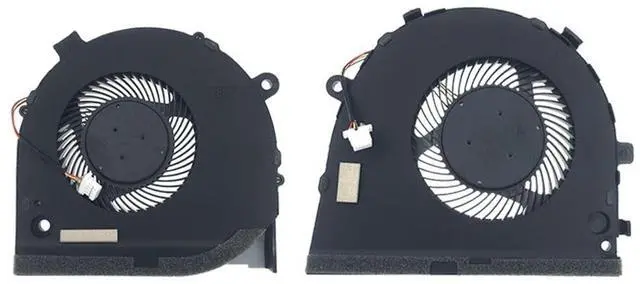

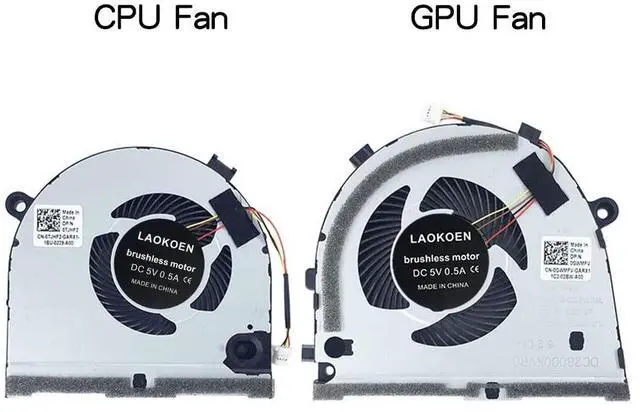
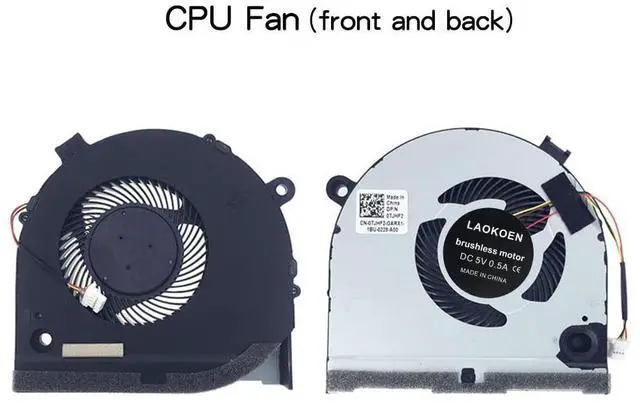
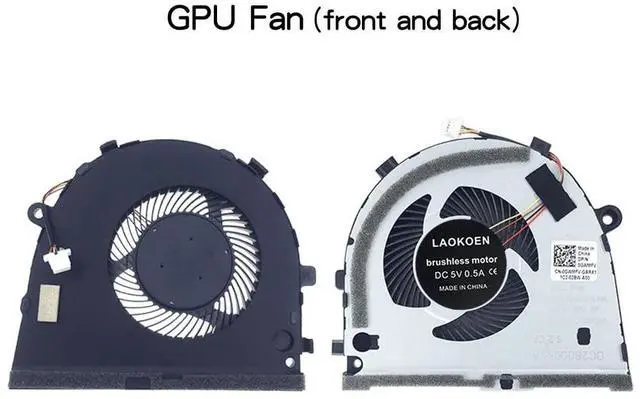


New Replacement Cooling Fans for Dell G3-3579 G3 15 3579 Gaming Series Laptop CPU+GPU Fan One Pair P/N: 0GWMFV 0TJHF2 5V 0.5A (4-Pin 4-Wire)
- Compatible models: For Dell G3-3579 G3 15 3579 Gaming Series Laptop CPU+GPU Fan One Pair P/N: 0GWMFV 0TJHF2 Series laptop Fan.
- Fan description: brand new, 5V0.5A.
- Applicable scenarios:Solve the error, abnormal noise, and high temperature of your laptop fan, so that your laptop fan can operate normally again!
- Worry-free service: Brand new, every fan has been tested before shipment and packed in a shockproof box. Ensure safety during transportation! In addition, we also provide a 90-day warranty for the product.
- Note: Please check the compatible models before purchasing and compare the sample fan Pictures If you have any questions about what kind of fan you need, please contact us.
+
+
Overview
Specs
Reviews

Any questions? Our AI beta will help you find out quickly.
Try me now
Please check the compatible model and compare the sample pictures, make sure this is the correct Cooling Fans you need! Please contact us if you have any issue! *Parameter: 5V 0.5A *Old and
New: brand
new*Warranty time: 90 days*Package
Include: 1 x CPU Fan + 1 x GPU Fan.
*Compatible Models: For Dell G3-3579 G3 15 3579 Gaming Series Laptop CPU+GPU Fan One Pair P/N: 0GWMFV 0TJHF2 Series laptop Fan.
*Applicable scenarios: Solve the error, abnormal noise, and high temperature of your laptop fan, so that your laptop fan can operate normally again! *Special attention:
1. Disassembly is risky, and installation needs to be cautious. If you cant install it yourself, its best to ask a professional to help install it. 2. Before replacing the notebook fan, remember to shut down the computer and power off the computer to avoid damage to the motherboard due to static electricity. In addition, do not reverse The fan plug is installed to avoid burning the fan.
*Installation Note: Pay attention to the fan plug, do not insert it backwards.
New: brand
new*Warranty time: 90 days*Package
Include: 1 x CPU Fan + 1 x GPU Fan.
*Compatible Models: For Dell G3-3579 G3 15 3579 Gaming Series Laptop CPU+GPU Fan One Pair P/N: 0GWMFV 0TJHF2 Series laptop Fan.
*Applicable scenarios: Solve the error, abnormal noise, and high temperature of your laptop fan, so that your laptop fan can operate normally again! *Special attention:
1. Disassembly is risky, and installation needs to be cautious. If you cant install it yourself, its best to ask a professional to help install it. 2. Before replacing the notebook fan, remember to shut down the computer and power off the computer to avoid damage to the motherboard due to static electricity. In addition, do not reverse The fan plug is installed to avoid burning the fan.
*Installation Note: Pay attention to the fan plug, do not insert it backwards.
Warranty & Returns
Warranty, Returns, And Additional Information
Warranty
- Please contact the Seller directly for warranty information. Warranty information may also be found on the Manufacturer's website.
- CONTACT
Return Policies
- Return for refund within: 30 days
- Return for replacement within: 30 days
- This item is covered by CloudBeast Return Policy
Manufacturer Contact Info
- For a directory of all our manufacturers, please click below.
- Manufacturers Directory
LOADING...