

Your Browsing History
- Free 30-day Returns
$223.99


Meet Your Seller



KCEVE KVM Switch 2 Monitors 3 Computers USB C HDMI DP, EDID, USB 3.0 KVM Switch Dual Monitor HDMI for 1 Laptops 2 Desktop Share 4 USB3.0 Device, 73W PD, 4K@60Hz, Aluminum, Power Adapter, Wired Remote
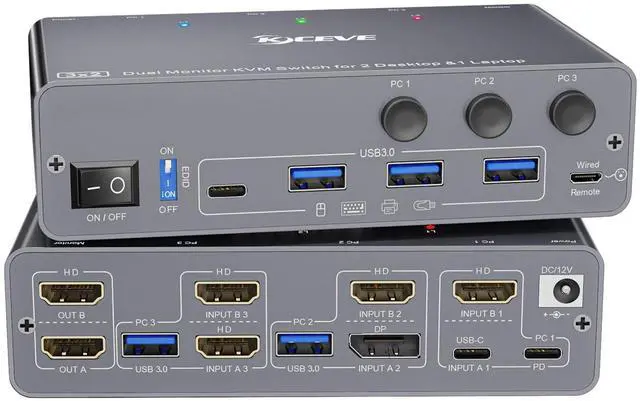
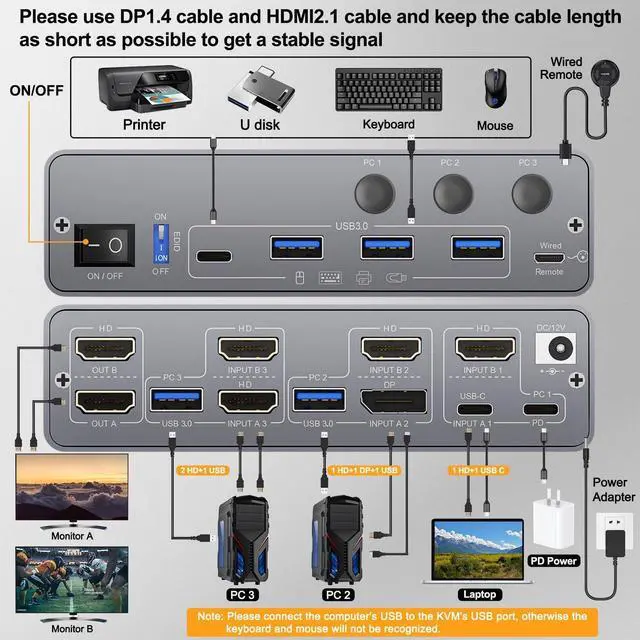
- USB 3.0 HDMI 2.0 KVM Switch 2 Monitors 3 Computers USB C HDMI DPKCEVE KVM switch Dual Monitor allows you to control 1 Laptop and 2 Desktop with one set of mouse keyboard and 2 HDMI monitors. The Laptop needs 1 HDMI + 1 USB C cable to plug into the HDMI KVM Switch 2 Monitors.The Desktop needs 2 HDMI + 1 USB cable (or 1 HDMI+1 DP+1 USB) to plug into the KVM Switch 2 monitor 1 laptop 2 desktop. Please make sure your laptop's USB C port and HDMI can output video at the same time
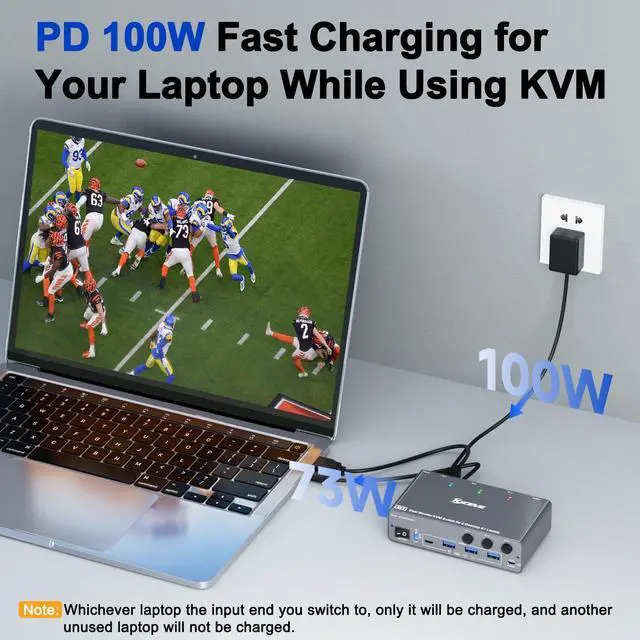
- 73W PD for USB C KVM Switch 1 Laptop and 2 Desktop PCKVM 3 computers 2 monitors have the function of charging laptop. Dual monitor KVM Switch USB C provides 73W charging efficiency to your laptop. Please use PD 100W charger. 3 Computers KVM switch USB C comes with an "on and off" switch, you can turn off the USB C KVM switch 2 monitors freely to achieve the effect of turning off the monitor
- Dual Monitor KVM Switch 3 Computers with 4 USB 3.0 Ports up to 5GbpsKVM Switch Dual Monitor for 1 Laptop and 2 Desktop S
+
+
Overview
Specs
Reviews

Any questions? Our AI beta will help you find out quickly.
Try me now
USB 3.0 HDMI 2.0 KVM Switch 2 Monitors 3 Computers USB C HDMI DPKCEVE KVM switch Dual Monitor allows you to control 1 Laptop and 2 Desktop with one set of mouse keyboard and 2 HDMI monitors. The Laptop needs 1 HDMI + 1 USB C cable to plug into the HDMI KVM Switch 2 Monitors. The Desktop needs 2 HDMI + 1 USB cable (or 1 HDMI+1 DP+1 USB) to plug into the KVM Switch 2 monitor 1 laptop 2 desktop. Please make sure your laptop's USB C port and HDMI can output video at the same time ^^ 73W PD for USB C KVM Switch 1 Laptop and 2 Desktop PCKVM 3 computers 2 monitors have the function of charging laptop.
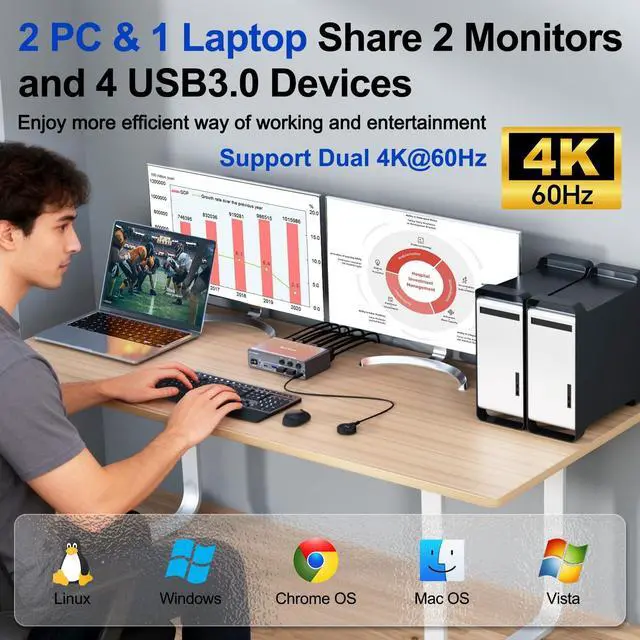
Dual monitor KVM Switch USB C provides 73W charging efficiency to your laptop. Please use PD 100W charger. 3 Computers KVM switch USB C comes with an "on and off" switch, you can turn off the USB C KVM switch 2 monitors freely to achieve the effect of turning off the monitor ^^ Dual Monitor KVM Switch 3 Computers with 4 USB 3.0 Ports up to 5GbpsKVM Switch Dual Monitor for 1 Laptop and 2 Desktop Share 2 monitors and 4 USB 3.0 devices without unplugging, Securely Identify Keyboard, Mouse, printers, scanners and other USB devices.
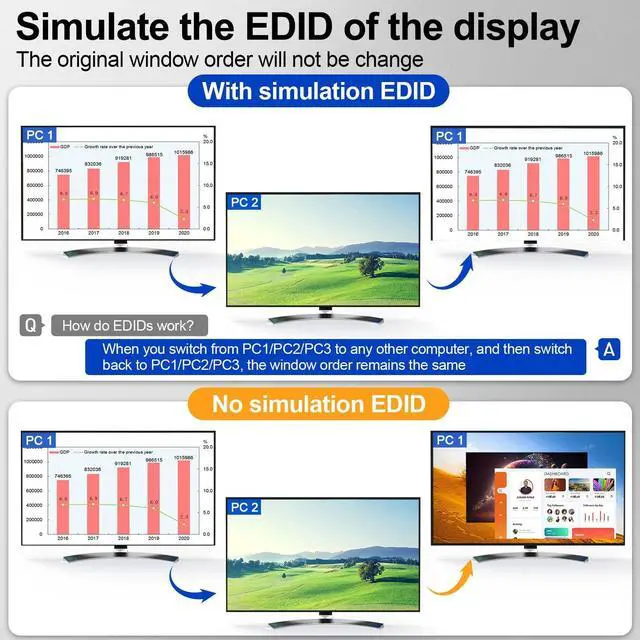
KVM switch 2 monitors 3 computers USB C support ultra-fast data transfer up to 5Gbps, backward compatible with USB 2.0 / 1.1 devices. Compliant with HDMI 2.0, displayport 1.4 ^^ KVM Switch 3 Computers 2 Monitors Support 4K@60HzKVM switch 3 computers support 4K@60Hz, 4K@30Hz, 2K@144Hz, 1080P@144hz backward compatibility. You could pressWindows+Pto select mirror mode or extended screen mode. Apple M1/M2 only supports single-screen output. MacBook Pro (M3) cannot output images through both USB C and HDMI port at the same time, and can only output one image ^^ EDID Emulator3 Computers KVM Switch supports EDID lock.
The EDID function is very useful because it automatically adjusts monitor settings for optimal resolution and refresh rate. This ensures you always get the best image quality. When switching screens, the original window will not be messed up. Provides an option to enable or disable the EDID function ^^ 2 Switching Methods for KVM Switch 3 ComputersPlug and Play. No software required. Switch freely between 3 Computer via Panel Button or 1.5 m wired remote (included). LED lights indicate which computer is active. Please connect a DC 12V power supply for KVM Switch 3 PC 2 monitors.
Each line of input signal corresponds to each line of display output. For PC1, you need to connect USB C and HDMI cables to the KVM to display 2 screens ^^ Great Compatibility and Wide ApplicationUSB 3.0 KVM Switch 3 Computers support HDMI, Displayport and USB C input devices, such as Desktop, laptop, HDTV, Monitor, Projectors. KCEVE KVM switch 2 monitors HDMI compatible with Windows 7/8/10/11/XP/Vista, Mac OS and Chrome systems. Widely used in office, business seminar, multimedia teaching, home theater, game room, scientific research test, etc ^^ After-sale SupportKCEVE 3 Computers 2 monitors KVM Switch built-in high performance chip, made of aluminum.
Included 1 KVM switch USB C HDMI DP, 1 USB C cables, 2 USB cable, 1 remote control, 1 manual, 1 DC 12V power supply. We provide 12 months After-sales service, lifetime technical support for our USB C KVM switch 3 Computer. Feel free to contact US with any question.
Dual monitor KVM Switch USB C provides 73W charging efficiency to your laptop. Please use PD 100W charger. 3 Computers KVM switch USB C comes with an "on and off" switch, you can turn off the USB C KVM switch 2 monitors freely to achieve the effect of turning off the monitor ^^ Dual Monitor KVM Switch 3 Computers with 4 USB 3.0 Ports up to 5GbpsKVM Switch Dual Monitor for 1 Laptop and 2 Desktop Share 2 monitors and 4 USB 3.0 devices without unplugging, Securely Identify Keyboard, Mouse, printers, scanners and other USB devices.
KVM switch 2 monitors 3 computers USB C support ultra-fast data transfer up to 5Gbps, backward compatible with USB 2.0 / 1.1 devices. Compliant with HDMI 2.0, displayport 1.4 ^^ KVM Switch 3 Computers 2 Monitors Support 4K@60HzKVM switch 3 computers support 4K@60Hz, 4K@30Hz, 2K@144Hz, 1080P@144hz backward compatibility. You could pressWindows+Pto select mirror mode or extended screen mode. Apple M1/M2 only supports single-screen output. MacBook Pro (M3) cannot output images through both USB C and HDMI port at the same time, and can only output one image ^^ EDID Emulator3 Computers KVM Switch supports EDID lock.
The EDID function is very useful because it automatically adjusts monitor settings for optimal resolution and refresh rate. This ensures you always get the best image quality. When switching screens, the original window will not be messed up. Provides an option to enable or disable the EDID function ^^ 2 Switching Methods for KVM Switch 3 ComputersPlug and Play. No software required. Switch freely between 3 Computer via Panel Button or 1.5 m wired remote (included). LED lights indicate which computer is active. Please connect a DC 12V power supply for KVM Switch 3 PC 2 monitors.
Each line of input signal corresponds to each line of display output. For PC1, you need to connect USB C and HDMI cables to the KVM to display 2 screens ^^ Great Compatibility and Wide ApplicationUSB 3.0 KVM Switch 3 Computers support HDMI, Displayport and USB C input devices, such as Desktop, laptop, HDTV, Monitor, Projectors. KCEVE KVM switch 2 monitors HDMI compatible with Windows 7/8/10/11/XP/Vista, Mac OS and Chrome systems. Widely used in office, business seminar, multimedia teaching, home theater, game room, scientific research test, etc ^^ After-sale SupportKCEVE 3 Computers 2 monitors KVM Switch built-in high performance chip, made of aluminum.
Included 1 KVM switch USB C HDMI DP, 1 USB C cables, 2 USB cable, 1 remote control, 1 manual, 1 DC 12V power supply. We provide 12 months After-sales service, lifetime technical support for our USB C KVM switch 3 Computer. Feel free to contact US with any question.
Warranty & Returns
Warranty, Returns, And Additional Information
Warranty
- Please contact the Seller directly for warranty information. Warranty information may also be found on the Manufacturer's website.
- CONTACT
Return Policies
- Return for refund within: 30 days
- Return for replacement within: 30 days
- This item is covered by LingGo Return Policy
Manufacturer Contact Info
- For a directory of all our manufacturers, please click below.
- Manufacturers Directory
LOADING...