Your Browsing History
Meet Your Seller
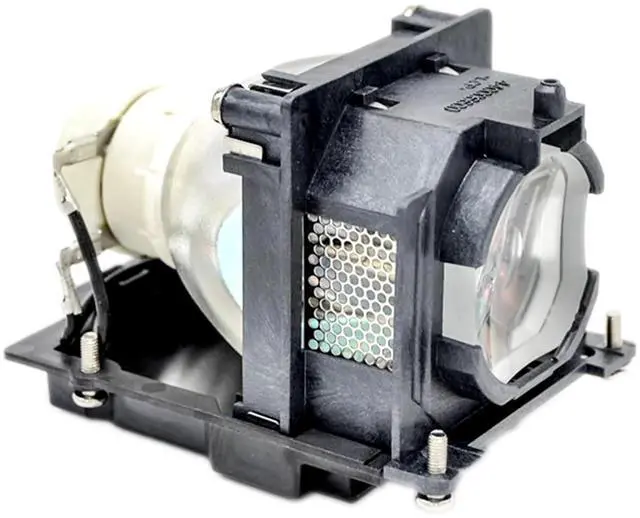
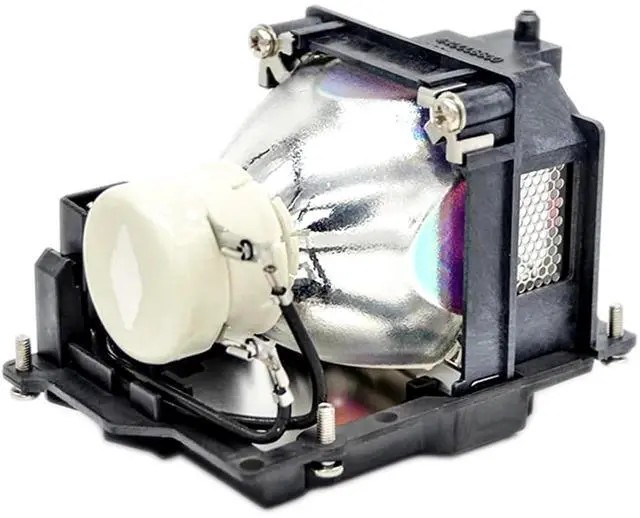
RANETLIO NP41LP Replacement Lamp Bulb with Housing Compatible with NEC M421X MC301X MC331X MC331W MC371X Projector Lamp
- RANETLIO Projector Lamp part number :NP41LP replacement lamp bulb with housing
- RENTLIO NP41LP replacement lamp is assmedbled with quality A++lampwick and durable reflector inside to Generate Higher Brightness
- This replacement lamp NP41LP is compatible with NEC M421X MC301X MC331X MC331W MC371X Projector Lamp
- RANETLIO Provides 180- Day Long Warranty for the Replacement. Excellent Customer Service, All the Inquires will be responded within 12 hours
- RANETLIO's Replacement Lamps will be strictly checked before shipping, and will be well packaged to protect the lamp from shake and water
+
+
Overview
Specs
Reviews
Any questions? Our AI beta will help you find out quickly.
Try me now
RANETLIO NP41LP Replacement Lamp Bulb with Housing Compatible with NEC M421X MC301X MC331X MC331W MC371X Projector LampProjector
Lamp Part Number: NP41LPThis replacement projector lamp is suitable for NEC M421X MC301X MC331X MC331W MC371X Projector LampType: Replacement lamp bulb with
HousingCondition: Brand
NewWarranty: All the lamps are tested before shipment, and
under 180 days warrantyPackage: Waterproof and
Shake proof solid boxApplication: For Home/School/Business PresentationSteps to
Install Your Projector Lamps: To install a projector lamp with the housing, just follow the easy steps below:; 1. Make sure the projector is unplugged and sitting on a flat surface2. Loosen the screw holding the projector lamp module cover in place and remove the panel3. Unplug the old projector lamp and remove it from the projector4. Plug the new projector lamp securely into place5. Attach the panel back onto the projector and tighten the screw

Lamp Part Number: NP41LPThis replacement projector lamp is suitable for NEC M421X MC301X MC331X MC331W MC371X Projector LampType: Replacement lamp bulb with
HousingCondition: Brand
NewWarranty: All the lamps are tested before shipment, and
under 180 days warrantyPackage: Waterproof and
Shake proof solid boxApplication: For Home/School/Business PresentationSteps to
Install Your Projector Lamps: To install a projector lamp with the housing, just follow the easy steps below:; 1. Make sure the projector is unplugged and sitting on a flat surface2. Loosen the screw holding the projector lamp module cover in place and remove the panel3. Unplug the old projector lamp and remove it from the projector4. Plug the new projector lamp securely into place5. Attach the panel back onto the projector and tighten the screw
Warranty & Returns
Warranty, Returns, And Additional Information
Warranty
- Please contact the Seller directly for warranty information. Warranty information may also be found on the Manufacturer's website.
- CONTACT
Return Policies
- Return for refund within: 30 days
- Return for replacement within: non-replaceable
- This item is covered by VersaCom Return Policy
Manufacturer Contact Info
- For a directory of all our manufacturers, please click below.
- Manufacturers Directory
LOADING...