Your Browsing History
- Free 30-day Returns
$46.99
Meet Your Seller
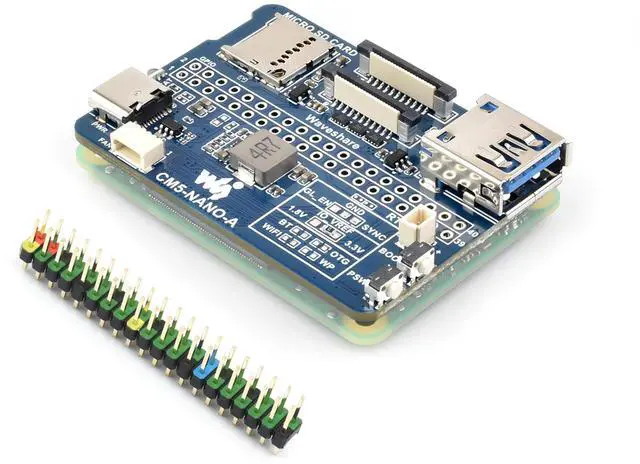
Mini Nano Base Board for Compute Module 5 Lite/eMMC, Same Size As CM5 Compact Size and Fully Functional, with Multiple Peripheral Interfaces-40PIN GPIO, USB 3.2 Gen1 Type-A, Fan Header,etc
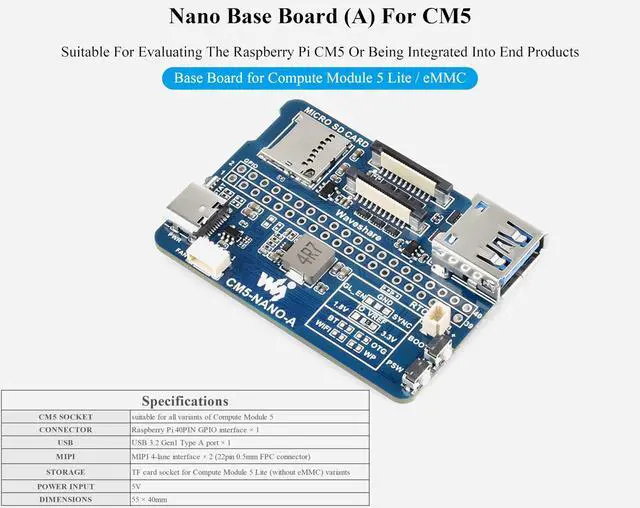
- Nano Base Board (A) for Compute Module 5 Lite / eMMC Same Size As The CM5. Suitable For Evaluating The Raspberry Pi CM5 Or Being Integrated Into End Products
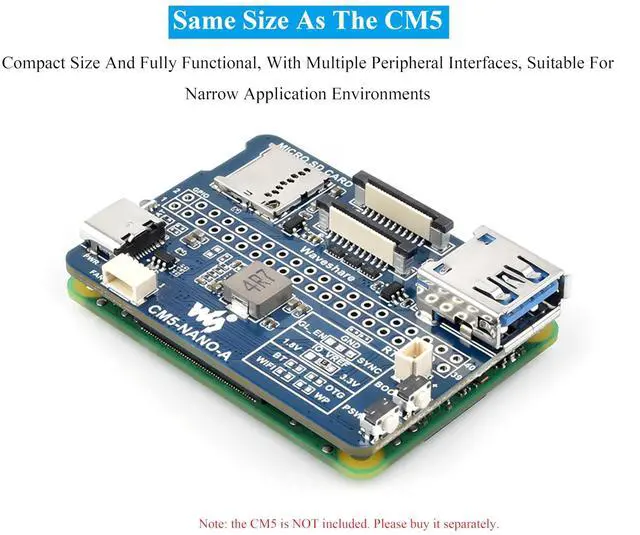
- Compact size and fully functional, With Multiple Peripheral Interfaces, Suitable for Narrow Application Environments
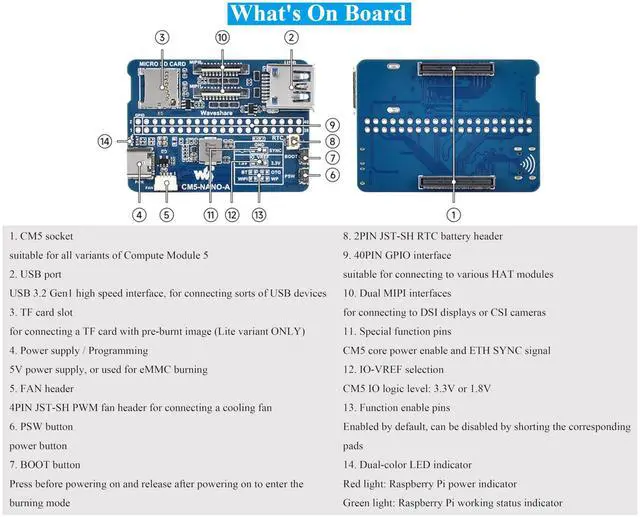
- With Multiple Peripheral Interfaces: 40PIN GPIO interface, USB 3.2 Gen1 Type A port , MIPI 4-lane interface x 2 (22pin 0.5mm FPC connector), Fan Header,etc.
- Onboard BOOT, you can press the BOOT button before powering on, connect the computer via Type C, and put the device into burning mode. The maximum power output of the USB TYPE A interface is 2A
- Precautions: Do not plug in or unplug any device other than USB when powered. Do not connect other devices when using Type C to burn, as insufficient power supply will cause the device to be unrecognizable.
- Comes with relevant resources and tutorials to help you get started quickly: bit.ly/41GGU6U
+
+
Overview
Specs
Reviews
Any questions? Our AI beta will help you find out quickly.
Try me now
Nano Base Board (A) for Compute Module 5 Lite / eMMC Same Size As The CM5. Suitable For Evaluating The Raspberry Pi CM5 Or Being Integrated Into End Products ^^ Compact size and fully functional, With Multiple Peripheral Interfaces, Suitable for Narrow Application Environments ^^
With Multiple Peripheral Interfaces: 40PIN GPIO interface, USB 3.2 Gen1 Type A port, MIPI 4-lane interface x 2 (22pin 0.5 mm FPC connector), Fan Header, etc. ^^ Onboard BOOT, you can press the BOOT button before powering on, connect the computer via Type C, and put the device into burning mode. The maximum power output of the USB TYPE A interface is 2A ^^
Precautions: Do not plug in or unplug any device other than USB when powered. Do not connect other devices when using Type C to burn, as insufficient power supply will cause the device to be unrecognizable. ^^ Comes with relevant resources and tutorials to help you get started quickly: bit. ly/41GGU6U

With Multiple Peripheral Interfaces: 40PIN GPIO interface, USB 3.2 Gen1 Type A port, MIPI 4-lane interface x 2 (22pin 0.5 mm FPC connector), Fan Header, etc. ^^ Onboard BOOT, you can press the BOOT button before powering on, connect the computer via Type C, and put the device into burning mode. The maximum power output of the USB TYPE A interface is 2A ^^
Precautions: Do not plug in or unplug any device other than USB when powered. Do not connect other devices when using Type C to burn, as insufficient power supply will cause the device to be unrecognizable. ^^ Comes with relevant resources and tutorials to help you get started quickly: bit. ly/41GGU6U
Warranty & Returns
Warranty, Returns, And Additional Information
Warranty
- Please contact the Seller directly for warranty information. Warranty information may also be found on the Manufacturer's website.
- CONTACT
Return Policies
- Return for refund within: 30 days
- Return for replacement within: 30 days
- This item is covered by JMDesign Return Policy
Manufacturer Contact Info
- For a directory of all our manufacturers, please click below.
- Manufacturers Directory
LOADING...