

Your Browsing History
- Free 30-day Returns
$60.99
Best Sellers
 Top Rated
- $66.98
- + FREE SHIPPING

Meet Your Seller


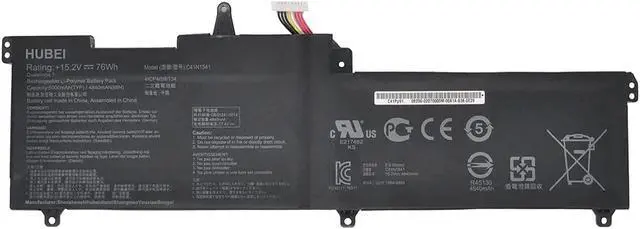
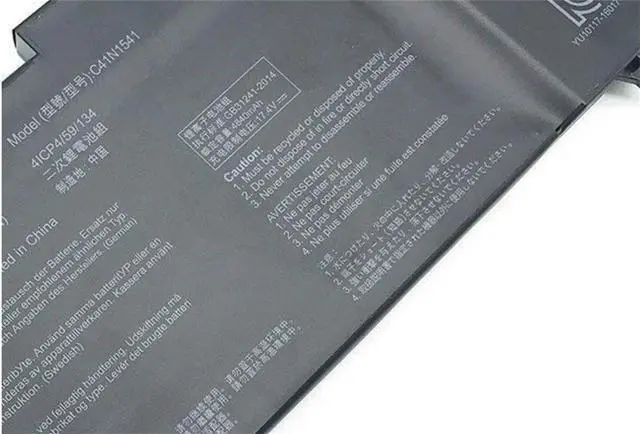
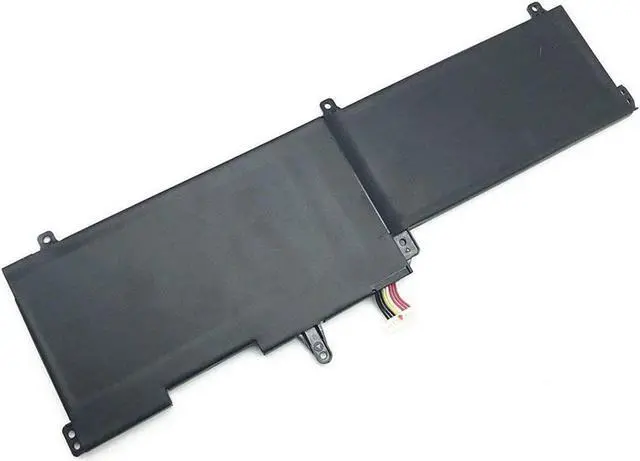



C41N1541 0B200-02070000 Battery Compatible for ASUS ROG GL702VM-DB74 GL702VM-GC059T ROG Strix GL702VT GL702 GL702V GL702VM GL702VM-1A GL702VM-DB71 GL702VM-GB031T GL702VM-GB032T(15.2V 76Wh)
- Condition: New Voltage: 15.2V Capacity:76Wh
- Replace Part Number: C41N1541 0B200-02070000
- Fit For: for ASUS GL702, GL702V, GL702VM, GL702VM-1A, GL702VM-DB71, GL702VM-DB74, GL702VM-GB031T, GL702VM-GB032T, GL702VM-GC004T, GL702VM-GC010T, GL702VM-GC017T, GL702VM-GC020T, GL702VM-GC035T, GL702VM-GC100T, GL702VM-GC102D, GL702VM-GC279T, GL702VM-GC280T, GL702VM-GC301T, GL702VS, GL702VS-1A, GL702VS-1C, GL702VSK-R, GL702VT, GL702VT-1A, GL702VT-GC018T, GL702VT-GC023T, GL702VT-GC024T
- CE & ROHS certified. 100% compatible with original battery.
- 30 Days Money Back and 12 months Warranty. 24 x 7 email support
+
+
Overview
Specs
Reviews

Any questions? Our AI mode will help you find out quickly.
Try me now
About Us:
A professional manufacturer in the field of power tool batteries, laptop batteries and charger,
provides high-quality, real capacity power products with excellent customer service.
Specification:
Battery Type: Li-ion
Voltage: 15.2V
Capacity: 76Wh
Compatible Part Numbers:
C41N1541 0B200-02070000
Compatible Machine Models:
for ASUS
GL702, GL702V, GL702VM, GL702VM-1A, GL702VM-DB71, GL702VM-DB74, GL702VM-GB031T, GL702VM-GB032T, GL702VM-GC004T, GL702VM-GC010T, GL702VM-GC017T, GL702VM-GC020T, GL702VM-GC035T, GL702VM-GC100T, GL702VM-GC102D, GL702VM-GC279T, GL702VM-GC280T, GL702VM-GC301T, GL702VS, GL702VS-1A, GL702VS-1C, GL702VSK-R, GL702VT, GL702VT-1A, GL702VT-GC018T, GL702VT-GC023T, GL702VT-GC024T, GL702VT-GC025T, GL702VT-GC033T, GL702VT-GC057T, GL702VT-GC061T, GL702VT-GC090TC, GL702VT-GC109T, GL702ZC, GL702ZC-R7, ROG Strix GL702VS, ROG Strix GL702VT, ROG Strix GL702ZC, ROG Strix GL702ZC-GC204T
How to chosse a correct battery for your laptop:
1. Make sure that the battery's model, voltage and capacity are exactly the same as your orginal one.
2. Make sure that the battery look the same as your original one.
3. Make sure that your laptop model is in the compatible list.
Note:
1. The first use of the battery, the battery voltage may be too low, you need to recharge the standby 24 hours before normal use.
2. The computer does not recognize the battery, the battery connector may be bad contact with the computer jack, At this time need to check if the battery connector of copper exposed.
(Click "Add to Cart" button. Enjoy your nice day! )
A professional manufacturer in the field of power tool batteries, laptop batteries and charger,
provides high-quality, real capacity power products with excellent customer service.
Specification:
Battery Type: Li-ion
Voltage: 15.2V
Capacity: 76Wh
Compatible Part Numbers:
C41N1541 0B200-02070000
Compatible Machine Models:
for ASUS
GL702, GL702V, GL702VM, GL702VM-1A, GL702VM-DB71, GL702VM-DB74, GL702VM-GB031T, GL702VM-GB032T, GL702VM-GC004T, GL702VM-GC010T, GL702VM-GC017T, GL702VM-GC020T, GL702VM-GC035T, GL702VM-GC100T, GL702VM-GC102D, GL702VM-GC279T, GL702VM-GC280T, GL702VM-GC301T, GL702VS, GL702VS-1A, GL702VS-1C, GL702VSK-R, GL702VT, GL702VT-1A, GL702VT-GC018T, GL702VT-GC023T, GL702VT-GC024T, GL702VT-GC025T, GL702VT-GC033T, GL702VT-GC057T, GL702VT-GC061T, GL702VT-GC090TC, GL702VT-GC109T, GL702ZC, GL702ZC-R7, ROG Strix GL702VS, ROG Strix GL702VT, ROG Strix GL702ZC, ROG Strix GL702ZC-GC204T
How to chosse a correct battery for your laptop:
1. Make sure that the battery's model, voltage and capacity are exactly the same as your orginal one.
2. Make sure that the battery look the same as your original one.
3. Make sure that your laptop model is in the compatible list.
Note:
1. The first use of the battery, the battery voltage may be too low, you need to recharge the standby 24 hours before normal use.
2. The computer does not recognize the battery, the battery connector may be bad contact with the computer jack, At this time need to check if the battery connector of copper exposed.
(Click "Add to Cart" button. Enjoy your nice day! )
Warranty & Returns
Warranty, Returns, And Additional Information
Warranty
- Please contact the Seller directly for warranty information. Warranty information may also be found on the Manufacturer's website.
- CONTACT
Return Policies
- Return for refund within: 30 days
- Return for replacement within: 30 days
- This item is covered by Riveira Store Return Policy
Manufacturer Contact Info
- For a directory of all our manufacturers, please click below.
- Manufacturers Directory
LOADING...
LOADING...