Your Browsing History
Meet Your Seller
Batianda for MacBook Air 13 Inch Case A2337 M1 A2179 A1932 2020 2019 2018 Version, Crystal Clear Plastic Hard Shell Cover + Keyboard Cover, C-Transparent
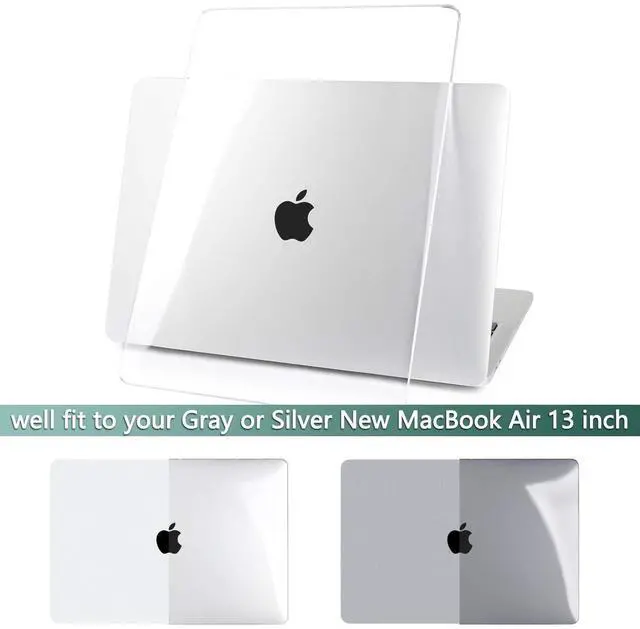
- Case Perfectly fit for MacBook Air 13 inch Touch ID 2020 2019 2018 Release.Model Numbers: A2337 M1 Chip/A2179/A1932
- Warning: Not suitable for latest macbook Air 13.6-inch m2 chip 2022 release and 2010-2017 Old MacBook Air 13.3 inch (logo can shine through) Model Number: A1466/A1369 (logo can shine through). Please kindly check your laptop model first before purchease.
- Stylish Design & Heat Rejection Design: High qulaity plastic hard shell cover, Perfect for adding some extra flair to your laotop devices. Soft rubberized frosted bottom shell vented for maximum heat dissipation lightweight, two-piece, snap-on case includes four support feet.
- Easy Installation & Removal: Simple clip-on/off design without the added risk of harming your laptop during application.
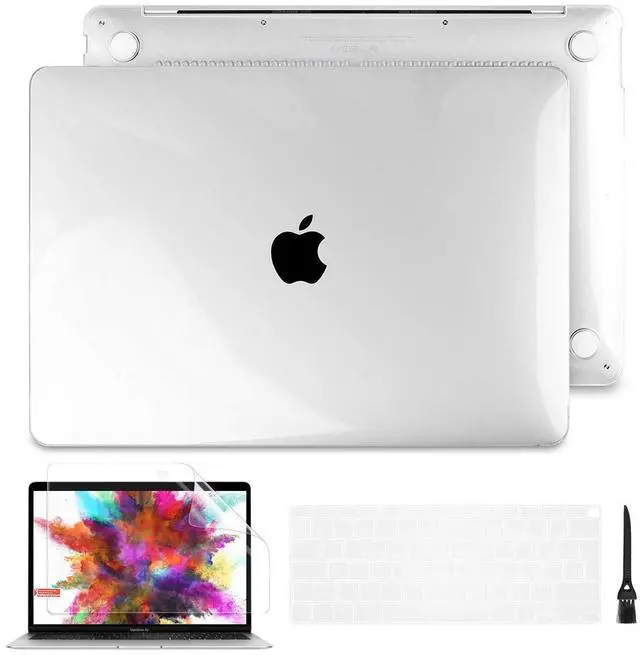
- Package Include 1 PC Hard Shell Case with Painting, 1 matching keyboard cover, 1 screen protector & 1 tiny cleaning brush to protect your laptop keyboard & screen against scratch and contaminates.
+
+
Overview
Specs
Reviews
Any questions? Our AI beta will help you find out quickly.
Try me now
Note: different models correspond to different case, please check the model number on the bottom of your laptop carefully Case Only Compatible For 2020 2019 2018 MacBook Air 13 Inch with
Touch IDModel Number: A2337 M1/A2179/A1932Case NOT Compatible -For 2020 2019 2018 2017 2016 Newest MacBook Pro 13-inch with Touch ID & Retina Display with
Thunderbolt 3 ports model: A2338/A2251/A2289/A2159/A1989/A1706/A1708-For 2019 2018 2017 2016 Newest MacBook Pro 15-inch with Touch bar with 4
Thunderbolt 3 ports model: A1990/A1707-For 2020 2019 Newest MacBook Pro 16-inch with
Touch Bar model: A2141-For 2008-2017
MacBook Air 13 inch model: A1466/A1369-For 2012-2015 MacBook Pro 13 inch with retina model: A1502/A1425-For 2012-2015 MacBook Pro 15 inch with retina model: A1398-For Old MacBook Pro 13 inch with
CD-ROM model: A1278-For Old MacBook Pro 15 inch with
CD-ROM model: A1286-For MacBook Air 11 inch model: A1370/A1465-For MacBook Retina 12 inch model: A1534Package
including: 1 printing case + 1matching Keyboard cover + 1screen protector + 1cleaning brushBatianda Case FeaturesHigh quality plastic hard shell cover, protect your Laptop from bumps and scratchesPrecise cut outs allow full access to all ports and functions, plug your charger, cable or headset without removing the caseSafe Heat dissipation/disbursement, Designed with ventilation holes at the bottom piece part of the cover, ensure your Laptop in a safe condition and never get megathermalInstallation
Instructions: 1. Start with the top cover of the case. Clip the 2 clips at the back of the Laptop first. 2. Pull the case slightly to the front until the 2 clips "clicking". 3. Turn around the laptop. Clip the bottom cover on the back of the laptop first.

Touch IDModel Number: A2337 M1/A2179/A1932Case NOT Compatible -For 2020 2019 2018 2017 2016 Newest MacBook Pro 13-inch with Touch ID & Retina Display with
Thunderbolt 3 ports model: A2338/A2251/A2289/A2159/A1989/A1706/A1708-For 2019 2018 2017 2016 Newest MacBook Pro 15-inch with Touch bar with 4
Thunderbolt 3 ports model: A1990/A1707-For 2020 2019 Newest MacBook Pro 16-inch with
Touch Bar model: A2141-For 2008-2017
MacBook Air 13 inch model: A1466/A1369-For 2012-2015 MacBook Pro 13 inch with retina model: A1502/A1425-For 2012-2015 MacBook Pro 15 inch with retina model: A1398-For Old MacBook Pro 13 inch with
CD-ROM model: A1278-For Old MacBook Pro 15 inch with
CD-ROM model: A1286-For MacBook Air 11 inch model: A1370/A1465-For MacBook Retina 12 inch model: A1534Package
including: 1 printing case + 1matching Keyboard cover + 1screen protector + 1cleaning brushBatianda Case FeaturesHigh quality plastic hard shell cover, protect your Laptop from bumps and scratchesPrecise cut outs allow full access to all ports and functions, plug your charger, cable or headset without removing the caseSafe Heat dissipation/disbursement, Designed with ventilation holes at the bottom piece part of the cover, ensure your Laptop in a safe condition and never get megathermalInstallation
Instructions: 1. Start with the top cover of the case. Clip the 2 clips at the back of the Laptop first. 2. Pull the case slightly to the front until the 2 clips "clicking". 3. Turn around the laptop. Clip the bottom cover on the back of the laptop first.
Warranty & Returns
Warranty, Returns, And Additional Information
Warranty
- Please contact the Seller directly for warranty information. Warranty information may also be found on the Manufacturer's website.
- CONTACT
Return Policies
- Return for refund within: 30 days
- Return for replacement within: 30 days
- This item is covered by LANMEll Return Policy
Manufacturer Contact Info
- For a directory of all our manufacturers, please click below.
- Manufacturers Directory
LOADING...