Your Browsing History
Meet Your Seller
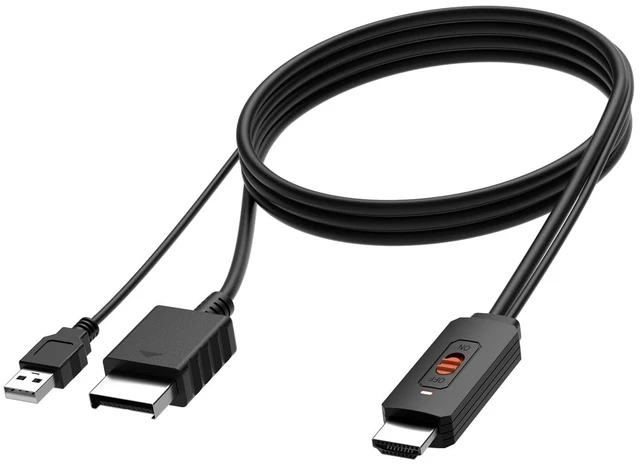
Azduou PS2 to HDMI Converter HDMI Cable for PlayStation 2 for PlayStation 3 Connecting PS2/ PS3 to HDTV with True Ypbpr Component Signal 100% Improve Video Quality
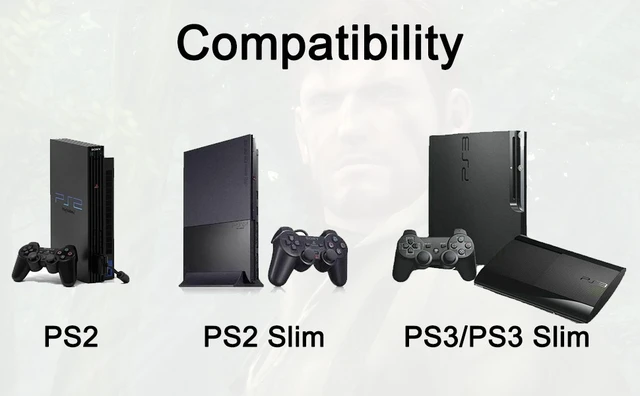
- Convert and upscale the analog Ypbpr signals to digital HDMI signals for modern HDTVs/monitors/projectors, which makes the HD link cable compatible with classic Fat PS2, Slim PS2 and PS3
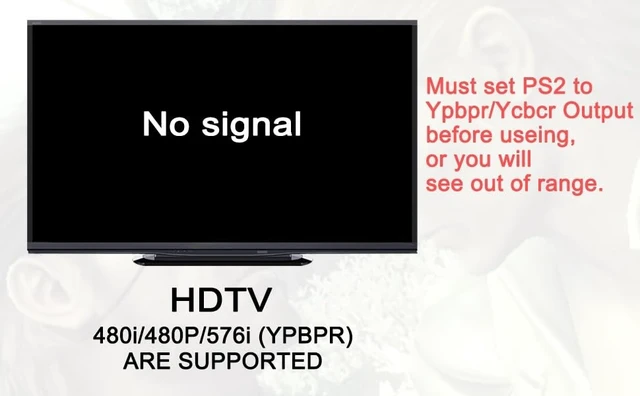
- Supported Resolutions: 480i, 480p and 576i (for all HDTV and Monitors)
- No need to install drivers, portable, flexible, plug and play. Provide advanced signal processing with great precision, colors, resolutions and details.
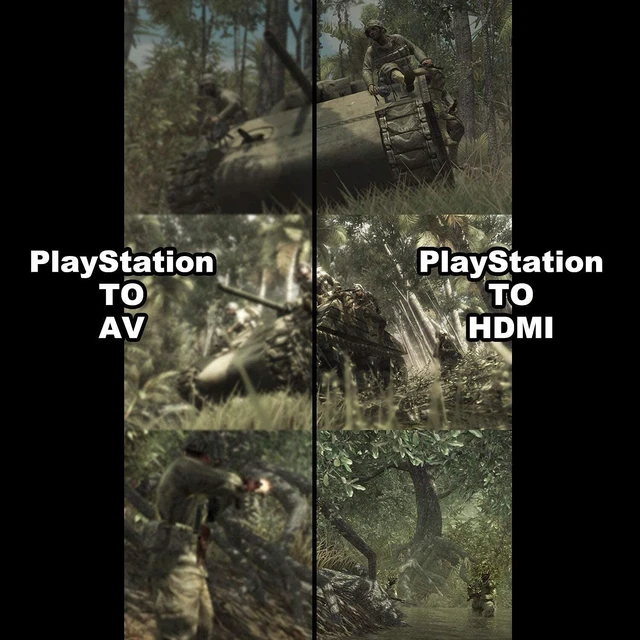
- PS2 HDMI Adapter Come With True Ypbpr HD Signal Output (100% Improve Video Quality).
- NOTE: Compatible with PlayStation 2/3 only. Any questions, please contact customer service directly.
+
+
Overview
Specs
Reviews
Any questions? Our AI mode will help you find out quickly.
Try me now
PS2 to HDMIThis converter is a must have if you want to keep using your older devices with your new smart modern HD TV/ HDMI monitor. It can Provide You a Fantastic Home Theater Experience.
Features: Support HDMI 480i/576i/480p output. No need to install drivers, portable and flexible, plug and play. Provide advanced signal processing with great precision, colors, resolutions and details. restore original game screen. Support NTSC 3.58, NTSC 4.43 standard TV formats input. The PS2 to HDMI converter utilises YPBPR Component outputs, To ensure you get the best picture quality possible.
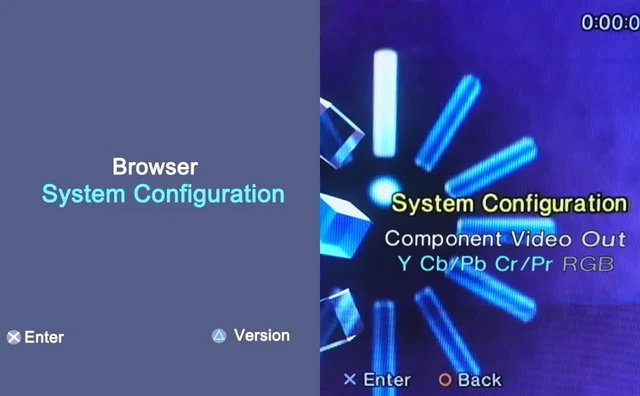
PS3 to HDMI Connection: If the PS3 HDMI port is not available, you can use this converter to connectIt is necessary to set the output mode of PS3. Press and hold the power button to the di sound. How to set PS2 Y Pb Pr \ Y Cb Cr signal outputDisplay device with HDMI & CVBS interfaceWith PS2 to CVBS cable---refer setting guideline 1Without PS2 to CVBS cable---refer setting guideline 2 Display device only with HDMI interfaceWith PS2 to CVBS cable and display device with CVBS interface---refer setting procedure 1Without CVBS interface device---refer setting procedure 2Setting guideline 1Connect PS2 to display device using PS2 to CVBS cable---set Y Pb Pr \ Y Cb Cr output in the game page---System Configuration Component Video Out Y CB/Pb Cr/PrSetting guideline 2Blind operation using PS2 controller---Boot PS2 and waiting for 20 seconds to use controller---pushbutton---push button---push 3 timebutton--- pushbutton---pushbutton---pushbutton---pushbutton *** is Enter buttonHow to Connect After SettingConnect PS2 to our adapter, and plug USB cable to offer powerConnect HDMI cable to our adapter and display deviceAdjust display deviceinput signal to "HDMI"Package Contents1 x PS2 to HDMI Converter Customer ServiceIf you encounter any problems after placing an order, you can contact us, and we will solve it for you as soon as possible.
NoteNo sound or blue screen appears, please check if the connection is successful.

Features: Support HDMI 480i/576i/480p output. No need to install drivers, portable and flexible, plug and play. Provide advanced signal processing with great precision, colors, resolutions and details. restore original game screen. Support NTSC 3.58, NTSC 4.43 standard TV formats input. The PS2 to HDMI converter utilises YPBPR Component outputs, To ensure you get the best picture quality possible.
PS3 to HDMI Connection: If the PS3 HDMI port is not available, you can use this converter to connectIt is necessary to set the output mode of PS3. Press and hold the power button to the di sound. How to set PS2 Y Pb Pr \ Y Cb Cr signal outputDisplay device with HDMI & CVBS interfaceWith PS2 to CVBS cable---refer setting guideline 1Without PS2 to CVBS cable---refer setting guideline 2 Display device only with HDMI interfaceWith PS2 to CVBS cable and display device with CVBS interface---refer setting procedure 1Without CVBS interface device---refer setting procedure 2Setting guideline 1Connect PS2 to display device using PS2 to CVBS cable---set Y Pb Pr \ Y Cb Cr output in the game page---System Configuration Component Video Out Y CB/Pb Cr/PrSetting guideline 2Blind operation using PS2 controller---Boot PS2 and waiting for 20 seconds to use controller---pushbutton---push button---push 3 timebutton--- pushbutton---pushbutton---pushbutton---pushbutton *** is Enter buttonHow to Connect After SettingConnect PS2 to our adapter, and plug USB cable to offer powerConnect HDMI cable to our adapter and display deviceAdjust display deviceinput signal to "HDMI"Package Contents1 x PS2 to HDMI Converter Customer ServiceIf you encounter any problems after placing an order, you can contact us, and we will solve it for you as soon as possible.
NoteNo sound or blue screen appears, please check if the connection is successful.
Warranty & Returns
Warranty, Returns, And Additional Information
Warranty
- Please contact the Seller directly for warranty information. Warranty information may also be found on the Manufacturer's website.
- CONTACT
Return Policies
- Return for refund within: 30 days
- Return for replacement within: 30 days
- This item is covered by kaipuda Return Policy
Manufacturer Contact Info
- For a directory of all our manufacturers, please click below.
- Manufacturers Directory
LOADING...