

Your Browsing History
- Free 30-day Returns
- $5.99 Shipping ()
$90.99
Most customers receive within 7-9 days.


Meet Your Seller

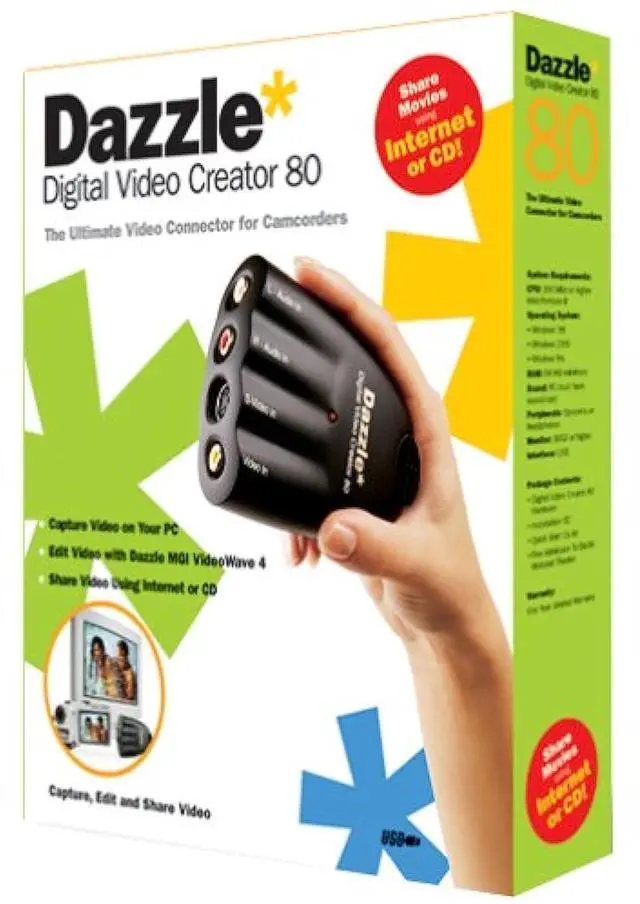
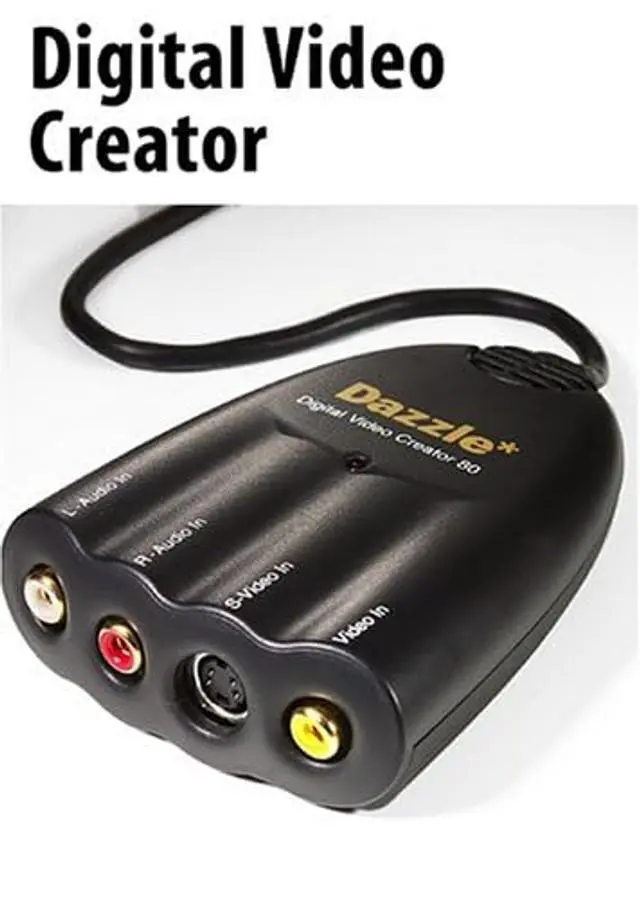


Dazzle Multimedia DM-5400 Digital Video Creator 80
- The ultimate USB video connector for camcorders featuring built-in audio/video ports and easy to use video editing software
- 4 audio/video ports - Left Audio In, Right Audio In, S-Video In and Video In
- With the Digital Video Creator 80, you can capture video from your Camcorder, VCR or TV; edit Video on PC; and send Video emails
- Includes free admission to Dazzle Webcast Theater
+
+
Overview
Specs
Reviews

Any questions? Our AI mode will help you find out quickly.
Try me now
From the ManufacturerDigital Video Creator 80 from Dazzle Multimedia is the ultimate video connector for camcorders, featuring built-in audio/video ports and easy-to-use video-editing software. Capture video from a camcorder, TV, or VCR. Dazzle MovieStar 5 lets you capture and edit your video, cut unwanted scenes, and add 3D transitions, titles, background audio, voice-over narration, and Hollywood-style special effects. MovieStar 5 also lets you share your video on video CD, S-VCD, DVD, video e-mail, or by Webcasting it across the Internet. Dazzle DVD Complete software allows you to take your edited videos and add interactive menus, burn directly to a DVD disc, and even design your own DVD disc labels and jewel case inserts.
Dazzle OnDVD gives users the ability to create a photo slideshows that can be burned to CD for playback on a DVD Player. DVC 80 hardware offers composite-video, S-video, and stereo analog (left/right) RCA inputs with a USB output for your PC. Connect your camcorder, VCR, or TV to the Dazzle Digital Video Creator 80 to capture video to your PC.
Digital Video Creator software suite: Dazzle
MovieStar 5: Easy but Powerful Video EditingDazzle MovieStar 5 makes capturing, editing, and sharing your video easy, but it doesn't leave out the powerful features you want. MovieStar 5's drag-and-drop interface lets you do almost any video editing task in three mouse clicks or less. With MovieStar 5 you can choose the straightforward Storyboard view to organize your project or you can use the precise Timeline view. Cut out unwanted parts of your video with a few mouse clicks. Add scrolling titles and credits into your video. Add 3D transitions to give your video Hollywood-style cuts between scenes. Choose from a wide range of special effects to spice up your video. MovieStar 5 supports Background Rendering, Fast Rendering and Smart Rendering to make processing your video fast. And with MovieStar 5's customized video codecs, you can be assured you will get the best video quality possible. MovieStar 5 has a built-in CD burning feature to allow you to record video CDs and S-video CDs of all your video footage. MovieStar 5 also allows you to make Real Media or Windows Media Internet-ready streaming videos. Then upload them for free to the Dazzle Webcasting site to share streaming video across the Internet.
Dazzle DVD Complete (Standard
Edition): Author your own DVDsWith DVD Complete it's easy to make DVDs which look like they were designed by a team of professionals in a Hollywood movie studio. DVD Complete takes the complexity out of technology without taking the features out of the technology. With DVD Complete's project wizard, you are guided through the five simple steps to go from camcorder to DVD disc. Capture video and have it automatically converted to crystal-clear, DVD-quality MPEG-2 video. Add interactive menus with multiple scenes, background audio, and scrolling credits. Choose one theme and have the backgrounds, selection buttons, jewel-case inserts, and labels for the DVD disc all automatically updated with the same graphical look and feel. Then just record to a DVD recorder. Don't have a DVD-recorder yet? With DVD Complete you can also record your movie to a CD using a CD-Recorder. Want to get your hands dirty and change any aspect of your creation? You can design things from scratch or make minor changes to what's there. With DVD Complete, you are the Hollywood director and DVD Complete is your team of videographers, graphic artists, and computer programmers.
All you need to know is what you like and DVD Complete will do the rest.
Dazzle OnDVD: Create Digital Photo Albums for Your DVD PlayerTake your digital pictures and turn them into photo albums that can be played on your home DVD player! Digital cameras allow you to take an unlimited number of photographs that quickly pile up on your computer and become difficult to manage. Where can you keep them all, and how do you keep from losing them? You can save the pla
Dazzle OnDVD gives users the ability to create a photo slideshows that can be burned to CD for playback on a DVD Player. DVC 80 hardware offers composite-video, S-video, and stereo analog (left/right) RCA inputs with a USB output for your PC. Connect your camcorder, VCR, or TV to the Dazzle Digital Video Creator 80 to capture video to your PC.
Digital Video Creator software suite: Dazzle
MovieStar 5: Easy but Powerful Video EditingDazzle MovieStar 5 makes capturing, editing, and sharing your video easy, but it doesn't leave out the powerful features you want. MovieStar 5's drag-and-drop interface lets you do almost any video editing task in three mouse clicks or less. With MovieStar 5 you can choose the straightforward Storyboard view to organize your project or you can use the precise Timeline view. Cut out unwanted parts of your video with a few mouse clicks. Add scrolling titles and credits into your video. Add 3D transitions to give your video Hollywood-style cuts between scenes. Choose from a wide range of special effects to spice up your video. MovieStar 5 supports Background Rendering, Fast Rendering and Smart Rendering to make processing your video fast. And with MovieStar 5's customized video codecs, you can be assured you will get the best video quality possible. MovieStar 5 has a built-in CD burning feature to allow you to record video CDs and S-video CDs of all your video footage. MovieStar 5 also allows you to make Real Media or Windows Media Internet-ready streaming videos. Then upload them for free to the Dazzle Webcasting site to share streaming video across the Internet.
Dazzle DVD Complete (Standard
Edition): Author your own DVDsWith DVD Complete it's easy to make DVDs which look like they were designed by a team of professionals in a Hollywood movie studio. DVD Complete takes the complexity out of technology without taking the features out of the technology. With DVD Complete's project wizard, you are guided through the five simple steps to go from camcorder to DVD disc. Capture video and have it automatically converted to crystal-clear, DVD-quality MPEG-2 video. Add interactive menus with multiple scenes, background audio, and scrolling credits. Choose one theme and have the backgrounds, selection buttons, jewel-case inserts, and labels for the DVD disc all automatically updated with the same graphical look and feel. Then just record to a DVD recorder. Don't have a DVD-recorder yet? With DVD Complete you can also record your movie to a CD using a CD-Recorder. Want to get your hands dirty and change any aspect of your creation? You can design things from scratch or make minor changes to what's there. With DVD Complete, you are the Hollywood director and DVD Complete is your team of videographers, graphic artists, and computer programmers.
All you need to know is what you like and DVD Complete will do the rest.
Dazzle OnDVD: Create Digital Photo Albums for Your DVD PlayerTake your digital pictures and turn them into photo albums that can be played on your home DVD player! Digital cameras allow you to take an unlimited number of photographs that quickly pile up on your computer and become difficult to manage. Where can you keep them all, and how do you keep from losing them? You can save the pla
Warranty & Returns
Warranty, Returns, And Additional Information
Warranty
- Please contact the Seller directly for warranty information. Warranty information may also be found on the Manufacturer's website.
- CONTACT
Return Policies
- Return for refund within: 30 days
- Return for replacement within: 30 days
- This item is covered by AetherWide Return Policy
Manufacturer Contact Info
- For a directory of all our manufacturers, please click below.
- Manufacturers Directory
LOADING...