Your Browsing History
Meet Your Seller
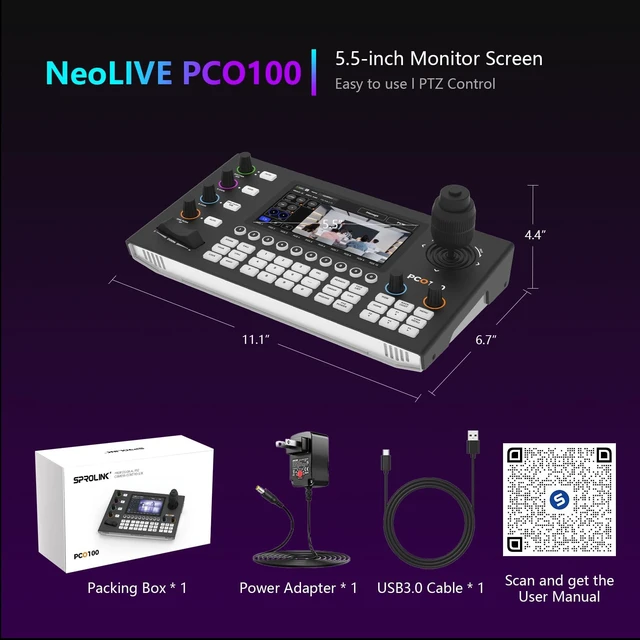
SPROLINK PCO100 PTZ Camera Controller with AI People Tracking, 5.5'' LCD Touchscreen, 4D Joystick, NDI Ready, PoE, Control 255 Cameras, VISCA/Onvif/Pelco for Church Live Streaming
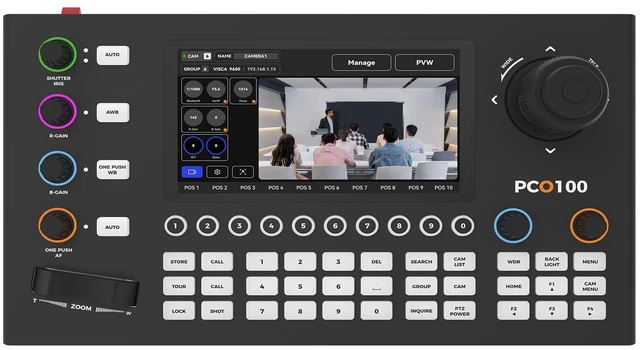
- SPROLINK AI PTZ Camera Controller SPROLINK PCO100 PTZ Camera Controller features a 7-inch LCD touchscreen for real-time preview and menu control, combined with a 4D Joystick for variable-speed PTZ adjustments. Industry-first built-in AI people tracking even with ordinary PTZ cameras, it automatically follows a persons movement (pan, tilt, zoom). Perfect for Church Worship, Live Events, and Lectures where instant visual feedback and auto-tracking are critical. You can easily pan, tilt, zoom, focus, iris, backlight, presets, PTZ speed, and quick PTZ camera select according to your needs.
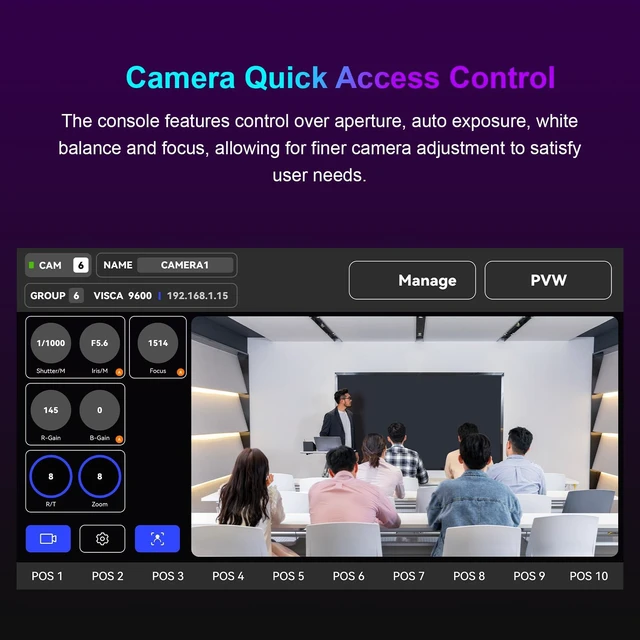
- Touchscreen Live Preview & 10 Direct Camera Keys Simultaneously view and manage PTZ camera feeds on the vivid 7-inch LCD touchscreen view live camera feed, adjust exposure, aperture, white balance, focus, and speed directly on screen. Use 10 one-touch shortcut keys for instant camera selection. Eliminate blind spots during live events with instant visual feedback while adjusting shots perfect for d
+
+
Overview
Specs
Reviews
Any questions? Ask CelesteSM will help you find out quickly.
Try me now
SPROLINK AI PTZ Camera Controller SPROLINK PCO100 PTZ Camera Controller features a 7-inch LCD touchscreen for real-time preview and menu control, combined with a 4D Joystick for variable-speed PTZ adjustments. Industry-first built-in AI people tracking even with ordinary PTZ cameras, it automatically follows a persons movement (pan, tilt, zoom). Perfect for Church Worship, Live Events, and Lectures where instant visual feedback and auto-tracking are critical. You can easily pan, tilt, zoom, focus, iris, backlight, presets, PTZ speed, and quick PTZ camera select according to your needs.
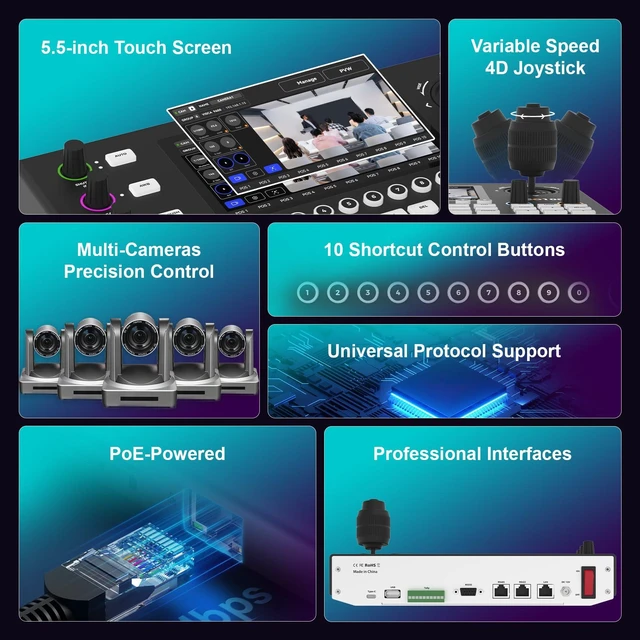
^^ Touchscreen Live Preview & 10 Direct Camera Keys Simultaneously view and manage PTZ camera feeds on the vivid 7-inch LCD touchscreen view live camera feed, adjust exposure, aperture, white balance, focus, and speed directly on screen. Use 10 one-touch shortcut keys for instant camera selection. Eliminate blind spots during live events with instant visual feedback while adjusting shots perfect for dynamic environments like worship services, sports broadcasts, or multi-camera productions where seamless switching is critical. ^^ Universal Protocol Support & 255-Camera Control The PTZ Controller supports network and analog two control modes.
With support for a wide array of protocols including VISCA, VISCA-Over-IP, SONY VISCA, ONVIF, Pelco-D/P, RS-232, RS-422, RS-485, and optional NDI, this joystick controller seamlessly integrates with a variety of cameras and equipment. Control up to 255 cameras on the same network (IP mode) or 7 via VISCA. Making it suitable for Large Conferences, Church Events, Live Streaming, OBS, vMix, Zoom, Teams, Facebook, YouTube and much more. ^^ Multiple Connections & PoE Support The SPROLINK PCO100 offers multiple connections, including RS422/RS485, RS232, and RJ45 (Ethernet).
And PoE supported, just one cable to connect to your LAN. The easy-to-use web interface makes setup a breeze, allowing you to quickly and easily configure your camera settings. Auto-search IP cameras, assign IDs, and manage devices effortlessly. This feature is especially useful for those who are new to live streaming or video production. ^^ Easy PTZ Control & AI Tracking SPROLINK PCO100 supports adding PTZ Cameras Parameters on Web Interface, and supports 10 cameras quick select (vs. 7 on competing models), controlling up to 255 PTZ cameras, easy and fast operation of the conference video camera, greatly improving the speed of multiple cameras to switch back and forth control.
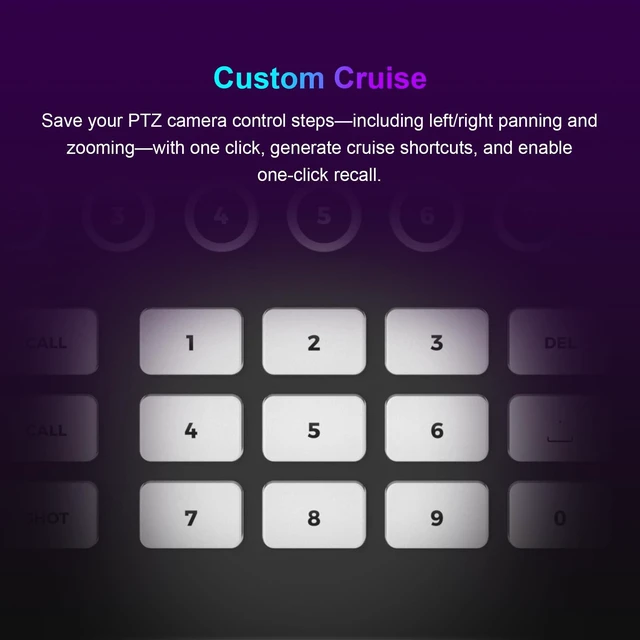
Built-in AI auto-tracking can be activated from the controller turning any PTZ camera into an auto-tracking camera. These features make it easy to achieve the exact shot you want, without any hassle. ^^ Custom Cruise Recording & Screenshot Album The PTZ Joystick Controller allows the operator to precisely record a complete camera movement sequence, including Pan, Tilt, Zoom positions, movement speed, and dwell time save and recall with one button. Plus, capture screenshots directly from the live preview and store them in the internal album for later review. Customizable boot interface and multi-color button indicators guide specific functions.
Delivering professional, stable automated shots and eliminating the need for repetitive manual control. ^^ IP Auto-Search & Dedicated Support Use the built-in IP auto-search function to automatically discover IPs, quickly configure static addresses, and jump directly to the web management interface with a single click, achieving professional, fast deployment. For any questions about setup or use, please contact us via Messages. We guarantee a response within 24 hours (faster than industry standard). Comes with 1-year warranty (extendable) and free lifetime technical support.
^^ Touchscreen Live Preview & 10 Direct Camera Keys Simultaneously view and manage PTZ camera feeds on the vivid 7-inch LCD touchscreen view live camera feed, adjust exposure, aperture, white balance, focus, and speed directly on screen. Use 10 one-touch shortcut keys for instant camera selection. Eliminate blind spots during live events with instant visual feedback while adjusting shots perfect for dynamic environments like worship services, sports broadcasts, or multi-camera productions where seamless switching is critical. ^^ Universal Protocol Support & 255-Camera Control The PTZ Controller supports network and analog two control modes.
With support for a wide array of protocols including VISCA, VISCA-Over-IP, SONY VISCA, ONVIF, Pelco-D/P, RS-232, RS-422, RS-485, and optional NDI, this joystick controller seamlessly integrates with a variety of cameras and equipment. Control up to 255 cameras on the same network (IP mode) or 7 via VISCA. Making it suitable for Large Conferences, Church Events, Live Streaming, OBS, vMix, Zoom, Teams, Facebook, YouTube and much more. ^^ Multiple Connections & PoE Support The SPROLINK PCO100 offers multiple connections, including RS422/RS485, RS232, and RJ45 (Ethernet).
And PoE supported, just one cable to connect to your LAN. The easy-to-use web interface makes setup a breeze, allowing you to quickly and easily configure your camera settings. Auto-search IP cameras, assign IDs, and manage devices effortlessly. This feature is especially useful for those who are new to live streaming or video production. ^^ Easy PTZ Control & AI Tracking SPROLINK PCO100 supports adding PTZ Cameras Parameters on Web Interface, and supports 10 cameras quick select (vs. 7 on competing models), controlling up to 255 PTZ cameras, easy and fast operation of the conference video camera, greatly improving the speed of multiple cameras to switch back and forth control.
Built-in AI auto-tracking can be activated from the controller turning any PTZ camera into an auto-tracking camera. These features make it easy to achieve the exact shot you want, without any hassle. ^^ Custom Cruise Recording & Screenshot Album The PTZ Joystick Controller allows the operator to precisely record a complete camera movement sequence, including Pan, Tilt, Zoom positions, movement speed, and dwell time save and recall with one button. Plus, capture screenshots directly from the live preview and store them in the internal album for later review. Customizable boot interface and multi-color button indicators guide specific functions.
Delivering professional, stable automated shots and eliminating the need for repetitive manual control. ^^ IP Auto-Search & Dedicated Support Use the built-in IP auto-search function to automatically discover IPs, quickly configure static addresses, and jump directly to the web management interface with a single click, achieving professional, fast deployment. For any questions about setup or use, please contact us via Messages. We guarantee a response within 24 hours (faster than industry standard). Comes with 1-year warranty (extendable) and free lifetime technical support.
Warranty & Returns
Warranty, Returns, And Additional Information
Warranty
- Please contact the Seller directly for warranty information. Warranty information may also be found on the Manufacturer's website.
- CONTACT
Return Policies
- Return for refund within: 30 days
- Return for replacement within: non-replaceable
- This item is covered by VersaCom Return Policy
Manufacturer Contact Info
- For a directory of all our manufacturers, please click below.
- Manufacturers Directory
LOADING...