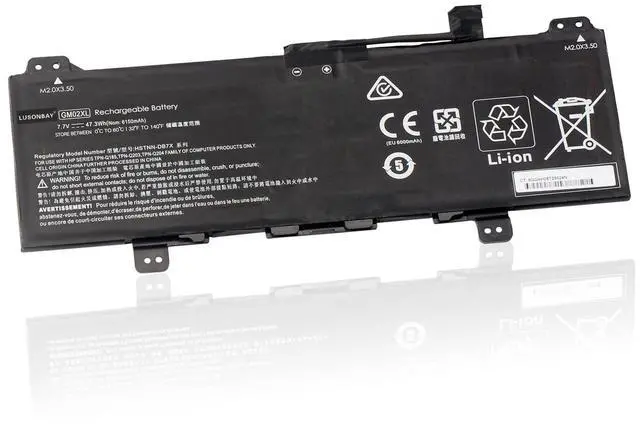
Greetings from the LUASONBAY Laptop Battery store. We are a professional manufacturer of power tool batteries, laptop batteries, and chargers. We have our factory, which provides high quality, competitive cost, and superior performance batteries and the best service to customers, it's our pleasure to service you.
Battery Specification:
Capacity: 47.3W h
Voltage: 7.7V
Battery Type: Li-ion
Condition: 100%
Brand New Cell: Grade "A++"
CellWarranty: 2 Years (24-Month Warranty)Battery Replace
Part Number: GM02XL, HSTNN-DB7X, HSTNN-UB7M, 917679-2C1, 917679-271, 917725-855, TPN-Q185Compatible With the
Laptop Model: For HP Chromebook 14 G5For HP Chromebook 14 G5 (3GJ73EA) For HP Chromebook 14 G5 (3GJ74EA) For HP Chromebook 14 G5 (3GJ76EA) For HP Chromebook 14 G5 (3VK05EA) For HP Chromebook X360 11 G1For HP Chromebook 11 G6 EEWhy Choose Us? Very easy to install. Offer stronger lasting time. Good performance A++ cells. Multiple protection prevents damage to the device. Professional technical team, quick response within 24 hrs. Replace a new replacement within 2 Years if quality problem. Professional tech teams production plants and different types of batteries are available. FAQ
Where can l find the laptop model? 1. Press Windows + R,
2. Type "msinfo32", then click OK,
3. Find "System Model" in the pop-up windowWhat should I do when using the battery for the first time? Please turn off the laptop and disconnect the power when you install the new battery and fully charge the battery before the first use. Then discharge the new battery use to 5%/7%(not to 0%) and then charge it to 95%, and cycle 3-4 times. Why my laptop can not recognize the battery? Dear customer, if it is not recognized when you turn on the computer, please try to update the BIOS settings or disconnect the old battery, hold down the power button for 20 seconds, and then connect the new battery, or please contact the service to ask for help.
Something needs to be attention: To extend the battery life, please charge and discharge the battery at least once a month. Do not expose the battery to hot, humid air. Please feel free to contact us if you have any confusion or search for another type of battery.