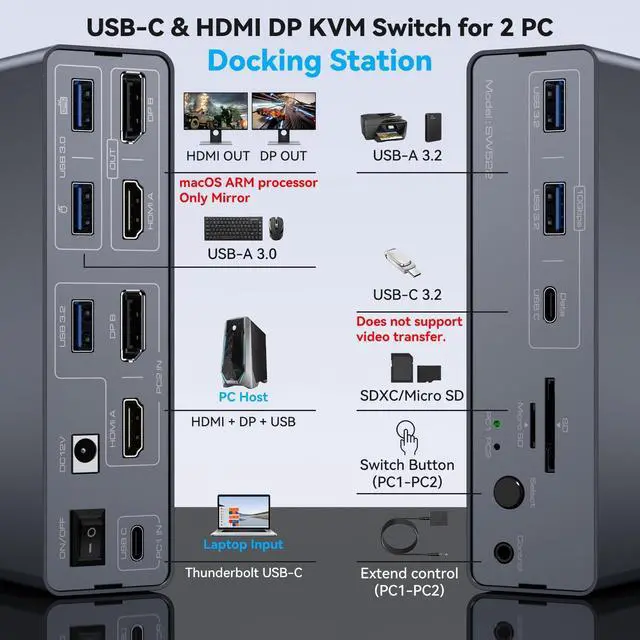
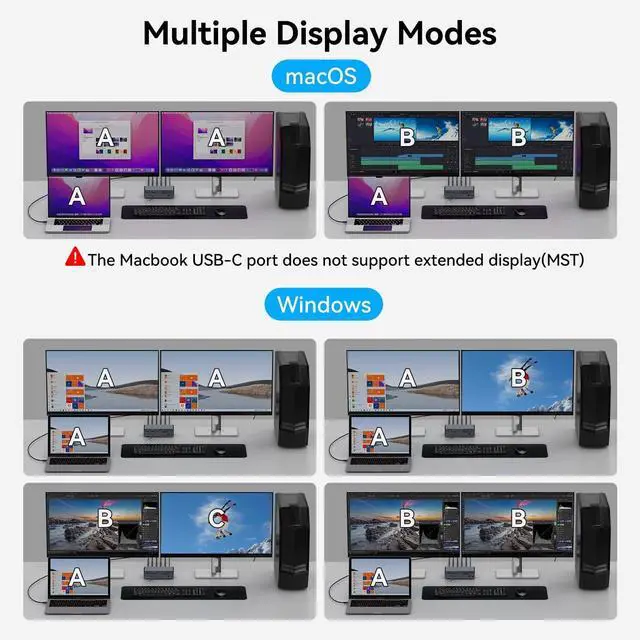
Pre-Purchase Information1. When Macbook or Mac OS devices are connected to 2 monitors through the switch, it is not possible to expand 2 different images, only copy mode is supported; this is due to the limitation of the Mac OS devices themselves.
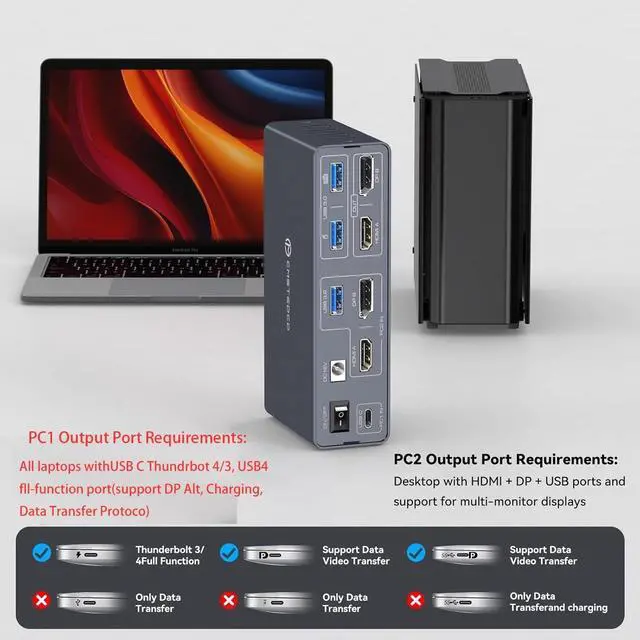
2. For better protection of the device's power supply, the USBC port connected to the computer on our switch is not equipped with the function of charging the computer (no PD function).
3. Please make sure the USB-C port of your laptop supports image output; the desktop needs to connect USB*1+HDMI*1+DP*1 to PC2 IN on the KVM ^^ Please Check CompatibilityThis Docking Station requires your laptop to have a Thunderbolt 3/4/5 port. For example, the
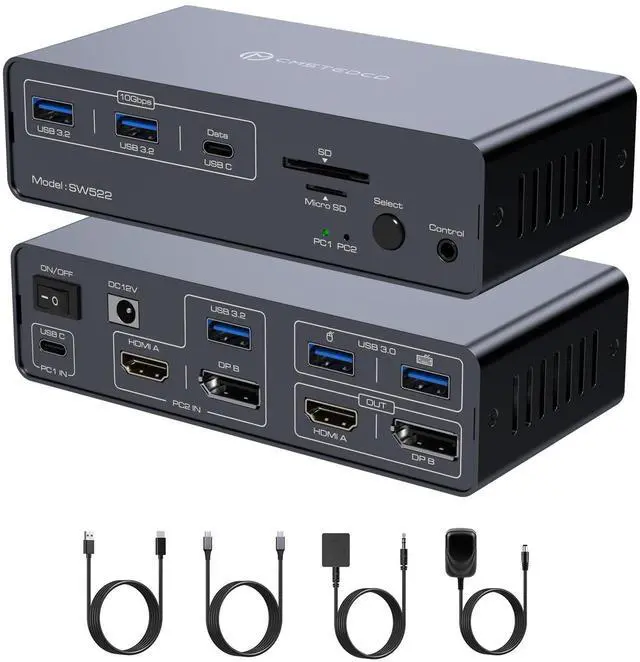
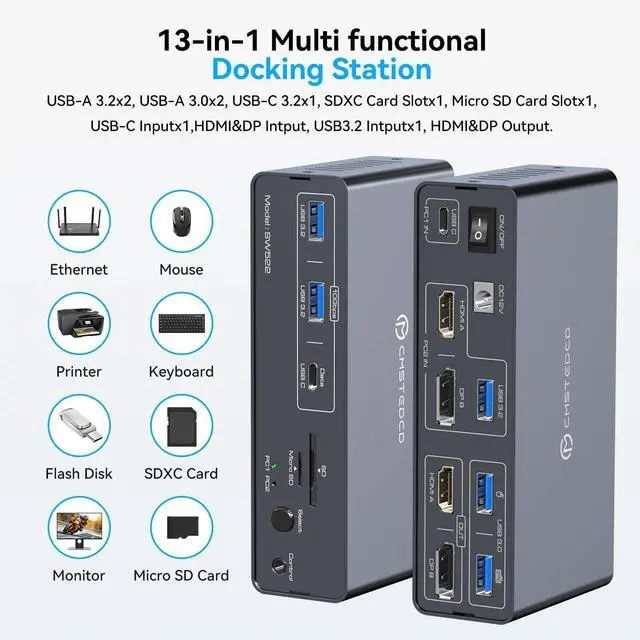
following laptop series: H-P laptops-EliteBook 700/800, Omen, Elite Dragonfly, Elitebook Ultra series; D-e-ll laptops-XPS, Latitude, Precision, Pro series; Len-o-vo laptops-ThinkPad, YOGA, ThinkBook, X1 series; A-c-er laptops-Swift, Concept D, Neo 2023+ series; A-su-s laptops-ROG, ProArt series. For specific models of laptops or compatible models of other brands, please check the second image of the product description for confirmation ^^ Multi-function 13-in-1 Docking StationThe Docking station dual monitor provides multiple shared peripheral ports: 2 USB 3.0 for connecting mouse and keyboard; 3 10Gbps USB 3.2 ports (2 USB-A+1 USB-C) for connecting printers, hard disks, USB flash drives, etc.; and 1 SD card slot + 1 Micro SD card slot provide you with a variety of data transfer methods to create a powerful home workstation.
Note: The 10Gbps USB-C port transfers data only and does not support PD charging or video transfer ^^ KVM Docking Station for Laptops & DesktopHDMI Displayport USB C KVM Docking Station Dual Monitor provides 1 USB-C (MST) input port for laptops, 1HDMI + 1DisplayPort + 1USB-A input port for desktops, outputs 1 HDMI monitor and 1 DP monitor, 2 Two computers share 2 monitors, seamless switching between work laptop and personal computers.
Note: USB C input without PD charging function, The computer's USB-C port needs to support Thunderbolt 3 or higher ^^ KVM Switch 2 Monitors 2 ComputersUSB KVM Switch Docking Station provides multiple shared peripheral ports: 2 USB 3.0 for connecting mouse and keyboard; 3 10Gbps USB 3.2 ports (2USB-A+1USB-C) for connecting printers, hard disks, USB flash drives, etc.; and 1 SD + 1 MicroSD card slot provides you with multiple data transfer methods.
Note: The 10Gbps USB-C port only transfers data and does not support PD charging or video transmission ^^ Dual Monitor KVM Switch Dock StationKVM Switch Dual Monitor are compatible with HDMI 2.0 and DP 1.4, DP port supports resolutions up to 4K120Hz and the HDMI port supports resolutions up to 4K60Hz and is backward compatible with other lower resolutions. For maximum resolution, make sure that all your devices and cables support the resolution and the total length of the input and output cables should not exceed 3 meters (10 feet) ^^ KVM Dock Support Two
Display ModesDuplicate Mode: 2 monitors display the same image, the computer and 2 monitors can display AAA or ABB mode.
Expand mode: 2 monitors display different images, the computer and 2 monitors can display ABC mode. Please make sure your laptop supports MST and SST to use both display modes properly. Due to system limitations, macOS does not support MST and cannot use the extended display ^^ Fast and Efficient SwitchingThe USB-C KVM Switch Docking Station can control the switching of 2 computers via the Select button on the control panel and an external cable controller (included), keeping your desk tidy, protecting your workspace and providing you with a comfortable working environment. LED indicator will show which source is working, avoiding the trouble of frequent wiring and improving efficiency.
NOTE: Keyboard shortcuts (hotkeys) toggles are not supported ^^ Packing List & Quality ServiceThe KVM must be used with power connected. The package includes 1 USB-A 3.0 cable, 1 USB-C to C cable, 1 ext