Your Browsing History
Meet Your Seller
AV Access 8K KVM Switch 3 Monitors 2 Computers, DP KVM Dock for Desktop PCs
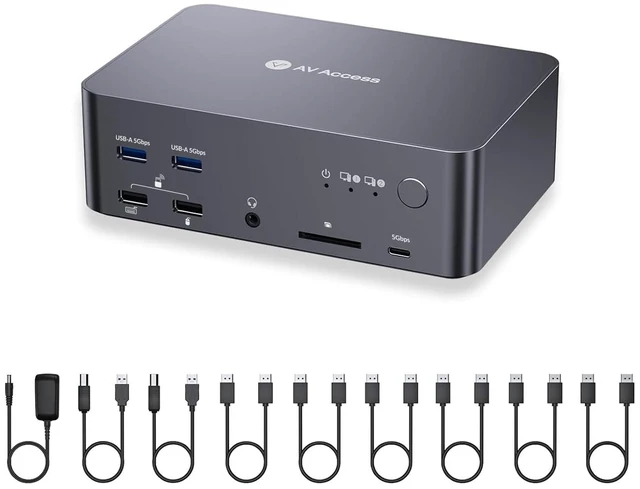
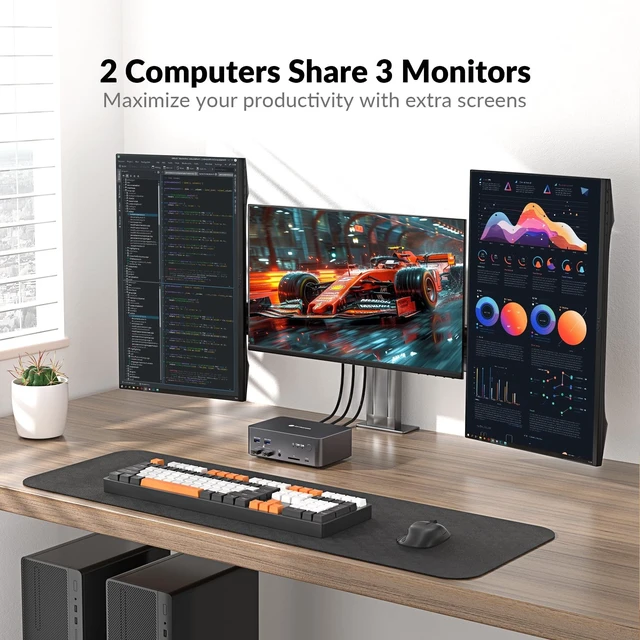
- True Triple Monitor KVM for 2 Desktop PCsControl 2 desktop computers with the same 3 monitors, keyboard, mouse, and USB peripheralsno repeated cable swapping. Each PC connects through 3 DisplayPort inputs, enabling a full extended desktop across three independent screens for trading, coding, content creation, engineering, gaming, and other multi-screen workflows.
- Triple Display Productivity with Independent OutputsRun three monitors simultaneously with independent display outputs, allowing different resolutions, layouts, and screen arrangements across your workspace. Ideal for users who need multiple applications, dashboards, timelines, or development windows visible at the same time.
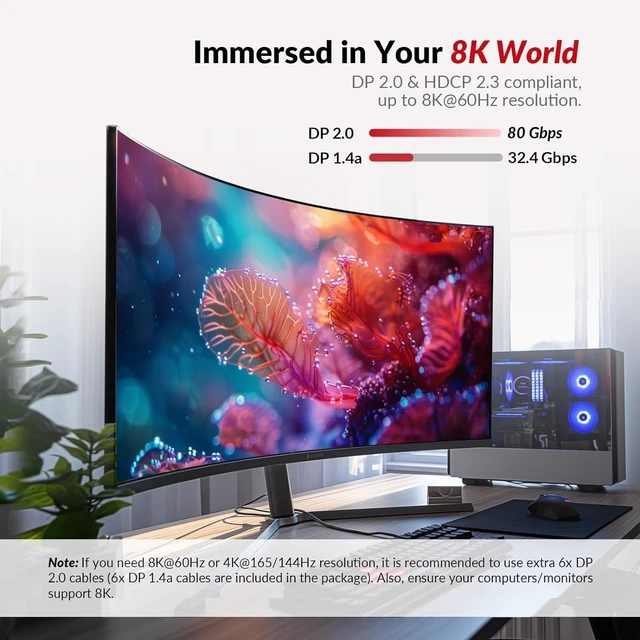
- 8K Resolution & Up to 480Hz High-Refresh GamingSupports DP 1.4a and DP 2.0 standards with up to 8K@60Hz, 4K@165Hz, 1440P@165Hz, 1080P@360Hz, and 1080P@480Hz. Enjoy sharp detail for professional work and ultra-smooth motion for competitive gaming, high-refresh monitors, and powerful desktop GPUs.
+
+
Overview
Specs
Reviews
Any questions? Our AI mode will help you find out quickly.
Try me now
True Triple Monitor KVM for 2 Desktop PCsControl 2 desktop computers with the same 3 monitors, keyboard, mouse, and USB peripheralsno repeated cable swapping. Each PC connects through 3 DisplayPort inputs, enabling a full extended desktop across three independent screens for trading, coding, content creation, engineering, gaming, and other multi-screen workflows. ^^ Triple Display Productivity with Independent OutputsRun three monitors simultaneously with independent display outputs, allowing different resolutions, layouts, and screen arrangements across your workspace. Ideal for users who need multiple applications, dashboards, timelines, or development windows visible at the same time.
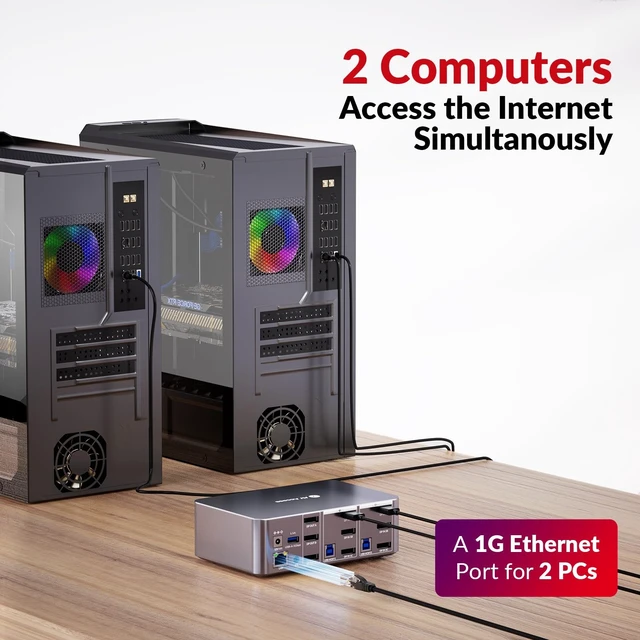
^^ 8K Resolution & Up to 480Hz High-Refresh GamingSupports DP 1.4 a and DP 2.0 standards with up to 8K@60Hz, 4K@165Hz, 1440P@165Hz, 1080P@360Hz, and 1080P@480Hz. Enjoy sharp detail for professional work and ultra-smooth motion for competitive gaming, high-refresh monitors, and powerful desktop GPUs. ^^ HDR & VRR for Smoother, More Immersive VisualsSupports HDR and VRR technologies to improve contrast, color depth, and motion smoothness while helping reduce screen tearing. A strong fit for creative professionals, gamers, and users working with high-performance displays. ^^ Always-On Gigabit Ethernet for Both PCsBoth connected computers can remain online through the shared 1 Gbps Ethernet connection at the same time.
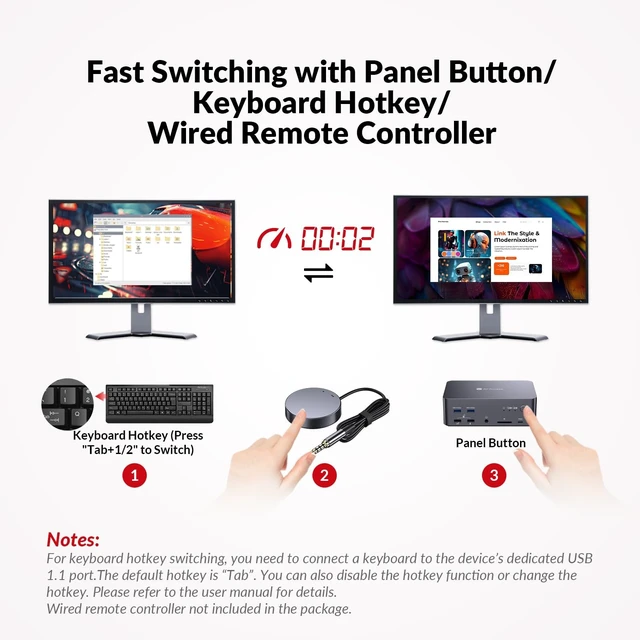
Even when one system is not actively selected, it can continue downloading files, syncing cloud data, or completing updates in the background without losing network access. ^^ Fast Switching with Auto Wake-UpSwitch control between two desktop PCs while keeping the same monitors and peripherals connected. Auto wake-up helps bring a sleeping computer back into use when selected, reducing extra steps and keeping dual-PC workflows moving smoothly. ^^ MST Support for Flexible Multi-Monitor SetupsSupports DisplayPort MST (Multi-Stream Transport) for advanced multi-display configurations. Independent display channels provide greater flexibility when arranging three screens for professional workstations, multi-window productivity, or complex desktop layouts.
^^ USB Hub for Keyboard, Mouse, Storage & MoreIntegrated USB 3.0 ports support data transfer speeds up to 5Gbps, with additional USB connections for keyboards, mice, storage devices, webcams, and other peripherals. A dedicated higher-power USB port helps support demanding devices such as external drives and cameras. ^^ Desktop Compatibility RequirementsPlease Check Before OrderingThis model is designed for desktop computers with 3 native DisplayPort outputs per PC and does not support laptops. For the most reliable display performance, use direct DisplayPort-to-DisplayPort connections. DisplayPort-to-HDMI, DisplayPort-to-USB-C, and other video conversion cables or adapters are not recommended, as they may affect display detection, resolution, refresh rate, or stability.

^^ 8K Resolution & Up to 480Hz High-Refresh GamingSupports DP 1.4 a and DP 2.0 standards with up to 8K@60Hz, 4K@165Hz, 1440P@165Hz, 1080P@360Hz, and 1080P@480Hz. Enjoy sharp detail for professional work and ultra-smooth motion for competitive gaming, high-refresh monitors, and powerful desktop GPUs. ^^ HDR & VRR for Smoother, More Immersive VisualsSupports HDR and VRR technologies to improve contrast, color depth, and motion smoothness while helping reduce screen tearing. A strong fit for creative professionals, gamers, and users working with high-performance displays. ^^ Always-On Gigabit Ethernet for Both PCsBoth connected computers can remain online through the shared 1 Gbps Ethernet connection at the same time.
Even when one system is not actively selected, it can continue downloading files, syncing cloud data, or completing updates in the background without losing network access. ^^ Fast Switching with Auto Wake-UpSwitch control between two desktop PCs while keeping the same monitors and peripherals connected. Auto wake-up helps bring a sleeping computer back into use when selected, reducing extra steps and keeping dual-PC workflows moving smoothly. ^^ MST Support for Flexible Multi-Monitor SetupsSupports DisplayPort MST (Multi-Stream Transport) for advanced multi-display configurations. Independent display channels provide greater flexibility when arranging three screens for professional workstations, multi-window productivity, or complex desktop layouts.
^^ USB Hub for Keyboard, Mouse, Storage & MoreIntegrated USB 3.0 ports support data transfer speeds up to 5Gbps, with additional USB connections for keyboards, mice, storage devices, webcams, and other peripherals. A dedicated higher-power USB port helps support demanding devices such as external drives and cameras. ^^ Desktop Compatibility RequirementsPlease Check Before OrderingThis model is designed for desktop computers with 3 native DisplayPort outputs per PC and does not support laptops. For the most reliable display performance, use direct DisplayPort-to-DisplayPort connections. DisplayPort-to-HDMI, DisplayPort-to-USB-C, and other video conversion cables or adapters are not recommended, as they may affect display detection, resolution, refresh rate, or stability.
Warranty & Returns
Warranty, Returns, And Additional Information
Warranty
- Please contact the Seller directly for warranty information. Warranty information may also be found on the Manufacturer's website.
- CONTACT
Return Policies
- Return for refund within: 30 days
- Return for replacement within: 30 days
- This item is covered by SmartJoy Shop Return Policy
Manufacturer Contact Info
- For a directory of all our manufacturers, please click below.
- Manufacturers Directory
LOADING...