




 here!
I’m your shopping assistant for PC builds, upgrades, and everything tech.
Got questions? Ask away!
Start a conversation
here!
I’m your shopping assistant for PC builds, upgrades, and everything tech.
Got questions? Ask away!
Start a conversation



Any questions? Ask CelesteSM will help you find out quickly.


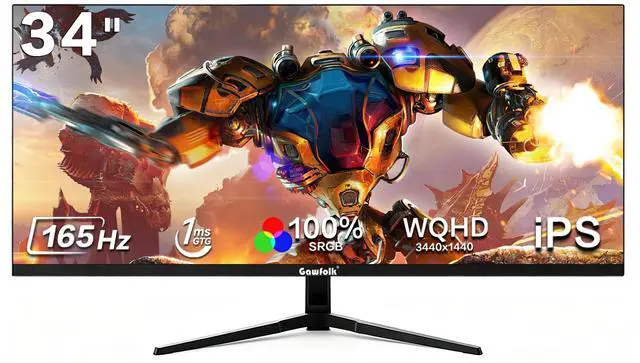
The Gawfolk 34-inch ultrawide gaming monitor is a 3440×1440 IPS display with a 165Hz refresh rate, Adaptive FreeSync, and a 21:9 aspect ratio, making it suitable for competitive PC gaming and immersive ultrawide play.
| Attribute | Value |
|---|---|
| Best For | Ultrawide gaming and split-screen productivity with a 34-inch IPS display, 3440 x 1440 resolution, 165Hz refresh rate and 21:9 aspect ratio |
| Panel And Resolution | 34-inch IPS panel with a 3440 x 1440 resolution and 21:9 ultrawide aspect ratio |
| Refresh Rate And Response | 165Hz refresh rate with a 0.01 ms response time for responsive gaming |
| Ports And Connectivity | HDMI connectivity, two DisplayPort connections and HDCP support |
| Included Items | Includes the monitor, stand, base, power adapter and DP cable |
| Model And Exterior | Gawfolk monitor with a black cabinet |
Q: Is the Gawfolk 34-inch 165Hz ultrawide better than the HP X34?
A: Choose the Gawfolk when you want a 34-inch 3440×1440 IPS display with 165Hz refresh, built-in speakers, PIP/PBP, dual HDMI 2.0 inputs, and a claimed 100% sRGB gamut. Choose the HP X34 when you prefer a documented flat IPS design from an established monitor brand and do not need the Gawfolk’s extra input and multitasking features. Both target the same core resolution and 165Hz ultrawide gaming class. ([support.hp.com](https://support.hp.com/us-en/product/product-specs/hp-x34-wqhd-gaming-monitor/2100695852?utm_source=openai))
Q: Should I buy the Gawfolk 34-inch 165Hz or a cheaper 34-inch 1080p ultrawide?
A: Choose the Gawfolk for sharper text, more usable workspace, and better image detail because its 3440×1440 resolution is substantially denser than 2560×1080 on a 34-inch panel. Choose a 2560×1080 ultrawide when your graphics hardware cannot comfortably drive 3440×1440 or when the lower-resolution display is the main budget priority. For office work, editing, and detailed games, the Gawfolk’s UWQHD resolution is the more meaningful upgrade than the refresh-rate difference alone. ([digitalcameraworld.com](https://www.digitalcameraworld.com/buying-guides/best-ultrawide-monitor-for-photo-editing?utm_source=openai))
Q: Gawfolk 34-inch 165Hz or KOORUI 34E6UC: which should I choose?
A: Choose the Gawfolk when IPS viewing characteristics, claimed 100% sRGB coverage, built-in speakers, PIP/PBP, and dual HDMI inputs are more important. Choose the KOORUI 34E6UC when you want a 1000R curved VA panel, HDR400 support, DCI-P3 coverage, and a height-adjustable stand. Their main gaming specifications are similar—34-inch 3440×1440 resolution and high refresh rates—so the decision depends more on panel behavior, curvature, ergonomics, and connectivity than on resolution. ([kooruigroup.com](https://kooruigroup.com/products/34e6uc-us-2?utm_source=openai))
Q: Is the Gawfolk 34-inch 165Hz a better choice than a 34-inch OLED ultrawide?
A: Choose the Gawfolk when you want an LCD monitor for mixed gaming and long-duration office use, especially if you prefer to avoid OLED burn-in management and static-content concerns. Choose a 34-inch OLED ultrawide when motion clarity, near-black performance, HDR contrast, and premium gaming image quality are higher priorities. OLED models can offer substantially faster pixel response and higher refresh rates, but they also require more attention to static interface elements and typically occupy a higher performance tier. ([rtings.com](https://www.rtings.com/monitor/reviews/asus/rog-swift-oled-pg34wcdn?utm_source=openai))
Q: Is the Gawfolk 34-inch ultrawide suitable for competitive gaming?
A: The Gawfolk is suitable for PC gaming when your system can sustain high frame rates at 3440×1440 and you value a wider field of view. Its 165Hz refresh rate and FreeSync support target smooth gameplay, while the 21:9 format is particularly useful for racing, simulation, and cinematic games. For highly competitive esports, a smaller 16:9 monitor with a still-higher refresh rate may be easier to drive and may better match game support and viewing preferences. Community reports also suggest checking the retailer’s return and warranty terms because individual panel or input issues can occur with budget-brand monitors. ([youtube.com](https://www.youtube.com/watch?v=EjPZpsq0LsQ&utm_source=openai))
Q: Can I use this monitor as a split-screen display for two computers or devices?
A: Yes. The monitor supports PIP/PBP mode and has two HDMI 2.0 inputs plus two DisplayPort 1.4 inputs, allowing content from multiple connected sources to be shown in separate areas. The available layout and resolution can depend on the connected devices and monitor settings.
Q: Is this monitor suitable for office work and replacing two standard monitors?
A: It is suitable for office multitasking, spreadsheets, document work, and side-by-side windows because its 21:9, 3440×1440 display provides substantially more horizontal workspace than a traditional 16:9 monitor. It can consolidate a dual-monitor setup for many users, but the usable workspace depends on the applications and computer performance.
Q: Can a computer run the full 3440×1440 resolution at 165Hz?
A: Yes, when the computer’s graphics hardware, output port, settings, and cable support the required bandwidth. DisplayPort 1.4 is the preferred connection for high-resolution, high-refresh PC gaming; the exact refresh rate available through HDMI depends on the source device and monitor configuration.
Q: Will this monitor work with a game console?
A: It can accept compatible console input through HDMI, but most consoles are designed for 16:9 output rather than 21:9 ultrawide output. As a result, console gameplay may appear with black bars on the sides or use a non-native resolution instead of filling the entire screen.
Q: Does it have built-in speakers and support wall mounting?
A: Yes. The monitor includes integrated stereo speakers for basic gaming, video, and meeting audio, and it supports 100×100mm VESA mounting. Separate speakers or headphones may still provide better sound quality for music, competitive gaming, or media production.
Q: Is the Gawfolk 34-inch ultrawide worth buying for the price?
A: It can be a reasonable budget purchase if the priority is getting 3440×1440 resolution, 165Hz refresh rate, FreeSync, and a 21:9 workspace at a lower price than established brands. The main trade-off is uncertainty around long-term reliability and customer support, with Reddit discussions reporting both satisfactory low-cost use and failures or support concerns. ([reddit.com](https://www.reddit.com/r/Monitors/comments/1nwgcy4/do_not_buy_the_gawfolk_monitor/?utm_source=openai))
Q: Is it suitable for both gaming and everyday work?
A: Yes, the listed specifications suit mixed use: 3440×1440 resolution provides horizontal workspace for split-screen tasks, while 165Hz and FreeSync are useful for PC gaming. It is best suited to users who want one large display for gaming, multitasking, streaming, and general desktop work rather than a monitor focused on professional color accuracy or business features such as USB-C docking. Reddit discussions also identify multitasking and work as common reasons to consider Gawfolk ultrawide models. ([reddit.com](https://www.reddit.com/r/ultrawidemasterrace/comments/1twp5ds/i_bought_a_gawfolk_45monitor_for_300_ama/?utm_source=openai))
Q: What are the main trade-offs compared with a better-known monitor brand?
A: The Gawfolk offers strong headline specifications for a budget monitor, including UWQHD resolution, 165Hz refresh rate, IPS panel, FreeSync, PIP/PBP, and VESA support. The trade-offs reported in community discussions include less confidence in build quality, the stand or power supply, dead-pixel risk, and warranty or support handling. Buyers should confirm the seller’s return and warranty terms before purchase. ([reddit.com](https://www.reddit.com/r/Monitors/comments/1rnnc7h/anyone_have_experience_with_gawfolk_monitors/?utm_source=openai))
Q: Who is this monitor best suited for?
A: It is best suited for budget-conscious PC gamers, streamers, and office users who want a single 34-inch 21:9 display for immersive gaming and side-by-side applications. It is less suitable for buyers who require proven long-term durability, premium ergonomics, integrated USB connectivity, or highly documented color performance. ([reddit.com](https://www.reddit.com/r/Monitors/comments/1ja9nkp/what_do_you_think_about_this_monitor_gawfolk/?utm_source=openai))


