




 here!
I’m your shopping assistant for PC builds, upgrades, and everything tech.
Got questions? Ask away!
Start a conversation
here!
I’m your shopping assistant for PC builds, upgrades, and everything tech.
Got questions? Ask away!
Start a conversation







Any questions? Ask CelesteSM will help you find out quickly.
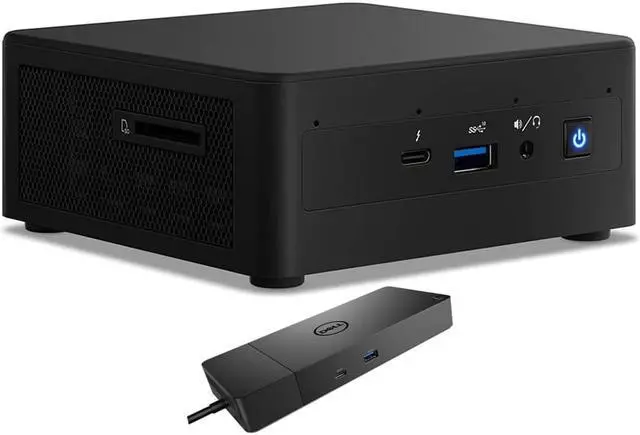
The Intel NUC11PAHi5 is a compact mini desktop with an 11th Gen Core i5-1135G7, 32GB RAM, a 2TB NVMe SSD, a 2TB HDD, and Windows 10 Pro, bundled with a Dell WD19S dock. It suits home and business users who want a small-footprint PC with ample memory, storage, and connectivity for everyday productivity.
| Attribute | Value |
|---|---|
| Best For | Business desktop use in a compact mini PC form, with Windows 10 Pro and integrated graphics |
| Processor And Cache | 11th Gen Intel Core i5 with four cores and 8MB L3 cache |
| Memory | 32GB DDR4 memory |
| Storage And Expansion | 2TB SSD plus 2TB HDD; no optical drive |
| Graphics | Integrated graphics with integrated video output |
| Networking And Connectivity | Wi-Fi 6 AX201, Bluetooth 4.2, and RJ45 Ethernet |
| Card Reader | Card reader included |
| Display And Peripherals | Monitor and keyboard not included; no built-in screen |
| Power And Appearance | 120W power supply; black |
| Model Identifiers | Intel NUC11PAHi5 |
Q: How does this NUC11PAHi5 compare with the NUC11PAHi3?
A: Choose the NUC11PAHi5 when you want the stronger processor configuration and this listing’s preinstalled 32GB of RAM and 4TB of combined SSD and HDD storage. The i5-1135G7 has 4 cores and 8 threads, compared with 2 cores and 4 threads in the i3-1115G4 used by the NUC11PAHi3.
Q: Should I choose this NUC11PAHi5 or the NUC11PAHi7?
A: Choose this NUC11PAHi5 configuration for everyday office and multitasking use with its included 32GB RAM, 4TB of storage, Windows 10 Pro, and WD19S dock. The NUC11PAHi7 is the higher CPU tier: its i7-1165G7 also has 4 cores and 8 threads, with a higher maximum turbo frequency of 4.7GHz versus 4.2GHz for the i5-1135G7.
Q: Is this NUC11PAHi5 bundle different from a barebones NUC11PAHi5 kit?
A: Yes. This listing is configured with 32GB RAM, a 2TB PCIe NVMe SSD, a 2TB HDD, Windows 10 Pro, and a Dell WD19S dock. A barebones NUC11PAHi5 kit is intended for buyers who want to select and install components such as memory and storage themselves; choose this bundle if you want those components and the dock included.
Q: Is this mini desktop suitable for office work and video meetings?
A: It is configured for everyday office work and multitasking, with an 11th Gen Core i5 processor, 32GB of RAM, a 2TB SSD, and Windows 10 Pro. It has no built-in webcam, so video meetings require an external webcam; a monitor is also needed.
Q: Does it come with a monitor or webcam?
A: No. The product data says no display and no webcam. You will need to provide a monitor and, for video calls, an external webcam. The listing does not specify whether a keyboard or mouse is included.
Q: Is it practical to use as a travel work computer?
A: It is compact enough to move between workspaces, but it is a desktop rather than a self-contained travel computer. It has no screen or webcam and needs a power source, monitor, and any peripherals you use, so it is most practical when those are available at your destination.
Q: Is it a good choice for gaming?
A: It uses integrated graphics and does not list a dedicated graphics card. It may suit less graphics-intensive games, but it is not the best fit if your priority is demanding games or high graphics settings.
Q: Is the NUC11PAHi5 suitable for everyday business work?
A: It appears suitable for general office work: the listing includes an 11th-gen Core i5, 32GB RAM, and an SSD, and Reddit users discussing an i5 NUC 11 describe it as a good fit for general business use. It has no built-in screen, so you’ll need a monitor and peripherals.
Q: Can this NUC handle Plex media-server use?
A: It can be a reasonable option for a small Plex server, especially for direct streaming or lighter workloads. Reddit users report successful 1080p streaming and multiple transcodes, but results depend on the media, software setup, and number of simultaneous streams; those reports aren’t a guarantee for every setup.
Q: Will the NUC11PAHi5 work with Linux?
A: Reddit users report running Ubuntu and Manjaro on the NUC11PAHi5, while another notes that a newer kernel or system updates may be needed for hardware such as its integrated graphics. If Linux is essential, check compatibility with your chosen distribution and kernel before relying on it.
Q: Is this NUC a good choice for gaming?
A: It is better suited to general computing and lighter uses than demanding gaming. The listing specifies integrated graphics, and Reddit discussion of an i5-1135G7 NUC describes it as a weaker gaming option than newer mini PCs with faster graphics. Choose a system with stronger graphics for modern or demanding games.


