• $1,289.00
  • Free 30-day Returns
  • Sold by Velztorm
    Hot Seller
    4.4 (2,201 seller ratings)

    Shipped by Velztorm

    Price alert
    Shop it at NeweggBusiness.

    Meet Your Seller

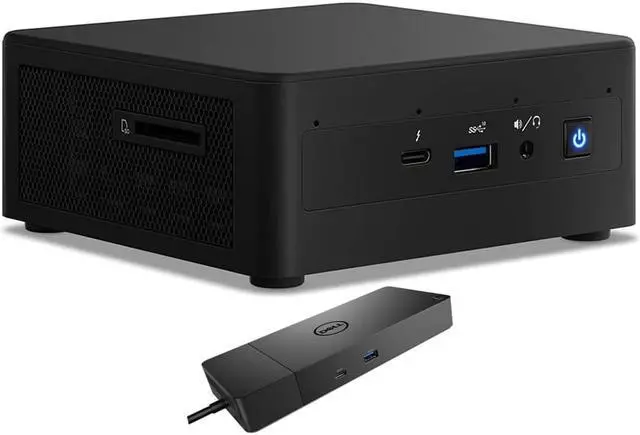
    Intel NUC11PAHi5 Home & Business Mini Desktop (Intel i5-1135G7 4-Core, Integrated Graphics, 16GB RAM, 256GB PCIe SSD, Wifi, USB 3.2, HDMI, Bluetooth, Win 10 Home) with WD19S 180W Dock

    • Windows 11 Pro
    • Windows 11 Home
    • Windows 10 Pro
    • Windows 10 Home
    • 64GB DDR4
    • 32GB DDR4
    • 16GB DDR4
    • 8GB DDR4
    • 4GB DDR4
    • 1TB
    • 1TB|1TB
    • 1TB|2TB
    • 1TB|None
    • 256GB|1TB
    • 256GB|2TB
    • 256GB|500GB
    • 256GB|None
    • 2TB
    • 2TB|1TB
    • 2TB|2TB
    • 2TB|None
    • 4TB|None
    • 500GB
    • 512GB|1TB
    • 512GB|2TB
    • 512GB|None
    • None
    • 11th Gen Intel Core i5-1135G7 2.40GHz Processor (upto 4.2 GHz, 8MB Cache, 4-Cores) ; Integrated Graphics Integrated Graphics, .
    • 16GB DDR4 SODIMM ; Wi-Fi 6 AX201 Wifi, Bluetooth 4.2, Ethernet LAN (RJ-45), No Webcam, .
    • No Display ; 120W Power Supply; Black Color, .
    • 256GB PCIe NVMe SSD; 1 HDMI, 1 mini Display Port, 2 Thunderbolt 3 (Type-C), SD Reader, No Optical Drive, Headphone/Microphone Combo Jack., Windows 10 Home., 1 Year Manufacturer warranty from Velztorm (Professionally upgraded by Velztorm)
    • Includes Dell WD19S 180W Docking Station(90W power delivery to any System (130W to Dell);USB-C Input. 180W Power adapter;USB-C 3.1 Gen 2, PowerShare, DisplayPort 1.4, HDMI 2.0b, Dual USB-A 3.1, GE RJ45;Windows, RedHat, Ubuntu Compatible)
    +
    +
    Overview
    Specs
    Reviews
    See all Q & A

    Any questions? Ask CelesteSM will help you find out quickly.

    We sell computers with custom/upgraded configurations to enhance system performance. If the computer has modifications as listed above, the manufacturers box was opened by our highly skilled technicians for testing, inspection, and installation of the upgrades according to the specifications advertised. All computers and components are brand new.

  • Model: Intel NUC 11 Performance kit NUC11PAHi5
  • Form/Style: Mini PC
  • Model No: NUC11PAHi5
  • Processor: 11th Gen Intel Core i5-1135G7 2.40GHz Processor (upto 4.2 GHz, 8MB Cache, 4-Cores)
  • Memory: 16GB DDR4 SO-DIMM
  • Graphics: Integrated Graphics Integrated Graphics,
  • Storage: 256GB PCIe SSD (Solid State Drive)
  • Operating System: Windows 10 Home
  • Display: No Display
  • Connectivity: Wi-Fi 6 AX201 Wifi, Bluetooth 4.2, Ethernet LAN (RJ-45)
  • Ports/Slots:, 1 HDMI, 1 mini Display Port, 2 Thunderbolt 3 (Type-C), SD Card Reader, No Optical Drive, Headphone/Microphone Combo Jack
  • Input/Output: No Webcam,
  • Battery: 120W Power Supply,
  • Other Features,
  • Color: Black
  • Weight: 1.32lb
  • Product Dimensions (WxLxH): 4.41 IN x 4.6 IN x 2.01 IN
  • 1 Year Manufacturer warranty from Velztorm (Professionally upgraded by Velztorm)


  • Dell WD19S 180W Docking Station
  • Model: WD19S
  • Model Number: WD19S-180W
  • 90W Output | 180W Adapter
  • USB-C | DisplayPort | HDMI | RJ45
  • 8.1x3.5x1.1 in | Black
  • Warranty & Returns

    Warranty, Returns, And Additional Information

    Warranty

    • Please contact the Seller directly for warranty information. Warranty information may also be found on the Manufacturer's website.
    • Read full details
    • CONTACT

    Return Policies

    • Return for refund within: 30 days
    • Return for replacement within: 30 days
    • This item is covered by Velztorm Return Policy

    Manufacturer Contact Info

    LOADING...

    The Intel NUC11PAHi5 is a compact mini desktop with an 11th Gen Core i5 processor, 16GB RAM, a 256GB SSD, and a Dell WD19S dock, suited to home and office users who want a small PC with a broad selection of connections for everyday productivity.

    Recommended For

    • Home-office and small-office users who mainly handle documents, web browsing, email, and routine multitasking, and want a compact desktop instead of a full-size tower.
    • Desk-based workers who want to connect multiple displays and peripherals through a small PC, with Thunderbolt 3 and the included WD19S dock supporting a more consolidated desk setup.
    • Users building a compact fixed workstation for everyday tasks who value a small footprint, wired networking, and the option to attach storage or other Thunderbolt peripherals.
    • Home users who want a compact PC for web browsing, streaming, and light everyday computing, and already have a monitor, keyboard, and mouse.

    Real-World Use Scenarios

    • For everyday home-office or small-business work—email, browser-based tools, documents, and several apps open—the NUC 11 should feel responsive for routine tasks. Connect an external monitor, keyboard, and mouse; a webcam is not included.
    • For a multi-screen desk setup, connect monitors for work such as keeping documents, spreadsheets, and browser windows visible at once. Intel lists quad-display and 4K support for this NUC model; the exact setup depends on the displays and connections used.
    • As a compact living-room PC, it can handle web browsing and video streaming, including smooth 4K playback reported in a review of a closely related NUC 11 Panther Canyon model. Allow room for ventilation and connect it to a TV or monitor.
    • For a personal Plex or home-lab setup, owners use the NUC11PAHi5 to run a media server and related services. Treat it as a compact, modest server rather than assuming a particular number of simultaneous streams; this configuration has 256GB of internal storage, so larger libraries may need external or network storage.

    Spec Summary

    AttributeValue
    Best ForCompact home or business desktop use, with a quad-core Core i5, 16GB memory, and 256GB SSD
    Processor And Cache11th Gen Intel Core i5 with a quad-core processor and 8MB L3 cache
    GraphicsIntegrated graphics with integrated video
    Memory And Storage16GB DDR4 memory and a 256GB SSD; no HDD
    Networking And Card ReaderWi-Fi 6 AX201, Bluetooth 4.2, RJ45 Ethernet, and a card reader
    System And Included EquipmentWindows 10 Home; monitor and keyboard not included, with no optical drive
    Power And Appearance120W power supply in a black mini PC form factor
    Model IdentifiersIntel NUC11PAHi5

    Reference Q&A

    Q: Should I choose the NUC11PAHi5 or the NUC11PAHi7?

    A: Choose the NUC11PAHi5 for its four-core Core i5 processor and the 16GB RAM and 256GB SSD in this configuration. Choose the NUC11PAHi7 if you want the higher-tier Core i7 processor and its Iris Xe graphics configuration, which has more execution units for graphics-focused tasks.

    Q: Is the NUC11PAHi5 or the NUC 12 Pro i5 a better choice for CPU-heavy work?

    A: Choose this NUC11PAHi5 configuration for a four-core, 11th-generation system with 16GB RAM and a 256GB SSD. Choose a NUC 12 Pro i5 configuration when newer-generation CPU capacity is the priority: its Core i5-1240P has 12 cores—four performance cores and eight efficient cores—and 16 threads, compared with the NUC11PAHi5 processor’s four cores and eight threads.

    Q: For multitasking, should I get the NUC11PAHi5 or the NUC11PAHi3?

    A: Choose the NUC11PAHi5 for multitasking: its Core i5-1135G7 has four cores and eight threads, and this configuration includes 16GB RAM. The NUC11PAHi3 is the lower-tier option in the same NUC 11 Performance family, with a dual-core Core i3-1115G4.

    Q: Is this mini PC suitable for everyday office work and online meetings?

    A: It should suit everyday office tasks such as browsing, email, documents, and spreadsheets, based on its quad-core Core i5 processor, 16GB RAM, and NVMe SSD. It has no built-in webcam or display, so you’ll need to provide a monitor and a webcam for video meetings.

    Q: Does it come with a monitor, keyboard, or mouse?

    A: No. The listing specifies no display and no keyboard; it does not list a mouse as included. You’ll need to provide a monitor, keyboard, and mouse separately.

    Q: Can it connect to two monitors?

    A: It has HDMI, mini DisplayPort, and two Thunderbolt 3 ports, plus a dock with HDMI and DisplayPort. These provide display-connection options, but the supplied product information does not confirm the maximum number of simultaneous displays or supported resolutions; check compatibility with your monitors and cables before buying.

    Q: Is it a good choice for gaming or demanding creative work?

    A: It is better suited to everyday computing than demanding gaming or graphics-heavy creative work. It uses integrated graphics and has no dedicated graphics card, so performance in those workloads may be limited.

    Q: Does the NUC11PAHi5 work well with Linux?

    A: Linux can work, but community reports describe mixed results: some users report successful Ubuntu or Manjaro use, while others report audio or 4K-display issues on older Ubuntu setups. The listed configuration comes with Windows 10 Home, so buyers planning to install Linux should check compatibility with their intended distribution and hardware before relying on it.

    Q: Can it play 4K video at 60 fps?

    A: For non-HDR 4K60 playback, owners in a comparison discussion reported that lower-powered NUCs handled YouTube playback and that the PAHi5 should be suitable. One commenter cautioned that 4K60 HDR could skip frames in some setups, so treat HDR performance as less certain.

    Q: Is it suitable for gaming?

    A: It may suit retro or less demanding games, but it is not a gaming-focused PC: the listing specifies integrated graphics, and an owner discussion notes that the small chassis can limit sustained performance through heat. Do not choose it expecting strong performance in demanding modern games.