




 here!
I’m your shopping assistant for PC builds, upgrades, and everything tech.
Got questions? Ask away!
Start a conversation
here!
I’m your shopping assistant for PC builds, upgrades, and everything tech.
Got questions? Ask away!
Start a conversation







Any questions? Ask CelesteSM will help you find out quickly.
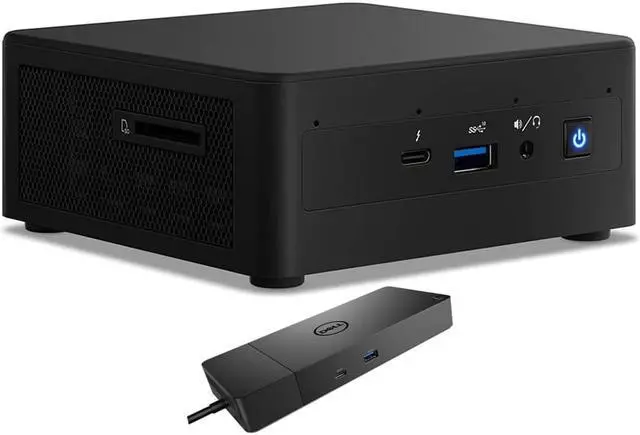
The Intel NUC11PAHi5 is a compact Windows 11 Home mini desktop with an 11th Gen Core i5, 16GB RAM, 512GB SSD, and Dell WD19S dock, suited to home-office and business users who want a small PC for everyday productivity and flexible desk connectivity.
| Attribute | Value |
|---|---|
| Best For | Home and business desktop use where a compact mini PC with Core i5 processing, 16GB memory, and SSD storage fits the setup |
| Processor And Core Count | 11th-generation Intel Core i5 with four cores and 8MB L3 cache |
| Graphics | Integrated graphics with integrated video output |
| Memory And Storage | 16GB DDR4 memory and 512GB SSD storage; no HDD or optical drive |
| Connectivity And Card Reading | Wi-Fi 6 AX201, Bluetooth 4.2, RJ45 Ethernet, and a card reader |
| Power And Form Factor | Mini PC form factor in black with a 120W power supply |
| Operating System | Windows 11 Home |
| Display And Peripherals | No screen or monitor included; no keyboard |
| Model Identifiers | Intel NUC11PAHi5 |
Q: Intel NUC11PAHi5 or NUC11PAHi3 for a mini desktop?
A: Choose the NUC11PAHi5 when you want the stronger processor and graphics configuration: its Core i5-1135G7 has 4 cores and Intel Iris Xe graphics, while the NUC11PAHi3 uses a 2-core Core i3-1115G4 with Intel UHD graphics. The listed NUC11PAHi5 configuration also includes 16GB RAM and a 512GB SSD.
Q: Is the NUC11PAHi5 or NUC11PAHi7 a better fit for everyday desktop use?
A: The NUC11PAHi5 is a practical fit when a 4-core processor, integrated Iris Xe graphics, and this listing’s 16GB RAM and 512GB SSD meet your needs. The NUC11PAHi7 has a higher maximum turbo frequency—up to 4.7GHz versus 4.2GHz for the i5—so it is the alternative to consider when you prioritize the higher-clocked processor.
Q: How does the NUC11PAHi5 compare with the older Intel NUC10i5FNK?
A: The NUC11PAHi5 is the newer-generation option, with an 11th Gen Core i5-1135G7 and Iris Xe graphics; the NUC10i5FNK uses a 10th Gen Core i5-10210U and Intel UHD graphics. Choose the NUC11PAHi5 when you want the newer processor generation and Iris Xe integrated graphics in a compact desktop.
Q: Is this mini PC suitable for home-office work and video meetings?
A: Yes. Its 11th Gen Core i5 processor, 16GB RAM, 512GB SSD, Wi-Fi 6, and Ethernet suit typical office tasks such as email, documents, browsing, and video meetings. It has no built-in webcam, so you’ll need an external webcam for video calls.
Q: Can it connect to two monitors?
A: It has HDMI, mini DisplayPort, and two Thunderbolt 3 ports, giving you several display-connection options. The listing does not specify the maximum number of simultaneous displays or supported resolutions, so check those details against your monitors and setup before buying.
Q: Does it come with a monitor, keyboard, or webcam?
A: No monitor or webcam is included, and the product details list no keyboard. Plan to supply a monitor, keyboard, mouse, and webcam as needed; the included WD19S dock is a docking station, not a display or camera.
Q: Is this a good computer to take while traveling for work?
A: It is compact enough to move between locations, but it is a desktop rather than a laptop: it has no built-in screen, keyboard, webcam, or battery. It is most practical for travel between workspaces where you can use a monitor, peripherals, and a power outlet.
Q: Is the NUC11PAHi5 a good choice for a 24/7 home server?
A: It may suit a small server that benefits from a quad-core processor, but a Reddit discussion describes the NUC11PAHi5 as a performance model not rated for 24/7 use. Treat it as a trade-off rather than a server-duty guarantee, especially if continuous operation is essential.
Q: Does Ubuntu work on the NUC11PAHi5?
A: Reddit users report running Ubuntu on this model, but experiences vary. One Ubuntu 20.04 user reported problems with 3.5 mm and HDMI audio, while other commenters reported successful Linux use. If reliable audio or a trouble-free setup is important, check compatibility with your intended Linux version before buying.
Q: Does the NUC11PAHi5 get hot or loud under load?
A: In one Reddit discussion, an owner said a short full-load test had manageable heat and noise, and suggested lowering the processor’s power limit to reduce them further. That is an individual report, not a guarantee for every workload or setup.


