




 here!
I’m your shopping assistant for PC builds, upgrades, and everything tech.
Got questions? Ask away!
Start a conversation
here!
I’m your shopping assistant for PC builds, upgrades, and everything tech.
Got questions? Ask away!
Start a conversation




Any questions? Ask CelesteSM will help you find out quickly.
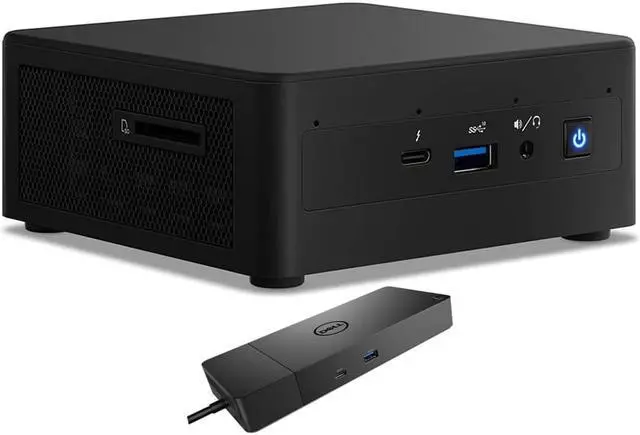
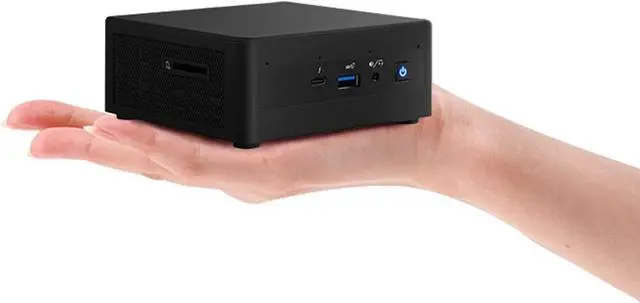
The Intel NUC11PAHi5 is a compact Windows 11 Pro mini desktop with an 11th Gen Core i5 processor, 16GB RAM, 2TB SSD, 1TB HDD, and a Dell WD19S dock, suited to office and home productivity setups that need substantial local storage and desk connectivity.
| Attribute | Value |
|---|---|
| Best For | A compact business desktop setup for users who need a quad-core Intel Core i5 system with 16GB of memory |
| Processor And Cache | 11th Gen Intel Core i5 with four cores and 8MB L3 cache |
| Graphics | Integrated graphics |
| Memory | 16GB DDR4 |
| Storage | 2TB SSD and 1TB HDD |
| Display And Optical Drive | No screen or monitor included; no optical drive |
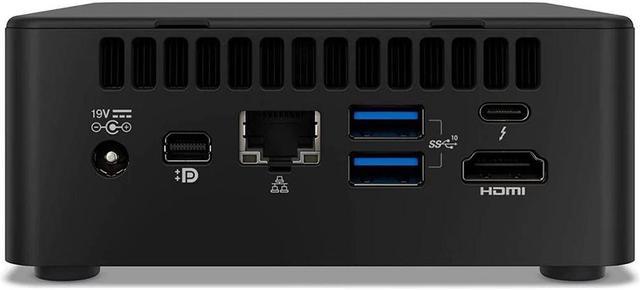
| Networking And Card Reader | Wi-Fi 6 AX201, Bluetooth 4.2, RJ45, and a card reader |
| Operating System | Windows 11 Pro |
| Form Factor And Power | Mini PC form factor with a 120W power supply; black |
| Model Identifiers | Intel NUC11PAHi5 |
Q: Should I choose the Intel NUC11PAHi5 or the NUC11PAHi3?
A: Choose the NUC11PAHi5 for more CPU and integrated-graphics capability: its Core i5-1135G7 has 4 cores and 8 threads with Iris Xe graphics, while the NUC11PAHi3’s Core i3-1115G4 has 2 cores and 4 threads. This listing also includes 16GB RAM and 3TB total storage across its SSD and HDD.
Q: How does the NUC11PAHi5 compare with the NUC11PAHi7?
A: Choose this NUC11PAHi5 listing when its 16GB RAM, 2TB SSD, 1TB HDD, and included Dell WD19S dock fit your setup. The NUC11PAHi7 is the higher-processor-tier option, with a Core i7-1165G7; both models use four-core, eight-thread processors.
Q: Is the NUC11PAHi5 a meaningful upgrade from the Intel NUC 10 i5?
A: Choose the NUC11PAHi5 for the newer 11th-generation Core i5-1135G7 platform and Intel Iris Xe graphics. The NUC 10 Performance i5 uses a 10th-generation Core i5-10210U with Intel UHD Graphics, making the NUC11PAHi5 the generation step-up for buyers prioritizing integrated graphics.
Q: Is this mini desktop suitable for office work and video meetings?
A: It is suited to typical office work such as email, web browsing, documents, and spreadsheets, with 16GB of RAM and an 11th Gen Intel Core i5 processor. It can connect to a webcam and headset, but no webcam is included. Performance in meetings depends on the conferencing app and connected equipment.
Q: Can it connect to more than one monitor?
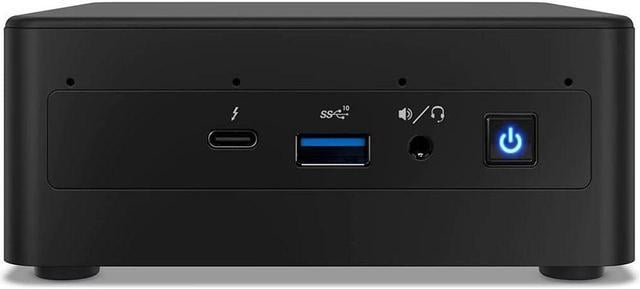
A: The listed computer has HDMI, mini DisplayPort, and two Thunderbolt 3 ports, and the included dock adds DisplayPort and HDMI outputs. The listing does not specify how many displays can run at once or their supported resolutions, so confirm the intended monitor setup and connection method before buying.
Q: Does it include a monitor, keyboard, or mouse?
A: No. The listing says no monitor, keyboard, or mouse is included. You will need a display and input devices to use it; the computer provides Wi-Fi, Bluetooth, USB, and Ethernet connections for compatible accessories.
Q: Is it a good choice for gaming or demanding graphics work?
A: It has integrated graphics rather than a dedicated graphics card, so it is better suited to everyday productivity and basic visual tasks than graphics-intensive gaming or demanding creative workloads. The listing does not specify performance for particular games or applications.
Q: Is this NUC suitable for software development and running several virtual machines?
A: It may suit lighter development work, but the listed configuration has a 4-core processor and 16GB of RAM. A Reddit user running 5–7 small virtual machines described using a 64GB version, so this 16GB configuration may be limiting for that workload. One user also reported persistent fan humming during development use.
Q: Is the NUC11PAHi5 quiet enough to keep on a desk?
A: Noise may be a trade-off. Reddit users have reported fan noise, including one development user who found the fan’s constant hum bothersome. Those are individual reports, so they do not establish how loud every unit will be.
Q: Does the NUC11PAHi5 work with Ubuntu or other Linux distributions?
A: Linux use has been reported, but the Reddit discussion found audio problems on Ubuntu 20.04: the 3.5 mm jack did not work for that user, and HDMI audio was unreliable. If Linux audio is important, treat compatibility as something to verify for your distribution and setup before buying.


