




 here!
I’m your shopping assistant for PC builds, upgrades, and everything tech.
Got questions? Ask away!
Start a conversation
here!
I’m your shopping assistant for PC builds, upgrades, and everything tech.
Got questions? Ask away!
Start a conversation







Any questions? Ask CelesteSM will help you find out quickly.
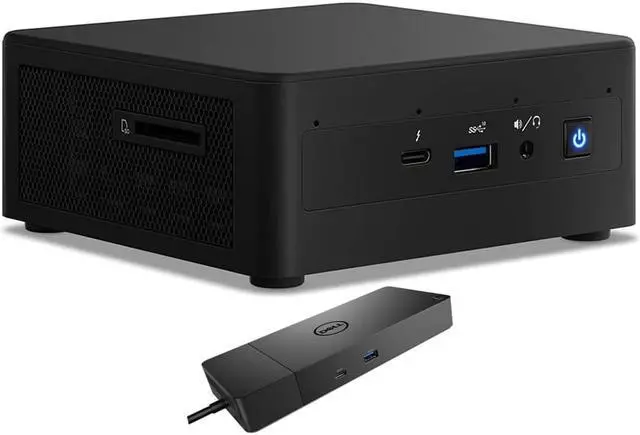
The Intel NUC11PAHi5 is a compact Windows 11 Pro mini desktop with an 11th Gen Core i5-1135G7, 16GB RAM, 256GB NVMe SSD, and included Dell WD19S dock, suited to home offices and business users who want a small PC with flexible wired and wireless connectivity.
| Attribute | Value |
|---|---|
| Best For | Home or business desktop use in a compact setup; plan to use a separate monitor and keyboard |
| Processor And Core Count | 11th Gen Intel Core i5 with four cores and 8MB L3 cache |
| Graphics | Integrated graphics |
| Memory And Storage | 16GB DDR4 memory and 256GB SSD; no HDD or optical drive |
| Networking And Expansion | Wi-Fi 6 AX201, Bluetooth 4.2, RJ-45 Ethernet, and a card reader |
| System And Power | Windows 11 Pro operating system with a 120W power supply |
| Design And Included Peripherals | Black mini PC; no built-in screen or included monitor or keyboard |
| Model Identifiers | Intel NUC11PAHi5 |
Q: Intel NUC 11 i5 vs i3: which configuration should I choose?
A: Choose this NUC 11 i5 when you want more CPU and integrated-graphics capability for everyday multitasking. Its Core i5-1135G7 has 4 cores and 8 threads with Iris Xe graphics; the NUC 11 i3-1115G4 has 2 cores and 4 threads with UHD graphics.
Q: Intel NUC 11 i5 vs i7: is the i7 worth choosing?
A: Choose the NUC 11 i7 when you want the series’ higher stated processor turbo frequency and cache: the i7-1165G7 is rated up to 4.7 GHz with 12 MB cache, compared with the i5-1135G7’s up to 4.2 GHz and 8 MB. This i5 listing pairs its 4-core, 8-thread processor with 16 GB RAM, a 256 GB SSD, and a WD19S dock.
Q: Intel NUC 11 i5 vs NUC 12 Pro i5: which is better for CPU-heavy work?
A: The NUC 12 Pro i5 is the stronger fit for workloads that can use more CPU threads: its Core i5-1240P has 12 cores and supports up to 16 threads, while this NUC 11’s Core i5-1135G7 has 4 cores and 8 threads. Choose this NUC 11 listing when its included 16 GB RAM, 256 GB SSD, Windows 11 Pro, and WD19S dock match your setup needs.
Q: Is this mini PC suitable for everyday office work and video meetings?
A: Yes. Its Core i5 processor, 16GB RAM, SSD, and Windows 11 Pro are suited to common office tasks such as documents, browsing, email, and video meetings. It has no built-in webcam, so you will need an external one for video calls.
Q: Can I use it with two monitors?
A: The NUC has HDMI, mini DisplayPort, and two Thunderbolt 3 ports, and the included dock adds HDMI and DisplayPort outputs. The listing does not specify the supported number of simultaneous displays or their maximum resolution, so confirm compatibility with your monitors and intended setup before buying.
Q: Is it practical to take on work trips?
A: It is compact and easier to move than a conventional desktop, but it is not a self-contained travel computer like a laptop. You will need a monitor or portable display, keyboard, mouse, and power wherever you use it.
Q: Does it include everything needed for a complete computer setup?
A: No. The listing says no monitor is included, and it also specifies no webcam or keyboard. Plan to provide a display, keyboard, and webcam if needed; the product includes a mouse only if separately stated in the package contents.
Q: Is the NUC11PAHi5 suitable for a Plex media server?
A: Reddit owners report using NUC11PAHi5 or the same i5-1135G7 NUC generation for Plex, including 1080p playback and transcoding. This listing’s 256GB SSD may be limiting for a large media library, so plan on network or additional storage if needed. Individual results depend on playback, transcoding, and software setup.
Q: Can the NUC11PAHi5 handle multiple Plex transcodes?
A: Some Reddit users report running multiple transcodes on NUC 11 systems with the i5-1135G7, but those reports are individual experiences, not a performance guarantee. Results can vary with resolution, tone mapping, subtitles, software, and settings.
Q: Can you upgrade the NUC11PAHi5’s RAM and storage?
A: Yes. A YouTube video specifically demonstrates installing RAM and SSDs in the NUC11PAHi5 and lists support for up to 64GB of memory. This listing already includes 16GB RAM and a 256GB PCIe SSD; check the seller’s configuration and warranty terms before changing components.
Q: Does Windows 11 work on the NUC11PAHi5?
A: This listing includes Windows 11 Pro. In a Reddit discussion about the same NUC model, an owner reported that Windows 11 ran successfully, though they needed to reinstall the Ethernet driver during setup.


