




 here!
I’m your shopping assistant for PC builds, upgrades, and everything tech.
Got questions? Ask away!
Start a conversation
here!
I’m your shopping assistant for PC builds, upgrades, and everything tech.
Got questions? Ask away!
Start a conversation







Any questions? Ask CelesteSM will help you find out quickly.
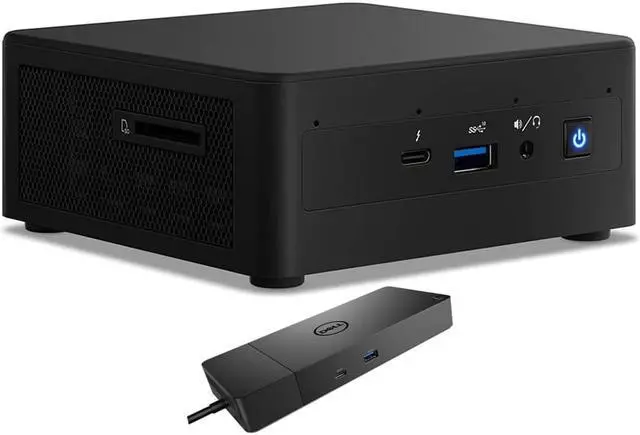
The Intel NUC11PAHi5 is a compact Windows 11 Home desktop with an 11th Gen Core i5-1135G7, 32GB RAM, a 256GB NVMe SSD, and a Dell WD19S dock. Its small form factor and included dock suit home-office and business users who want a desktop setup with added connectivity.
| Attribute | Value |
|---|---|
| Best For | Compact home or business desktop use with integrated graphics |
| Processor And Cache | Intel Core i5 11th Gen quad-core processor with 8MB L3 cache |
| Graphics | Integrated graphics |
| Memory Configuration | 32GB DDR4 memory |
| Storage And Expansion | 256GB SSD with a card reader; no HDD or optical drive |
| Wired And Wireless Networking | Wi-Fi 6 AX201, Bluetooth 4.2, and RJ45 connectivity |
| Display And Peripherals | No screen or monitor included; no keyboard included |
| Power | 120W power supply |
| Model Identifiers | Intel NUC11PAHi5 |
| Operating System | Windows 11 Home |
| Color | Black |
Q: Intel NUC11PAHi5 or NUC11PAHi3: which configuration should I choose?
A: Choose the NUC11PAHi5 for workloads that benefit from four CPU cores, eight threads, and Intel Iris Xe graphics. The NUC11PAHi3 has two cores, four threads, and Intel UHD graphics, making it the lower-tier option in the same NUC 11 Performance family.
Q: How does the NUC11PAHi5 compare with the older NUC10 i5?
A: The NUC11PAHi5 uses an 11th Gen Core i5-1135G7 with Iris Xe graphics, while the NUC10 i5 configuration uses a 10th Gen Core i5-10210U with UHD Graphics 620. Notebookcheck’s tests of an NUC 11 system with the same i5-1135G7 recorded stronger results than the NUC10 i5 in several single-core, multi-core, and graphics benchmarks; results can vary with system configuration.
Q: Should I choose the NUC11PAHi5 or NUC11PAHi7?
A: Both are four-core, eight-thread NUC 11 Performance models. Choose this NUC11PAHi5 for its Core i5-1135G7, which boosts up to 4.2 GHz; choose the NUC11PAHi7 if you want the Core i7-1165G7’s higher 4.7 GHz turbo frequency and 12 MB cache. This listing also includes 32 GB of RAM and a Dell WD19S dock.
Q: Is this mini desktop suitable for everyday office work?
A: Yes. The Core i5 processor and 32GB of RAM make it suitable for typical office tasks such as documents, email, web browsing, and multitasking. It has integrated graphics, so it is less suited to graphics-intensive work.
Q: Can I use it as a travel work computer?
A: It can be moved between workspaces, but it is not a self-contained travel computer: it has no screen or built-in battery. You will need a monitor and access to power; the product listing also does not specify a keyboard as included.
Q: Does it come with a monitor, keyboard, and mouse?
A: No monitor is included, and the listing specifies no keyboard. It includes a Dell WD19S docking station; a mouse is not listed, so check the seller’s package details if you need one.
Q: Can it run two monitors?
A: The listed computer has HDMI, mini DisplayPort, and two Thunderbolt 3 ports, which provide several display-connection options. The listing does not confirm the maximum number of monitors that can run at once, so verify the NUC and dock display configuration before buying for a multi-monitor setup.
Q: Is it a good choice for gaming?
A: It is better suited to everyday computing than demanding gaming. Its integrated graphics may handle lighter games, but the listing does not include a dedicated graphics card and does not promise performance for modern graphics-intensive games.
Q: Will the NUC11PAHi5 work with Ubuntu or another Linux distribution?
A: Linux is possible, but reports are mixed. Users reported successful installations, alongside issues with HDMI audio, display behavior, or suspend on some distributions and kernel versions. If Linux is essential, be prepared to check hardware compatibility and troubleshoot drivers.
Q: Is the NUC11PAHi5 suitable for office work, and will its fan be noisy?
A: Its 4-core i5 and 32GB RAM configuration is suited to typical office tasks. A user with this model described it as quiet at a low fixed fan setting in an air-conditioned office, while noting that the fan ramps up during heavier tasks. Fan noise will depend on workload and settings.
Q: Is the NUC11PAHi5 suitable for gaming?
A: It has integrated graphics, not a dedicated GPU, so it is a better fit for lighter or older games than graphics-intensive gaming. A user discussing retro gaming with this model noted that the small chassis can limit heat dissipation under higher performance settings.
Q: Could it have problems after waking from sleep or turning the display back on?
A: Some owners reported sluggishness or display glitches after idle or wake, including with Windows and multiple monitors. These are individual reports, not proof that every unit has the problem; if reliable sleep-and-wake behavior is essential, consider testing that workflow during the return period.


