




 here!
I’m your shopping assistant for PC builds, upgrades, and everything tech.
Got questions? Ask away!
Start a conversation
here!
I’m your shopping assistant for PC builds, upgrades, and everything tech.
Got questions? Ask away!
Start a conversation




Any questions? Ask CelesteSM will help you find out quickly.
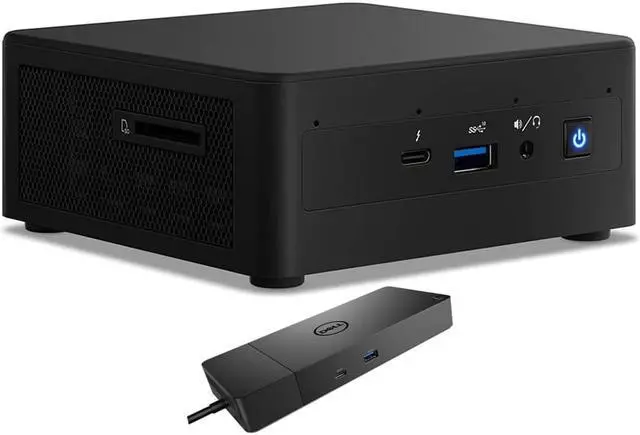
The Intel NUC11PAHi5 is a compact Windows 10 Pro desktop with an 11th Gen Core i5 processor, 8GB RAM, 256GB SSD, and bundled Dell WD19S dock, suited to office work, web browsing, and everyday multitasking in a space-conscious setup.
| Attribute | Value |
|---|---|
| Best For | Compact desktop computing for business and workstation use |
| Processor And Cache | 11th Gen Intel Core i5 quad-core processor with 8 MB of L3 cache |
| Graphics | Integrated graphics with integrated video |
| Memory | 8GB DDR4 memory |
| Storage And Expansion | 256GB SSD storage, with no HDD or optical drive; card reader included |
| Networking And Wireless | Wi-Fi 6 AX201, Bluetooth 4.2, and RJ45 networking |
| Operating System | Windows 10 Pro |
| Display And Included Peripherals | No display or monitor included; no keyboard included |
| Chassis And Power | Black mini PC with a 120W power supply |
| Model Identifiers | Intel NUC11PAHi5 |
Q: Should I choose the Intel NUC11PAHi5 or the NUC11PAHi3?
A: Choose the NUC11PAHi5 for multitasking and workloads that benefit from four processor cores. The NUC11PAHi3 is the lower-tier option, with two cores and Intel UHD graphics; the NUC11PAHi5 has four cores and Iris Xe graphics when configured with dual-channel memory.
Q: Is the NUC11PAHi5 or NUC11PAHi7 the better fit?
A: Choose the NUC11PAHi5 for a four-core NUC with a 4.2 GHz maximum turbo frequency and 8 MB cache. The NUC11PAHi7 keeps the four-core design and raises the maximum turbo frequency to 4.7 GHz, with 12 MB cache and more Iris Xe graphics execution units, making it the higher-tier choice for workloads that can use the added processor and graphics headroom.
Q: How does the NUC 11 Performance compare with the NUC 10?
A: Choose the NUC 11 Performance when integrated-graphics capability and single-core responsiveness are priorities. In Notebookcheck’s comparison, the tested NUC 11 Core i7 system was about 20% faster in single-threaded workloads than the NUC 10 comparison system, while its Iris Xe graphics delivered a substantial generational improvement over UHD Graphics 620.
Q: Is this mini PC suitable for everyday office work?
A: Yes. Its four-core Intel Core i5 processor and Windows 10 Pro suit routine tasks such as email, web browsing, documents, and spreadsheets. The 8GB of RAM may limit heavier multitasking, and integrated graphics are not intended for demanding graphics work or gaming.
Q: Can it run two monitors?
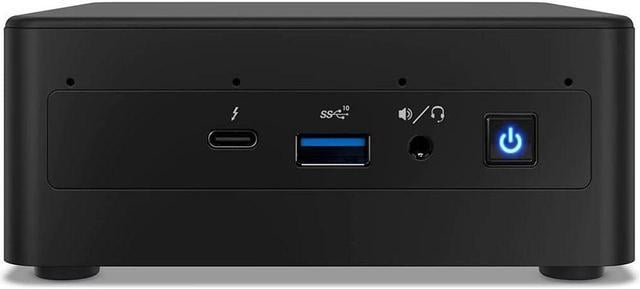
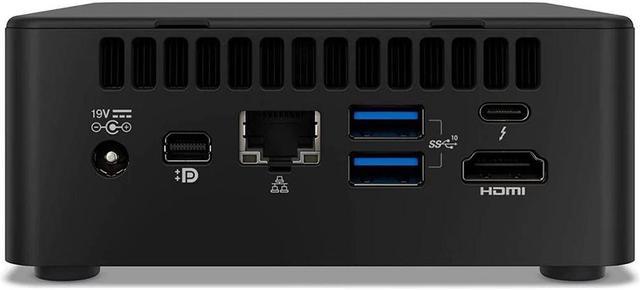
A: The PC lists HDMI, mini DisplayPort, and Thunderbolt 3 ports, and the included dock has HDMI and DisplayPort outputs. The product details do not state the maximum number of simultaneous displays or confirm a specific dock-and-monitor setup, so verify the intended connections before buying.
Q: Is it ready for video meetings?
A: It can support video meetings with separately supplied peripherals, but it has no built-in webcam or screen. You will need a monitor and a compatible webcam; the listed headphone/microphone combo jack can connect a compatible headset.
Q: Is this a good computer to take on business trips?
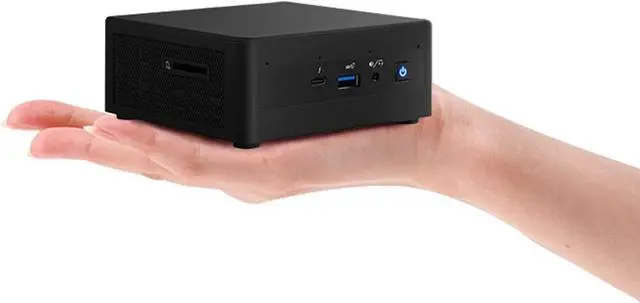
A: It is compact, but it is a desktop rather than a laptop: it has no built-in screen, keyboard, or webcam and needs external power. It is better suited to a fixed desk or a trip where you can use a monitor and peripherals than to working on the move.
Q: Is the NUC11PAHi5 suitable for running virtual machines or a home server?
A: It may suit a light server or a small number of VMs, but this listing’s 8GB RAM and 256GB SSD limit how much you can run comfortably. A Reddit discussion about using this model for ESXi notes that its power settings can be adjusted; plan on upgrading memory and storage for heavier workloads.
Q: Can this NUC run Linux?
A: A Reddit owner reported that Ubuntu 20.04 mostly worked on the NUC11PAHi5, but had problems with the 3.5 mm audio jack and intermittent HDMI audio. Treat that as a reported configuration-specific issue, not a guarantee of the same behavior on every Linux version or setup. The listing itself comes with Windows 10 Pro.
Q: Can I use an external GPU with this NUC?
A: The NUC has Thunderbolt 3, and a Reddit owner reported using a Razer Core X eGPU with this model. That setup initially had issues and reportedly worked after disabling the integrated GPU, so eGPU compatibility may require troubleshooting and is not assured for every enclosure or graphics card.
Q: Is the NUC11PAHi5 a reasonable choice for retro gaming?
A: It may work for retro or otherwise modest gaming, but it uses integrated graphics rather than a dedicated GPU. A Reddit discussion about using this model for retro gaming notes that the small chassis limits cooling and sustained performance, which is a trade-off for more demanding games.


