




 here!
I’m your shopping assistant for PC builds, upgrades, and everything tech.
Got questions? Ask away!
Start a conversation
here!
I’m your shopping assistant for PC builds, upgrades, and everything tech.
Got questions? Ask away!
Start a conversation







Any questions? Ask CelesteSM will help you find out quickly.
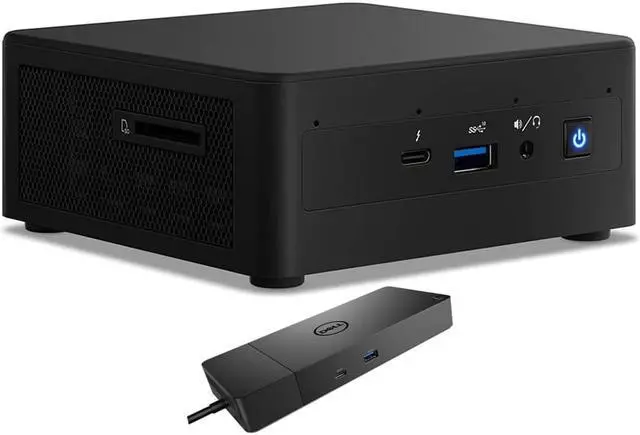
The Intel NUC11PAHi5 is a compact mini desktop with an 11th Gen Intel Core i5-1135G7, 32GB RAM, a 128GB SSD, and a 500GB HDD, bundled with a Dell WD19S dock; it suits office work, business use, and everyday multitasking when you already have a display.
| Attribute | Value |
|---|---|
| Best For | Compact business desktop use, with an 11th Gen Core i5 quad-core processor, 32GB memory, and 500GB HDD storage |
| Processor And Core Count | 11th Gen Intel Core i5 quad-core processor |
| Cache | 8MB L3 cache per CPU |
| Memory | 32GB DDR4 |
| Storage | 500GB HDD |
| Graphics | Integrated graphics with integrated video output |
| Networking And Connectivity | Wi-Fi 6 AX201, Bluetooth 4.2, and RJ45 Ethernet |
| Card Reader | Card reader included |
| Operating System | Windows 10 Pro |
| Power And Appearance | 120W power supply; black |
| Display And Peripherals | No built-in screen or included monitor; no keyboard or optical drive |
| Model Identifiers | Intel NUC11PAHi5 mini PC |
Q: Should I get the Intel NUC11PAHi5 or the NUC11PAHi7?
A: Choose this NUC11PAHi5 listing for its Core i5-1135G7, 32GB RAM, and included storage configuration for everyday business and multitasking use. Choose the NUC11PAHi7 if you want the higher-tier Core i7-1165G7; both are quad-core, eight-thread NUC 11 models.
Q: How does the NUC11PAHi5 compare with the NUC11PAHi3?
A: The NUC11PAHi5 is the more capable choice for multitasking: its Core i5-1135G7 has four cores and eight threads with Iris Xe graphics, while the NUC11PAHi3 uses a two-core, four-thread Core i3-1115G4 with Intel UHD graphics. The i3 configuration suits a more entry-level setup; this i5 listing also includes 32GB of RAM.
Q: Is the NUC11PAHi5 a worthwhile step up from the older NUC10i5FNK?
A: Choose the NUC11PAHi5 when you want the newer 11th Gen Core i5-1135G7 platform and Iris Xe integrated graphics. The NUC10i5FNK is built around a 10th Gen Core i5-10210U and Intel UHD Graphics, making it the earlier-generation option in this comparison.
Q: Is this mini desktop suitable for office work and video meetings?
A: Yes. The four-core Intel Core i5 processor and 32GB of RAM are suitable for typical office tasks such as email, browsing, documents, and spreadsheets. It has integrated graphics and no built-in webcam, so video meetings require a separate webcam; a monitor, keyboard, and mouse are also not listed as included.
Q: Can it connect to more than one monitor?
A: It has HDMI, Mini DisplayPort, and two Thunderbolt 3 ports, and the included dock adds HDMI and DisplayPort outputs. The listing does not specify how many displays can run simultaneously or the supported resolutions, so confirm display and dock compatibility for your setup before buying.
Q: Does it come with a monitor, keyboard, or mouse?
A: No monitor, keyboard, or mouse is listed as included. You will need to provide those peripherals separately; the product does include the mini desktop and a Dell WD19S docking station.
Q: Is it a good choice for a travel work computer?
A: It is compact, but it is a desktop rather than a laptop: it has no built-in screen, keyboard, or webcam, and needs a power source and external peripherals to use. It is better suited to a compact desk setup or moving between workspaces where those accessories are available than to working on the go.
Q: Is the storage suitable for everyday files and apps?
A: The configuration has a 128GB SATA SSD plus a 500GB hard drive. The SSD provides a smaller space for the operating system and frequently used apps, while the larger HDD adds room for files; users with many large apps or projects may want additional storage.
Q: Does the NUC11PAHi5 work well with Linux?
A: Linux compatibility may require troubleshooting. One NUC11PAHi5 owner reported problems with audio on Ubuntu, including unreliable HDMI audio and a nonworking 3.5 mm jack. That is an individual report, not proof that every unit will have the same issues.
Q: Should I expect to troubleshoot drivers or network connections?
A: Possibly. A video about setting up this NUC model reports that Windows Wi-Fi or Ethernet may need Intel drivers; Reddit users also describe Ethernet connection problems. These are community reports, so they do not establish that all units are affected.
Q: Can the NUC11PAHi5 serve as a work desktop?
A: Its listed Core i5-1135G7 processor and 32GB of RAM make it a compact option to consider for desktop work. However, one Reddit user who used this model as a work PC reported sluggish behavior after leaving it locked for several hours, so that report is worth weighing but does not show how common the issue is.


