




 here!
I’m your shopping assistant for PC builds, upgrades, and everything tech.
Got questions? Ask away!
Start a conversation
here!
I’m your shopping assistant for PC builds, upgrades, and everything tech.
Got questions? Ask away!
Start a conversation







Any questions? Ask CelesteSM will help you find out quickly.
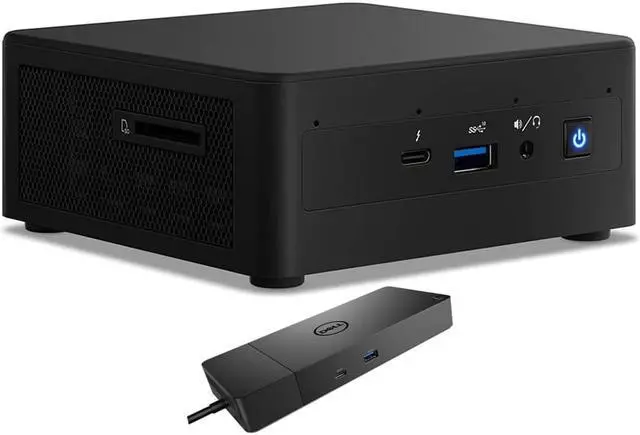
The Intel NUC11PAHi5 is a compact Windows 10 Pro mini desktop with an 11th Gen Core i5, 32GB RAM, a 128GB SSD plus 1TB HDD, and a Dell WD19S dock; it suits office work, everyday multitasking, and users who want extra connectivity in a small workspace.
| Attribute | Value |
|---|---|
| Best For | Home and business desktop computing in a compact mini PC form factor, running Windows 10 Pro |
| Processor And Cache | Intel Core i5 11th Gen quad-core processor with 8MB L3 cache |
| Memory Configuration | 32GB DDR4 memory |
| Storage | 1TB HDD |
| Graphics | Integrated graphics with integrated video output |
| Networking And Connectivity | Wi-Fi 6 AX201, Bluetooth 4.2, and RJ45 networking |
| Media And Included Peripherals | Card reader included; monitor, keyboard, and optical drive not included |
| Physical Design And Power | Black mini PC with a 120W power supply |
| Model Identifiers | Intel NUC11PAHi5 |
Q: Intel NUC11PAHi5 vs NUC11PAHi3: which is better for multitasking?
A: Choose the NUC11PAHi5 when you want more capacity for multitasking and integrated-graphics workloads. Its Core i5-1135G7 has 4 cores and 8 threads with Iris Xe graphics; the NUC11PAHi3’s Core i3-1115G4 has 2 cores and 4 threads with Intel UHD graphics. This Newegg configuration also comes with 32GB RAM, a 128GB SSD, a 1TB HDD, and a Dell WD19S dock. ([intel.com](https://www.intel.com/content/www/us/en/products/sku/208658/intel-core-i51135g7-processor-8m-cache-up-to-4-20-ghz/specifications.html?utm_source=openai))
Q: Intel NUC11PAHi5 vs NUC11PAHi7: which configuration should I choose?
A: Choose this NUC11PAHi5 listing for its specified 32GB RAM, 128GB SSD, 1TB HDD, Windows 10 Pro, and included Dell WD19S dock. Choose a NUC11PAHi7 configuration when you prefer the higher-tier Core i7-1165G7, which reaches up to 4.7 GHz and has 96 Iris Xe graphics execution units; the Core i5-1135G7 reaches up to 4.2 GHz and has 80. ([intel.com](https://www.intel.com/content/www/us/en/products/sku/208658/intel-core-i51135g7-processor-8m-cache-up-to-4-20-ghz/specifications.html?utm_source=openai))
Q: Intel NUC11PAHi5 vs NUC10i5FNK: what changes between generations?
A: Choose the NUC11PAHi5 if you want the 11th-generation Core i5-1135G7 and Iris Xe integrated graphics. Both systems use 4-core, 8-thread Core i5 processors, while the NUC10i5FNK uses the 10th-generation i5-10210U and Intel UHD graphics. This NUC11PAHi5 listing also specifies 32GB RAM, 128GB SSD, 1TB HDD, and a Dell WD19S dock. ([intel.com](https://www.intel.com/content/www/us/en/products/sku/208658/intel-core-i51135g7-processor-8m-cache-up-to-4-20-ghz/specifications.html?utm_source=openai))
Q: Is this mini desktop suitable for everyday office work and multitasking?
A: Yes. Its 11th Gen Core i5 processor and 32GB of RAM suit common office tasks such as documents, spreadsheets, web browsing, and general multitasking. It uses integrated graphics, so it is less suited to demanding graphics work or gaming.
Q: Does it come with a monitor?
A: No. The listing specifies that no monitor is included. You will need to provide a compatible monitor separately.
Q: Can it connect to multiple monitors?
A: It has HDMI, mini DisplayPort, and Thunderbolt 3 ports, and the included dock also provides display outputs. Multiple-monitor setups may be possible, but the number and supported resolution depend on the monitor connections and dock configuration.
Q: Is it practical to use as a travel work computer?
A: It is compact enough to move between locations, but it is a desktop rather than a self-contained travel computer. You will need a display, keyboard, and mouse, and should plan to transport its power supply and any needed cables; the included dock adds another item to carry.
Q: Will the NUC11PAHi5 be quiet enough for a desk?
A: Noise depends on workload and fan settings. Reddit users describe it as quiet at idle or with light office use, but others report a persistent fan hum or more noise under load. It is not a fanless system, so consider fan noise if you need a silent PC.
Q: Is the NUC11PAHi5 a good choice for Linux?
A: Linux can work, but user reports describe possible audio and suspend-related issues, including fan behavior during sleep. If reliable audio or trouble-free suspend is essential, check reports for your Linux distribution and peripherals before buying.
Q: Can it handle programming work and several virtual machines?
A: The listed 32GB of RAM and four-core i5 make it a compact option to consider for development and lighter virtualization. One NUC11PAHi5 owner reports generally satisfactory development performance with several small VMs, but used 64GB of RAM; that experience does not establish how well this 32GB configuration will handle heavier concurrent workloads.
Q: Is it suitable for gaming, or should I plan on an eGPU?
A: This configuration has integrated graphics, not a dedicated gaming GPU. Reddit discussions mention occasional gaming and eGPU use, but do not establish performance across games; treat built-in graphics as a limitation for demanding gaming and verify performance for the specific games you play.


