




 here!
I’m your shopping assistant for PC builds, upgrades, and everything tech.
Got questions? Ask away!
Start a conversation
here!
I’m your shopping assistant for PC builds, upgrades, and everything tech.
Got questions? Ask away!
Start a conversation







Any questions? Ask CelesteSM will help you find out quickly.
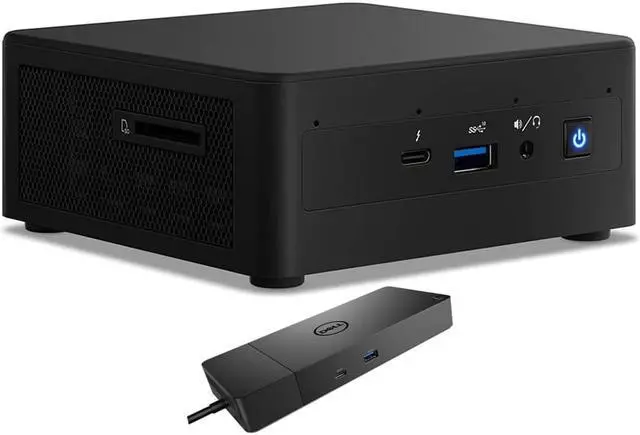
The Intel NUC11PAHi5 is a compact Windows 10 Pro mini desktop with an 11th Gen Core i5, 16GB RAM, a 512GB SATA SSD, and a Dell WD19S dock, suited to home and small-office users who want a space-saving setup for everyday productivity.
| Attribute | Value |
|---|---|
| Best For | Business desktop computing in space-constrained setups, with a quad-core Intel Core i5 processor |
| Processor And Cache | 11th Gen Intel Core i5 quad-core processor with 8MB L3 cache |
| Memory | 16GB DDR4 memory |
| Storage | 512GB SSD; no HDD |
| Graphics | Integrated graphics |
| Networking And Connectivity | Wi-Fi 6 AX201, Bluetooth 4.2, Ethernet RJ45, and a card reader |
| Operating System | Windows 10 Pro |
| Display And Peripherals | No screen or monitor included; no keyboard included |
| Power | 120W power supply |
| Model And Design | Intel NUC11PAHi5 mini PC in black |
Q: Should I choose the NUC11PAHi5 or the NUC 11 i3 version?
A: Choose the NUC11PAHi5 for its Core i5-1135G7 with 4 cores and 8 threads, plus Intel Iris Xe graphics. The NUC 11 i3 uses a 2-core, 4-thread Core i3-1115G4 with Intel UHD graphics. This listing also includes 16GB RAM, a 512GB SSD, and a Dell WD19S dock.
Q: Is the NUC11PAHi5 or the NUC 11 i7 version a better fit?
A: Choose this NUC11PAHi5 configuration for its Core i5 processor, 16GB RAM, 512GB SSD, and included Dell WD19S dock. The NUC 11 i7 version steps up to the Core i7-1165G7, with a higher maximum turbo frequency, more cache, and more Iris Xe graphics execution units; consider it when those processor and graphics specifications are a priority.
Q: How does the NUC11PAHi5 compare with the older NUC10i5FNK?
A: Choose the NUC11PAHi5 if you want the 11th Gen Core i5-1135G7 platform and Intel Iris Xe graphics. The NUC10i5FNK is a 10th Gen model with a Core i5-10210U. This NUC11 listing also comes configured with 16GB RAM and a 512GB SSD, along with a Dell WD19S dock.
Q: Is this mini PC suitable for office work and video meetings?
A: It is configured for everyday office work, with an 11th Gen Core i5 processor, 16GB RAM, 512GB SSD, Wi-Fi 6, and Windows 10 Pro. It has no built-in webcam, so video meetings require an external webcam; check whether your monitor or headset provides a microphone and speakers.
Q: Can I use two monitors with this computer?
A: The NUC has HDMI and mini DisplayPort outputs, so it can connect to two monitors with compatible cables. A monitor is not included. The bundled dock also has display outputs, but its use depends on the monitor connections and system setup.
Q: Is this a good computer to take on work trips?
A: It is compact and easy to move, but it is a desktop rather than a self-contained travel computer: it has no built-in screen, battery, or webcam. You will need access to a monitor, power, and any peripherals needed for your work.
Q: Is it suitable for gaming?
A: It has integrated graphics, not a dedicated graphics card. It may suit lighter games, but it is not the best fit for graphics-intensive games or users seeking high gaming performance.
Q: Is the NUC11PAHi5 suitable as a daily work or business PC?
A: It should suit everyday office work and general business use: this configuration has a quad-core Core i5-1135G7, 16GB RAM, and a 512GB SSD. A Reddit discussion describes the NUC 11 i5 as suitable for general business tasks. It is not a complete workstation setup: a monitor, keyboard, and mouse are not included.
Q: Can the NUC11PAHi5 work as a Plex media server?
A: It may suit a home Plex server, particularly for 1080p streaming. In a Reddit discussion, an owner of the NUC11PAHi5 reported running Plex in a Linux container and handling 1080p playback with about 15% CPU use. That is an individual report, not a guarantee for every setup; the listed 512GB SSD may also be limiting if you need substantial media storage.
Q: Is the NUC11PAHi5 a straightforward choice for Linux?
A: It can run Linux, but some users report needing newer kernels or troubleshooting audio and display behavior. Reddit users in a NUC11PAHi5 discussion reported Ubuntu and Manjaro working, alongside issues such as HDMI audio problems. If you want a setup that works with minimal tinkering, those reports are a reason to check current Linux support for your intended distribution and peripherals before buying.


