




 here!
I’m your shopping assistant for PC builds, upgrades, and everything tech.
Got questions? Ask away!
Start a conversation
here!
I’m your shopping assistant for PC builds, upgrades, and everything tech.
Got questions? Ask away!
Start a conversation







Any questions? Ask CelesteSM will help you find out quickly.
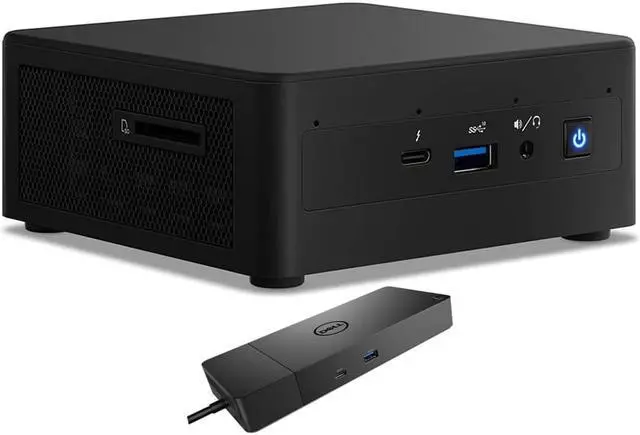
The Intel NUC11PAHi5 is a compact Windows 11 Pro mini desktop with an 11th Gen Core i5-1135G7, 8GB RAM, a 128GB SATA SSD, and a 2TB HDD, bundled with a Dell WD19S dock; it suits home and office productivity setups that need ample storage and expanded connectivity.
| Attribute | Value |
|---|---|
| Best For | Business desktop use in a compact mini-PC setup, with integrated graphics and 2TB of hard-drive storage |
| Processor And Core Count | 11th Gen Intel Core i5 with a quad-core processor and 8MB L3 cache |
| Graphics | Integrated graphics |
| Memory Configuration | 8GB DDR4 memory |
| Storage And Expansion | 2TB hard drive, card reader, and no optical drive |
| Wired And Wireless Networking | Wi-Fi 6 AX201, Bluetooth 4.2, and RJ45 connectivity |
| Display Setup | No monitor or built-in screen included |
| Operating System | Windows 11 Pro |
| Chassis And Power | Black mini PC with a 120W power supply |
| Keyboard And Peripherals | Keyboard not included |
| Model Identifiers | Intel NUC11PAHi5 |
Q: Intel NUC11PAHi5 or NUC11PAHi3: which is better for multitasking?
A: Choose the NUC11PAHi5 when you regularly keep several applications open or want the higher graphics tier: its Core i5-1135G7 has 4 cores and 8 threads with Intel Iris Xe graphics, compared with the NUC11PAHi3’s 2-core, 4-thread Core i3-1115G4 and Intel UHD graphics. The NUC11PAHi3 is the lower processor tier for lighter everyday workloads.
Q: Should I choose the NUC11PAHi5 or the NUC11PAHi7?
A: Choose the NUC11PAHi7 if you want the higher-performance processor in the same NUC 11 Performance family. Its Core i7-1165G7 offers a higher maximum turbo frequency than the NUC11PAHi5’s Core i5-1135G7, and independent testing of the closely related Panther Canyon i7 configuration found stronger multi-core performance. The NUC11PAHi5 is a suitable choice for everyday productivity and multitasking with its 4-core, 8-thread processor.
Q: How does the NUC11PAHi5 compare with the older Intel NUC10i5FNK?
A: Choose the NUC11PAHi5 when you prefer the newer 11th-generation Core i5-1135G7 platform and Intel Iris Xe graphics. The NUC10i5FNK uses a 10th-generation Core i5-10210U with Intel UHD Graphics 620, making it the previous-generation alternative. Both are compact Intel NUC Performance systems; the processor generation and integrated graphics are the key distinctions.
Q: Is this mini PC suitable for office work and online meetings?
A: It is configured for routine desktop productivity, with an 11th Gen Core i5 processor and Windows 11 Pro. The 8GB of RAM may be limiting when many apps or browser tabs are open, and the PC has no built-in webcam, so video meetings require an external webcam.
Q: Can I take this mini PC with me when I travel for work?
A: It is compact and can be transported, but it is not a self-contained travel computer: it has no screen or battery and requires a monitor, keyboard, mouse, and power supply at your destination. It is more practical when you have a fixed setup at both ends of a trip.
Q: Can I connect this PC to a monitor and use my existing keyboard and mouse?
A: Yes. The PC has HDMI, mini DisplayPort, Thunderbolt 3, and USB ports for connecting displays and peripherals. A monitor, keyboard, and mouse are not included, so you will need to supply compatible ones. The included dock adds HDMI, DisplayPort, USB-A, and Ethernet connections.
Q: Is 128GB of SSD storage enough for this PC?
A: The 128GB SSD provides relatively limited space for Windows and frequently used apps, while the 2TB hard drive offers much more room for files and media. It suits users who can keep larger files on the hard drive, but may feel restrictive if they want many applications or large projects on the SSD.
Q: Is this NUC suitable for everyday office work?
A: It is a reasonable fit for typical office tasks: a Reddit discussion describes NUC11PAHi5 systems being used for office work. The listed configuration has 8GB RAM, so heavier multitasking may be a reason to consider a memory upgrade; participants in that discussion recommended 16GB for their use.
Q: Is 8GB of RAM enough, or should I upgrade it?
A: The product is listed with 8GB DDR4 SODIMM memory. That can suit lighter workloads, but Reddit users discussing this model recommended 16GB for office use and general headroom. Consider an upgrade if you regularly multitask or run more demanding applications.
Q: Is the NUC11PAHi5 quiet enough for an office?
A: Reddit reports suggest the fan can be quiet during light office use, but may become audible under heavier tasks. Fan noise depends on workload and settings; one user reported adjusting the minimum fan speed for a quieter office setup.
Q: Does the NUC11PAHi5 work with Linux?
A: Reddit reports describe Linux running on the NUC11PAHi5, but experiences vary. One Ubuntu user reported audio problems, particularly through the built-in audio connections. If Linux is essential, check compatibility for your distribution and audio setup before buying.


