




 here!
I’m your shopping assistant for PC builds, upgrades, and everything tech.
Got questions? Ask away!
Start a conversation
here!
I’m your shopping assistant for PC builds, upgrades, and everything tech.
Got questions? Ask away!
Start a conversation







Any questions? Ask CelesteSM will help you find out quickly.
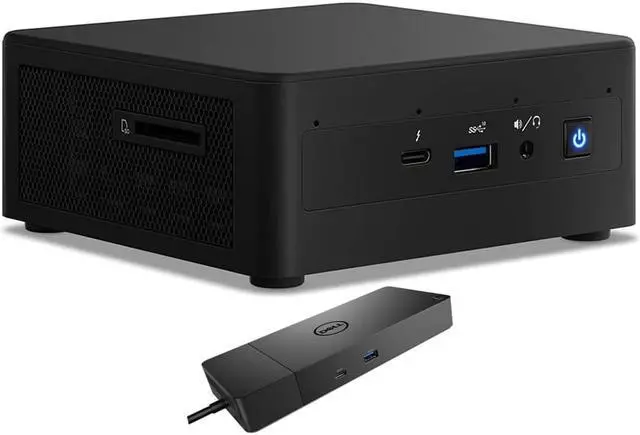
The Intel NUC11PAHi5 is a compact Windows 11 Home mini desktop with an 11th Gen Core i5 processor, 8GB RAM, a 4TB SATA SSD, and a Dell WD19S dock, suited to home or business users who want a small everyday productivity PC with generous storage and expanded connectivity.
| Attribute | Value |
|---|---|
| Best For | A compact home or business desktop for general computing, with integrated graphics, 8GB memory, and 4TB SSD storage |
| Processor And Cache | 11th Gen Intel Core i5 quad-core processor with 8MB L3 cache |
| Graphics | Integrated graphics |
| Memory | 8GB DDR4 |
| Storage And Expansion | 4TB SSD storage, no HDD, and no optical drive; card reader included |
| Networking | Wi-Fi 6 AX201, Bluetooth 4.2, and RJ-45 networking |
| Display | No screen or monitor included |
| Keyboard | Keyboard not included |
| Power And Color | 120W power supply; black |
| Operating System | Windows 11 Home |
| Model Identifiers | Intel NUC11PAHi5 mini PC |
Q: Intel NUC11PAHi5 vs NUC11PAHi3: which is better for multitasking?
A: Choose the NUC11PAHi5 for more CPU capacity: its Core i5-1135G7 has four cores and eight threads, compared with two cores and four threads in the NUC11PAHi3’s Core i3-1115G4. This listing also includes 8GB RAM, a 4TB SATA SSD, and a WD19S dock.
Q: Should I get the NUC11PAHi5 or NUC11PAHi7 for more performance headroom?
A: Choose the NUC11PAHi7 if you want the higher-clocked processor and more integrated-graphics execution units: its Core i7-1165G7 reaches up to 4.7GHz and has 96 execution units, versus up to 4.2GHz and 80 execution units in the NUC11PAHi5’s Core i5-1135G7. Both are NUC 11 Performance models; the NUC11PAHi5 listing pairs its processor with 8GB RAM, a 4TB SATA SSD, and a WD19S dock.
Q: NUC11PAHi5 vs NUC10i5FNK: which one has the newer platform?
A: The NUC11PAHi5 is the newer-generation choice: it uses an 11th Gen Core i5-1135G7, while the NUC10i5FNK uses a 10th Gen Core i5-10210U. Choose the NUC11PAHi5 if you prefer the later processor generation and the listed bundle’s 4TB SSD and WD19S dock.
Q: Is this mini PC suitable for everyday office work and video meetings?
A: It is configured for general office tasks such as web browsing, email, documents, and video meetings. It has 8GB of RAM, Wi‑Fi 6, Ethernet, and Windows 11 Home, but no built-in webcam; use an external webcam for video calls. Heavy multitasking may be limited by the 8GB memory.
Q: Does it include a monitor, keyboard, or mouse?
A: No monitor is included, and the listed configuration does not include a keyboard or mouse. The Dell WD19S dock is included. You will need a display and input devices to use the PC.
Q: Is it a good choice for travel work?
A: It is compact and can be moved between work locations, but it is not a self-contained travel computer: it has no screen, keyboard, or webcam. Plan to bring or have access to a monitor, input devices, and power. A laptop is more practical when you need a complete setup on the go.
Q: Is this a good PC for gaming?
A: It is not configured as a gaming-focused PC. Its integrated graphics are better suited to everyday computing and lighter graphics workloads than demanding modern games. The listing does not provide game-performance benchmarks.
Q: Is the NUC11PAHi5 suitable as a work PC?
A: Its Core i5-1135G7 and compact form factor fit typical office use, and Reddit users describe using this model for work. However, this configuration includes only 8GB of RAM; one work-use discussion recommends 16GB. Consider whether you can upgrade the memory before buying.
Q: Can it work as a Plex or file server?
A: Reddit users report using the NUC11PAHi5 as a Plex and file server. This listing provides a 4TB SATA SSD and Ethernet, but has 8GB of RAM; assess whether that memory is sufficient for your server workload and any additional services you plan to run.
Q: Is the included 8GB of RAM enough?
A: It may be adequate for basic tasks, but Reddit discussions about this model include users configuring 16GB or more, and one office-use discussion recommends 16GB. For heavier multitasking or server use, check upgrade options rather than assuming the included 8GB will be enough.
Q: Could fan noise or sleep behavior be a drawback?
A: Possibly. Reddit users report fan activity during suspend or sleep on some NUC11PAHi5 systems, while reports about noise during normal use vary. If quiet sleep operation is important, treat this as a potential compatibility or setup issue rather than a guaranteed behavior.


