




 here!
I’m your shopping assistant for PC builds, upgrades, and everything tech.
Got questions? Ask away!
Start a conversation
here!
I’m your shopping assistant for PC builds, upgrades, and everything tech.
Got questions? Ask away!
Start a conversation







Any questions? Ask CelesteSM will help you find out quickly.
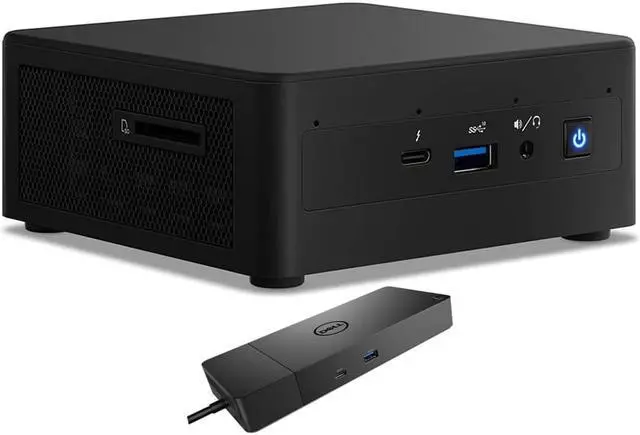
The Intel NUC11PAHi5 is a compact mini PC with an 11th Gen Core i5 processor, 8GB of RAM, a 500GB HDD, and Windows 10 Home, bundled with a Dell WD19S dock; it suits home-office and business users who want a small desktop with flexible wired display and peripheral connections.
| Attribute | Value |
|---|---|
| Best For | A compact mini PC for business desktop use |
| Processor And Core Count | 11th Gen Intel Core i5 with a quad-core processor |
| Cache | 8MB L3 cache |
| Graphics | Integrated graphics with integrated video output |
| Memory | 8GB DDR4 memory |
| Storage | 500GB HDD; no SSD |
| Networking And Connectivity | Wi-Fi 6 AX201, Bluetooth 4.2, and RJ-45 Ethernet |
| Expansion And Peripherals | Card reader included; no optical drive or keyboard |
| Display | No screen or monitor included |
| Operating System | Windows 10 Home |
| Power | 120W power supply |
| Color | Black |
| Model Identifiers | Intel NUC11PAHi5 |
Q: For multitasking, should I choose the NUC11PAHi5 or NUC11PAHi3?
A: Choose the NUC11PAHi5 when you want a four-core, eight-thread processor for running multiple apps at once. The NUC11PAHi3 has a two-core, four-thread processor, making it the simpler processor tier in the same NUC 11 Performance family.
Q: Should I get the NUC11PAHi5 or the NUC11PAHi7?
A: The NUC11PAHi5 provides four cores and eight threads, with turbo frequency up to 4.2 GHz. The NUC11PAHi7 keeps the same core and thread count while offering up to 4.7 GHz turbo frequency and a larger cache. Choose this NUC11PAHi5 configuration for its i5-based setup and included 8GB RAM, 500GB HDD, and docking station.
Q: How does this NUC11PAHi5 compare with the NUC 12 Pro i5?
A: This NUC11PAHi5 uses an 11th Gen Core i5-1135G7 with four cores and eight threads. The NUC 12 Pro i5 uses a 12th Gen Core i5-1240P with 12 cores and 16 threads, so it offers a newer processor with more cores for highly parallel workloads. Choose the NUC11PAHi5 for its listed 8GB RAM, 500GB HDD, and included dock; choose the NUC 12 Pro i5 when the newer processor configuration is the priority.
Q: Is this mini PC suitable for everyday office work?
A: Yes, it is equipped for routine tasks such as email, web browsing, and document editing. Its 8GB of RAM and 500GB hard drive are modest, so it is less suited to heavy multitasking or workloads that benefit from faster SSD storage.
Q: Does it include a monitor and webcam for video meetings?
A: No. The product information says no monitor is included and lists no webcam. You will need an external display and webcam for video meetings; a keyboard is also not listed as included.
Q: Can I connect more than one monitor?
A: The PC lists HDMI, mini DisplayPort, and two Thunderbolt 3 ports, and the included dock adds HDMI and DisplayPort outputs. The product information does not confirm how many displays can run simultaneously in a particular setup, so check your monitor connections and dock requirements before buying.
Q: Is it practical as a travel work computer?
A: It is compact, but it is a desktop rather than a standalone travel computer: it has no built-in screen, keyboard, or webcam, and the listing does not specify a battery. It is better suited to a fixed desk or a location with external peripherals.
Q: Is the NUC11PAHi5 suitable as a work PC?
A: It can suit general desktop work, but this listing’s 8GB of RAM and 500GB hard drive are modest. A Reddit user discussed using the same model as a main work PC after installing more RAM and an NVMe drive, so buyers with heavier multitasking needs should consider upgrading the listed configuration.
Q: Will the NUC11PAHi5 work with Linux?
A: A Reddit user reported that Ubuntu 20.04 mostly worked on the NUC11PAHi5, but reported problems with 3.5mm audio and intermittent HDMI audio. Linux may be viable, but buyers who rely on built-in audio should check current distro and driver compatibility before choosing it; this listing comes with Windows 10 Home.
Q: Can I connect an external graphics card to the NUC11PAHi5?
A: The NUC has Thunderbolt 3 ports, and a Reddit user reported using a Razer Core X eGPU with this model. That setup involved troubleshooting, so an external GPU is an option to investigate—not a plug-and-play guarantee. The listing itself has integrated graphics and does not include an eGPU.
Q: Should I upgrade the RAM or storage?
A: Consider an upgrade if you expect to multitask heavily or want faster storage: this listing has 8GB of RAM and a 500GB HDD, and no SSD is specified. A YouTube build of the NUC11PAHi5 shows the creator installing additional RAM and both SATA and M.2 SSD storage; that demonstrates upgrade options, not that every buyer must upgrade.


