




 here!
I’m your shopping assistant for PC builds, upgrades, and everything tech.
Got questions? Ask away!
Start a conversation
here!
I’m your shopping assistant for PC builds, upgrades, and everything tech.
Got questions? Ask away!
Start a conversation







Any questions? Ask CelesteSM will help you find out quickly.
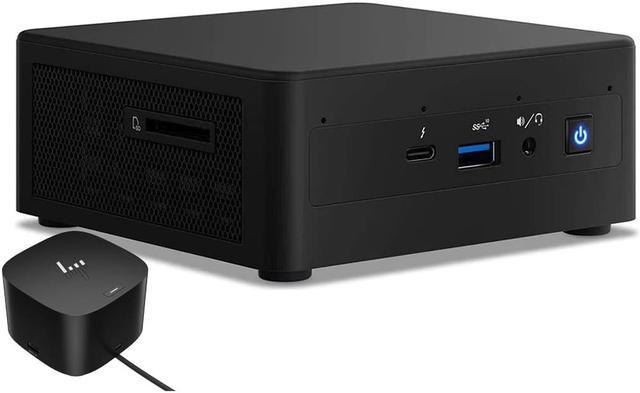
The Intel NUC11PAHi5 is a compact mini PC with an 11th Gen Core i5 processor, 16GB RAM, 1TB SATA SSD, and Windows 10 Pro, suited to home-office and business productivity in space-conscious setups.
| Attribute | Value |
|---|---|
| Best For | Home and business desktop productivity in a compact mini PC form factor |
| Processor And Cache | 11th Gen Intel Core i5 quad-core processor with 8MB L3 cache |
| Graphics | Integrated graphics |
| Memory | 16GB DDR4 memory |
| Storage | 1TB SSD storage; no HDD listed |
| Networking And Connectivity | Wi-Fi 6 AX201, Bluetooth 4.2, and RJ45 Ethernet |
| Expansion And Peripherals | Card reader included; no optical drive, keyboard, or monitor included |
| Operating System | Windows 10 Pro |
| Power And Design | 120W power supply; black mini PC |
| Model Identifiers | Intel NUC11PAHi5 |
Q: Should I choose the Intel NUC11PAHi5 or the NUC 12 Pro i5?
A: Choose the NUC11PAHi5 when its 16GB RAM, 1TB SSD, and included Thunderbolt dock match your setup. Choose the NUC 12 Pro i5 when you want the newer Core i5-1240P platform, which has 12 cores and 16 threads compared with the NUC11PAHi5’s four cores and eight threads. The NUC 12 Pro is the generation upgrade; this NUC 11 bundle emphasizes included memory, storage, and docking.
Q: Is the NUC11PAHi5 or the NUC11PAHi7 a better fit for multitasking?
A: The NUC11PAHi5 provides a four-core, eight-thread Core i5 platform for everyday productivity and multitasking. Choose the NUC11PAHi7 if you want the higher-tier Core i7-1165G7 configuration and additional processing headroom for heavier workloads; a Notebookcheck review found a substantial multi-thread performance gap between the i7 and i5 Panther Canyon versions.
Q: Should I get the NUC11PAHi5 or the NUC11PAHi3?
A: Choose the NUC11PAHi5 for its four-core, eight-thread Core i5-1135G7 when you want more capacity for multitasking. The NUC11PAHi3 uses a two-core, four-thread Core i3-1115G4 and is the lower processor tier. This listing also includes 16GB RAM and a 1TB SSD, so compare the full configurations as well as the processor.
Q: How does the NUC11PAHi5 compare with the NUC 11 Pro i5?
A: Both models use the Core i5-1135G7, so the processor tier is similar. The NUC11PAHi5 is the Performance-family model and this listing includes 16GB RAM, a 1TB SSD, and a Thunderbolt dock. The NUC 11 Pro belongs to Intel’s Pro family; compare its specific configuration and connectivity with the bundled setup when choosing between them.
Q: Is this mini desktop suitable for office work and video meetings?
A: It is configured for everyday office work, with an 11th Gen Core i5 processor, 16GB RAM, a 1TB SSD, Wi-Fi 6, and Windows 10 Pro. It has no built-in webcam, monitor, or keyboard, so video meetings require a separate webcam and display; a keyboard and mouse are also needed.
Q: Does it come with a monitor, keyboard, or mouse?
A: No monitor or keyboard is included in the provided specifications; a mouse is not listed either. The bundle includes the mini desktop and a 120W Thunderbolt dock, so plan to supply the missing peripherals separately.
Q: Can it run more than one monitor?
A: The listing includes HDMI, mini DisplayPort, and Thunderbolt 3 connections, and says the bundled dock supports up to three monitors, including dual 4K UHD. The exact number of displays and resolutions depend on the connection and display setup, so check the dock’s connection requirements before buying.
Q: Is it suitable for gaming?
A: It has integrated graphics rather than a discrete graphics card, so it is better suited to everyday computing than demanding modern games. It may handle lighter games, but the product information does not specify game performance.
Q: Is the NUC11PAHi5 suitable for everyday office work?
A: It is a reasonable fit for typical office tasks: the listed configuration has an 11th-gen Core i5, 16GB RAM, and a 1TB SSD. A Reddit discussion specifically mentions using the NUC11PAHi5 for office-oriented work. Its integrated graphics make it a less suitable choice for graphics-intensive workloads.
Q: Does the NUC11PAHi5 work with Linux?
A: Community reports indicate that Linux can work, but setup may depend on the distribution and kernel version. One discussion reports success with Ubuntu and Manjaro, while another describes issues such as the fan staying on during suspend. If Linux is essential, be prepared to check drivers and power-management behavior for your chosen setup.
Q: Is the NUC11PAHi5 quiet enough for a desk?
A: Reports vary: some users describe quiet operation during ordinary use, while others notice a persistent fan hum or fan noise during sleep. Expect some fan sound, especially under load, and consider the placement and noise sensitivity of your work area.


