




 here!
I’m your shopping assistant for PC builds, upgrades, and everything tech.
Got questions? Ask away!
Start a conversation
here!
I’m your shopping assistant for PC builds, upgrades, and everything tech.
Got questions? Ask away!
Start a conversation




Any questions? Ask CelesteSM will help you find out quickly.
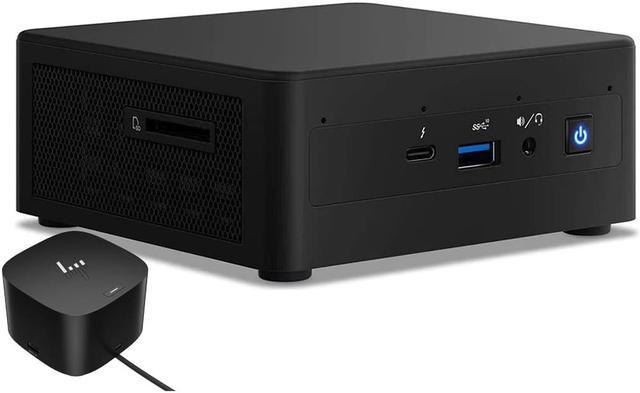
The Intel NUC11PAHi5 is a compact mini desktop with an 11th Gen Core i5 processor, 8GB RAM, a 512GB SSD, and a 120W Thunderbolt dock, suited to home and business users who want a small PC for everyday productivity and expanded connectivity.
| Attribute | Value |
|---|---|
| Best For | Home and business computing where a compact desktop with an Intel Core i5 processor, 8GB memory, and 512GB SSD is suitable |
| Processor And Cache | 11th Gen Intel Core i5 with four cores and 8MB L3 cache |
| Memory | 8GB DDR4 memory |
| Storage | 512GB SSD; no HDD listed |
| Graphics | Integrated graphics |
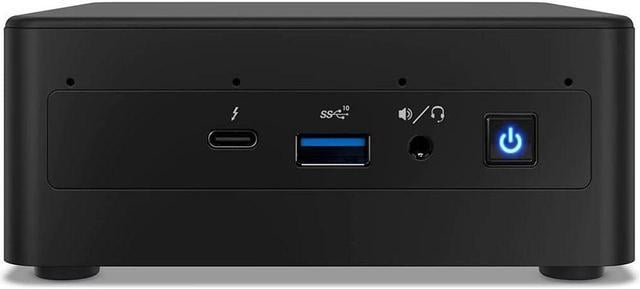
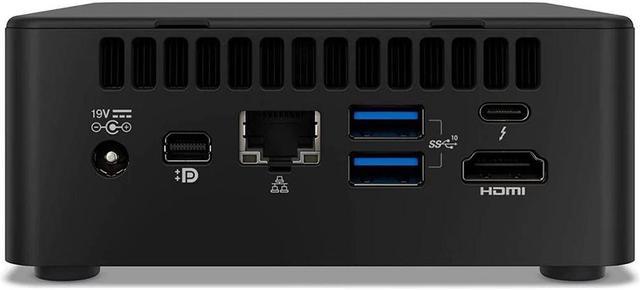
| Connectivity | Wi-Fi 6 AX201, Bluetooth 4.2, RJ45 Ethernet, and a card reader |
| Display And Peripherals | No monitor or screen included; no keyboard or optical drive |
| Operating System | Windows 10 Home |
| Physical Design And Power | Black mini PC with a 120W power supply |
| Model Identifiers | Intel NUC11PAHi5 |
Q: NUC11PAHi5 vs NUC11PAHi3: which is better for office multitasking?
A: Choose the NUC11PAHi5 for multitasking-heavy office use. Its Core i5-1135G7 has 4 cores and 8 threads, compared with 2 cores and 4 threads in the NUC11PAHi3’s Core i3-1115G4. This Newegg configuration also includes 8GB RAM, a 512GB SSD, and a Thunderbolt dock.
Q: NUC11PAHi5 vs NUC11PAHi7: which should I choose for a compact work PC?
A: Choose the NUC11PAHi5 for general home and office productivity with this listing’s 8GB RAM, 512GB SSD, and included dock. Choose the NUC11PAHi7 if you want the higher CPU tier: both processors have 4 cores and 8 threads, while the i7-1165G7 has a higher maximum turbo frequency and more cache than the i5-1135G7.
Q: NUC11PAHi5 vs NUC10i5: what changes between the generations?
A: Both are four-core, eight-thread Intel NUCs. The NUC11PAHi5 uses the 11th Gen Core i5-1135G7 with 8MB cache and Intel Iris Xe graphics; the NUC10i5 uses the 10th Gen Core i5-10210U with 6MB cache and Intel UHD graphics. Choose the NUC11PAHi5 if you prefer the newer processor generation and graphics platform.
Q: Does this mini desktop include a monitor, keyboard, or webcam?
A: No monitor is included, and the listing specifies no keyboard or webcam. Plan to provide a display and keyboard; for video calls, you will also need an external webcam.
Q: Is this a good choice for everyday office work and video meetings?
A: It is suited to routine desktop work such as documents, email, and web browsing, with a quad-core Core i5 processor, 8GB RAM, and a 512GB SSD. The 8GB of RAM may be limiting for heavy multitasking, and video meetings require an external webcam.
Q: Can it run multiple monitors?
A: The bundle is designed for multi-monitor use: the mini PC lists HDMI, mini DisplayPort, and two Thunderbolt 3 ports, while the included dock lists HDMI and DisplayPort outputs and support for up to three monitors. Confirm the supported monitor count and resolution for your specific cable and dock setup before buying.
Q: Is this practical as a travel work computer?
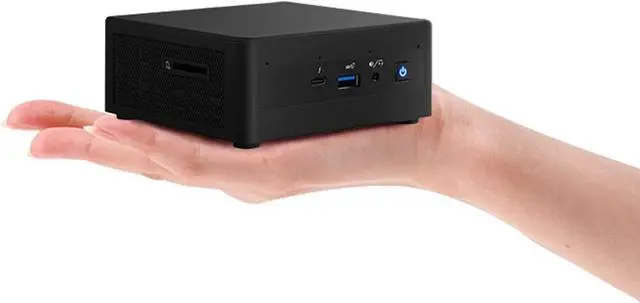
A: It is a compact desktop that can be moved between workspaces, but it is not a self-contained laptop replacement: it has no built-in screen or battery, and no webcam is listed. You will need a display, power, and any peripherals required for your work.
Q: Is the NUC11PAHi5 suitable for gaming?
A: It may suit older or less demanding games, but it is not a dedicated gaming PC: it uses integrated graphics and this listing has 8GB of RAM. A YouTube test of the same model tried several games with 16GB of RAM, so its results may not reflect this 8GB configuration.
Q: Should I check the Thunderbolt ports before buying?
A: Yes, especially if you plan to use the included dock or other Thunderbolt devices. Reddit users have reported port and display-output problems on some NUC11PAHi5 units, but those reports are anecdotal and do not establish that every unit is affected. Test both ports with your intended setup if possible.
Q: Is 8GB of RAM enough, or should I plan for more?
A: The listing includes 8GB, while a Reddit owner described using the same NUC model with 32GB. That shows a higher-memory configuration has been used, but confirm the installed memory and upgrade options for the specific unit before buying.


