




 here!
I’m your shopping assistant for PC builds, upgrades, and everything tech.
Got questions? Ask away!
Start a conversation
here!
I’m your shopping assistant for PC builds, upgrades, and everything tech.
Got questions? Ask away!
Start a conversation







Any questions? Ask CelesteSM will help you find out quickly.
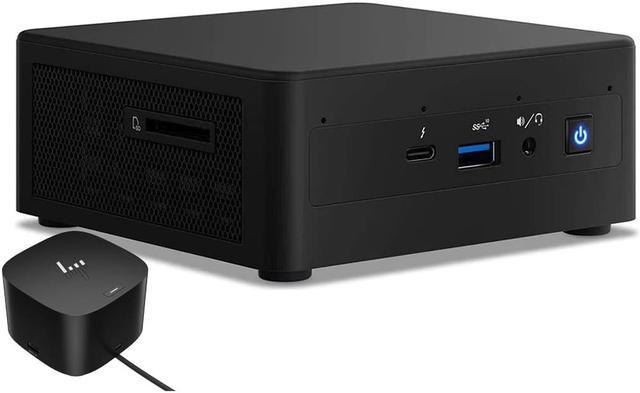
The Intel NUC11PAHi5 is a compact mini desktop with an 11th Gen Core i5 processor, 16GB of RAM, a 1TB SSD, a 2TB hard drive, and a 120W G4 dock. It suits home and office users who want a small Windows PC with substantial storage and expanded connectivity for everyday productivity.
| Attribute | Value |
|---|---|
| Best For | Compact home or business desktop computing with 16GB memory and combined SSD and HDD storage |
| Processor And Core Count | 11th Gen Intel Core i5 with a quad-core processor and 8MB L3 cache |
| Graphics | Integrated graphics with integrated video interface |
| Memory Configuration | 16GB DDR4 memory |
| Storage | 1TB SSD and 2TB HDD |
| Networking And Connectivity | Wi-Fi 6 AX201, Bluetooth 4.2, and RJ-45 Ethernet |
| Card Reader | Card reader included |
| Operating System | Windows 10 Home |
| Power | 120W power supply |
| Chassis And Included Equipment | Black Mini PC; monitor and keyboard not included |
| Optical Drive | No optical drive |
| Model Identifiers | Intel NUC11PAHi5 |
Q: Intel NUC11PAHi5 vs NUC11PAHi3: which is better for multitasking?
A: Choose the NUC11PAHi5 for heavier multitasking: its Core i5-1135G7 has 4 cores and 8 threads, compared with 2 cores and 4 threads in the NUC11PAHi3’s Core i3-1115G4. The NUC11PAHi5 also pairs its processor with Iris Xe graphics. The NUC11PAHi3 is the lower-tier option for lighter everyday computing.
Q: Intel NUC11PAHi5 vs NUC11PAHi7: is the i7 version worth choosing?
A: Choose the NUC11PAHi5 for a capable 4-core, 8-thread system with the listed 16GB memory and storage bundle. The NUC11PAHi7 uses a Core i7-1165G7, also with 4 cores and 8 threads, and offers higher maximum turbo frequency—up to 4.7 GHz versus 4.2 GHz for the i5. The i7 configuration is a fit when you want more processor headroom; the i5 configuration provides a strong balance for everyday work and multitasking.
Q: Intel NUC11PAHi5 vs NUC 12 Pro with Core i5: which should I choose?
A: Choose the NUC11PAHi5 if you want the specific ready-to-use configuration listed here: 16GB RAM, a 1TB SSD, a 2TB HDD, and a bundled dock. Choose an Intel NUC 12 Pro with Core i5-1240P if your priority is a newer processor generation and higher multicore CPU throughput; reviews and benchmarks report a substantial performance step up over the 11th-generation Core i5-1135G7. NUC 12 Pro configurations vary, so compare the included memory, storage, and accessories before choosing.
Q: Is this mini PC suitable for everyday office work and multitasking?
A: Yes. Its 11th Gen Core i5 processor, 16GB of RAM, and 1TB SSD are suited to common office work such as documents, email, browsing, and routine multitasking. It has integrated graphics, so it is a less suitable choice for graphics-intensive work.
Q: What do I need to use it for video meetings?
A: You will need a monitor and an external webcam: neither is included, and the mini PC has no built-in screen or webcam. The listing includes Wi-Fi and a headphone/microphone combo jack.
Q: Can it support a multi-monitor desk setup?
A: The bundle includes a dock with HDMI and DisplayPort outputs, and the product information lists support for dual 4K displays and up to three monitors. Check that your monitor connections and desired display arrangement are compatible with the dock and PC before buying.
Q: Is it a good choice for gaming?
A: It is better suited to everyday computing and lighter games than demanding modern games. The system uses integrated graphics and does not list a dedicated graphics card or game-specific performance results.
Q: Can this NUC replace a laptop if I don’t need portability?
A: It may suit someone who wants a compact, upgradeable desktop rather than a portable computer. A NUC11PAHi5 owner described it as an alternative to a laptop when mobility was not needed. This listing includes 16GB RAM and 3TB of combined storage, but no monitor, keyboard, or webcam.
Q: Is the NUC11PAHi5 a good choice for Linux?
A: Linux use is discussed by NUC11PAHi5 owners, but the discussion includes troubleshooting sound. It does not establish that every Linux setup will have problems; if Linux is your main OS, check support for your preferred distribution and hardware before buying. This listing comes with Windows 10 Home.
Q: Is this NUC suitable for retro gaming?
A: An owner discussed using the NUC11PAHi5 for retro gaming, but the thread focuses on performance tuning and thermal limits rather than providing game benchmarks. The listing has integrated graphics, so check performance for the specific games and emulators you plan to use; the discussion does not establish suitability for modern, demanding games.


