




 here!
I’m your shopping assistant for PC builds, upgrades, and everything tech.
Got questions? Ask away!
Start a conversation
here!
I’m your shopping assistant for PC builds, upgrades, and everything tech.
Got questions? Ask away!
Start a conversation







Any questions? Ask CelesteSM will help you find out quickly.
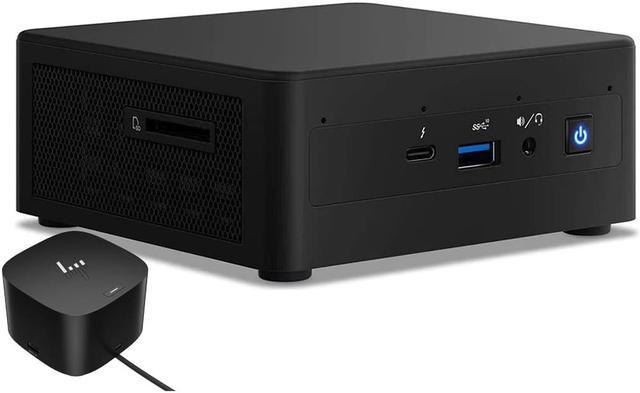
The Intel NUC11PAHi5 is a compact Windows 11 Pro mini desktop with an 11th Gen Core i5 processor, 4GB of DDR4 memory, a 1TB hard drive, and a 120W G4 dock. It suits home or office users who want a small setup for everyday computing and extra dock connectivity.
| Attribute | Value |
|---|---|
| Best For | Home and business desktop use in a compact mini PC setup, with Windows 11 Pro and integrated graphics |
| Processor And Cache | 11th Gen Intel Core i5 quad-core processor with 8MB L3 cache |
| Graphics | Integrated graphics with integrated video output |
| Memory | 4GB DDR4 memory |
| Storage | 1TB HDD; no SSD |
| Connectivity And Card Reader | Wi-Fi 6 AX201, Bluetooth 4.2, RJ45 Ethernet, and a card reader |
| Display And Optical Drive | No screen or monitor included; no optical drive |
| Power And Appearance | 120W power supply; black |
| Keyboard | No keyboard included |
| Model Identifiers | Intel NUC11PAHi5 |
Q: Intel NUC11PAHi5 or NUC11PAHi3: which is better for multitasking?
A: Choose the NUC11PAHi5 for multitasking. Its Core i5-1135G7 has 4 cores and 8 threads, compared with 2 cores and 4 threads in the NUC11PAHi3’s Core i3-1115G4. The i3 model is the more basic option for lighter desktop work.
Q: Should I get the NUC11PAHi5 or the NUC11PAHi7?
A: Choose the NUC11PAHi5 for a four-core, eight-thread NUC 11 Performance system for everyday desktop tasks. The NUC11PAHi7 keeps the same core and thread count but raises maximum turbo frequency to 4.7 GHz from the i5’s 4.2 GHz, making it the higher-tier choice when peak processor speed is the priority.
Q: Should I buy this NUC11PAHi5 bundle or an Intel NUC11PAHi5 barebones kit?
A: Choose this bundle if you want the listed Windows 11 Pro installation, 4GB of RAM, 1TB hard drive, and included dock together. Choose the barebones kit if you prefer to select and install the memory and storage yourself.
Q: Is this mini PC suitable for everyday office work?
A: It can handle basic tasks such as email, documents, and web browsing, but its 4GB of RAM may limit multitasking, especially with many browser tabs or video meetings open. It has an 11th Gen Core i5 processor, integrated graphics, and a 1TB hard drive, but no SSD is listed.
Q: Does it include a monitor, keyboard, or webcam for video meetings?
A: No. The listing specifies no monitor or webcam, and no keyboard is listed as included. You will need a separate display and keyboard, and an external webcam if you want to join video meetings.
Q: Is it practical to use as a travel work computer?
A: It is compact, but it is a desktop rather than a laptop: it has no built-in screen or battery. Using it away from a fixed desk requires access to power and a monitor, and you may also need to bring a keyboard, mouse, and webcam.
Q: Can the RAM or storage be upgraded?
A: The listing confirms 4GB of DDR4 RAM and a 1TB 2.5-inch hard drive, but it does not confirm upgrade limits or procedures. If you need more memory or want to add an SSD, verify compatibility and upgrade options with the seller before buying.
Q: Is the listed 4GB RAM and 1TB HDD enough for everyday work?
A: It may suit basic, light tasks, but 4GB RAM is a tight starting point for multitasking, and the listing has a hard drive rather than an SSD. Reddit owners discuss using larger RAM configurations and SSDs with this NUC model, so plan for upgrades if you want more headroom or faster storage.
Q: Can I upgrade the RAM or storage later?
A: The NUC 11 platform is described in a YouTube review as supporting up to 64GB of DDR4 memory and M.2 or 2.5-inch storage. Reddit owners also discuss using higher-capacity RAM and SSDs. Confirm the exact unit’s installed parts and upgrade terms with the seller before buying.
Q: Is this NUC a good choice for gaming?
A: It is better suited to retro or less demanding games than to modern, graphics-intensive gaming: this listing has integrated graphics and only 4GB of RAM. A Reddit discussion about retro gaming with this model also identifies thermal limits as a constraint on pushing performance.


