




 here!
I’m your shopping assistant for PC builds, upgrades, and everything tech.
Got questions? Ask away!
Start a conversation
here!
I’m your shopping assistant for PC builds, upgrades, and everything tech.
Got questions? Ask away!
Start a conversation







Any questions? Ask CelesteSM will help you find out quickly.
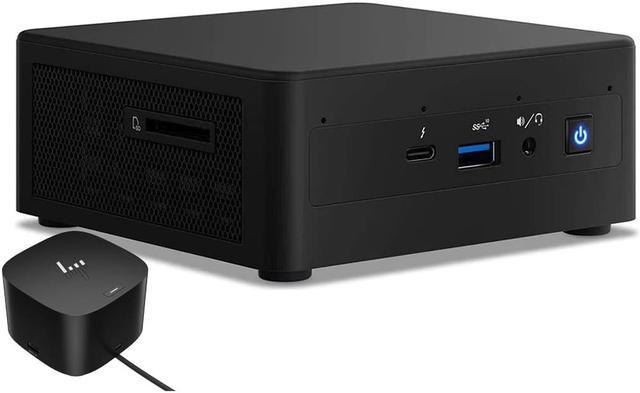
The Intel NUC11PAHi5 is a compact mini desktop with an 11th Gen Core i5 processor, 8GB RAM, a 1TB NVMe SSD, and an included Thunderbolt dock, suited to home or office productivity where desk space and flexible connectivity matter.
| Attribute | Value |
|---|---|
| Best For | Compact business desktop use in a mini PC form factor |
| Processor And Cache | 11th Gen Intel Core i5 with a quad-core processor and 8MB L3 cache |
| Graphics And Display | Integrated graphics; monitor and screen not included |
| Memory | 8GB DDR4 memory |
| Storage | 1TB SSD, with no HDD or optical drive |
| Networking And Connectivity | Wi-Fi 6 AX201, Bluetooth 4.2, and RJ45 Ethernet |
| Card Reader | Card reader included |
| Operating System | Windows 10 Home |
| Power And Color | 120W power supply in black |
| Model Identifiers | Intel NUC11PAHi5 |
Q: Should I get the Intel NUC11PAHi5 or the NUC11PAHi7?
A: Choose the NUC11PAHi5 for a four-core, eight-thread mini PC with an i5-1135G7 and Iris Xe graphics. Choose the NUC11PAHi7 if you want the same core and thread count with the i7-1165G7, higher listed turbo frequency, and more cache. This Newegg bundle also includes 8GB RAM, a 1TB SSD, and a Thunderbolt dock.
Q: How does the NUC11PAHi5 compare with the NUC11PAHi3?
A: The NUC11PAHi5 has a four-core, eight-thread i5-1135G7 and Iris Xe graphics; the NUC11PAHi3 has a two-core, four-thread i3-1115G4 and Intel UHD graphics. Choose the Hi5 for more processor threads and the Iris Xe graphics configuration; choose the Hi3 for the i3 tier in the same NUC 11 Performance family.
Q: Should I choose the NUC11PAHi5 or the slimmer NUC11PAKi5?
A: Both use the Core i5-1135G7. The NUC11PAHi5 uses Intel’s tall chassis format, while the NUC11PAKi5 uses the slim format. Choose the Hi5 when its included 1TB SSD, 8GB RAM, and bundled Thunderbolt dock fit your setup; consider the Ki5 when a slim NUC 11 chassis is the priority.
Q: Is this mini desktop suitable for everyday office work and video meetings?
A: It is suited to routine office tasks such as documents, email, browsing, and video calls. It has an 11th Gen Core i5 processor, 8GB RAM, and a 1TB SSD. It has no built-in webcam or display, so video meetings require an external webcam and monitor; 8GB of RAM may also constrain heavier multitasking.
Q: Can I use it with multiple monitors?
A: The included dock is listed as supporting up to three monitors, and the mini desktop has HDMI, mini DisplayPort, and Thunderbolt 3 ports. The exact number of displays and supported resolutions depend on the connection setup, so check the dock and monitor port requirements before connecting them.
Q: Is it practical to take this mini PC when traveling?
A: It is compact and can be moved between workspaces, but it is not a self-contained travel computer: it has no screen or webcam and requires external power, a display, and input devices. It is more suitable for a fixed desk or a destination where those accessories are available.
Q: Can I upgrade the RAM or storage later?
A: The provided listing confirms 8GB RAM and a 1TB PCIe SSD but does not specify upgrade limits or procedures for this professionally upgraded configuration. Check with the seller before buying if future memory or storage upgrades are important.
Q: Can the NUC11PAHi5 work as a Plex or home media server?
A: Reddit users describe using this model as a headless server and for Plex, including video transcoding. This listing’s 8GB of RAM is less than the 32GB configuration mentioned in one report, so consider whether your workload may call for a memory upgrade. User reports are anecdotal and do not guarantee performance for every media format or stream count.
Q: Is the NUC11PAHi5 suitable for gaming?
A: It is better suited to casual or retro gaming than demanding games. The product has integrated graphics, and a Reddit discussion about this model notes that heavier gaming is a limitation; increasing power settings may also run into thermal limits in the small chassis.
Q: Can the NUC11PAHi5 play 4K video at 60 fps?
A: A Reddit discussion about this model reports successful 4K60 YouTube playback, while noting that HDR playback may skip frames. Treat this as an individual user report, not a guarantee for every video, app, or display setup.
Q: Will the NUC11PAHi5 work with Linux?
A: Reddit reports include users running Linux Mint on this model, but discussions also mention troubleshooting and reliability concerns. It may suit someone comfortable checking drivers and diagnosing issues; the listing itself comes with Windows 10 Home.


