




 here!
I’m your shopping assistant for PC builds, upgrades, and everything tech.
Got questions? Ask away!
Start a conversation
here!
I’m your shopping assistant for PC builds, upgrades, and everything tech.
Got questions? Ask away!
Start a conversation







Any questions? Ask CelesteSM will help you find out quickly.
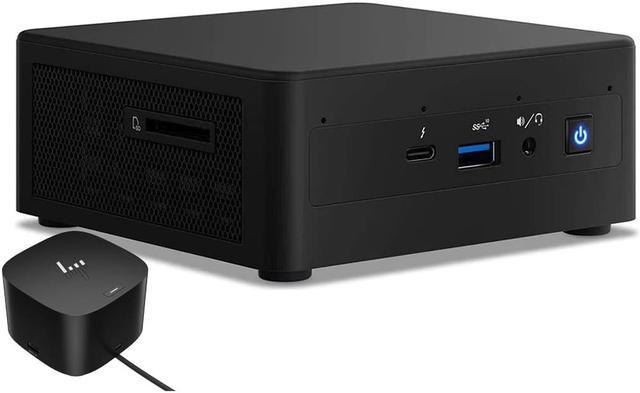
The Intel NUC11PAHi5 is a compact Windows 10 Home mini desktop with an 11th Gen Core i5 processor, 32GB RAM, a 256GB NVMe SSD, and a bundled Thunderbolt dock, suited to home or office productivity and multitasking.
| Attribute | Value |
|---|---|
| Best For | Home or business desktop use in a compact mini PC form factor, with a quad-core processor and 32GB of memory |
| Processor And Cache | 11th Gen Intel Core i5 with four cores and 8MB L3 cache |
| Graphics | Integrated graphics |
| Memory | 32GB DDR4 |
| Storage And Expansion | 256GB SSD, no HDD or optical drive; card reader included |
| Networking | Wi-Fi 6 AX201, Bluetooth 4.2, and RJ-45 Ethernet |
| Display | No screen or monitor included |
| Operating System | Windows 10 Home |
| Power And Appearance | 120W power supply; black |
| Keyboard And Peripherals | Keyboard not included |
| Model Identifiers | Intel NUC11PAHi5 |
Q: Intel NUC11PAHi5 or NUC11PAHi3: which configuration should I choose?
A: Choose the NUC11PAHi5 when you want the stronger processor tier in Intel’s NUC 11 Performance family: its Core i5-1135G7 has 4 cores and 8 threads, compared with the NUC11PAHi3’s Core i3-1115G4 with 2 cores and 4 threads. This listed configuration also includes 32GB RAM, a 256GB PCIe SSD, and a 120W dock.
Q: Should I choose the NUC11PAHi5 or the NUC11PAHi7?
A: Choose this NUC11PAHi5 configuration if 32GB RAM, a 256GB PCIe SSD, and the included dock match your setup. The NUC11PAHi7 uses a Core i7-1165G7 in the same NUC 11 Performance family, making it the higher-processor-tier option for users prioritizing CPU performance. A review of the closely related NUC 11 i7 model includes benchmark comparisons with the i5-1135G7.
Q: NUC11PAHi5 or Intel NUC 12 Pro with Core i5: which is the better fit?
A: Choose the NUC11PAHi5 when you want this listed 32GB configuration and its included dock for a compact desktop setup. Choose the NUC 12 Pro Core i5-1240P when you prefer a newer 12th-generation Intel platform and its higher-core-count processor. The choice is primarily between the NUC11PAHi5’s bundled memory and dock configuration and the NUC 12 Pro’s newer processor generation.
Q: Is this mini desktop suitable for office work and video calls?
A: It is suitable for everyday office work such as documents, browsing, and multitasking, with a 4-core Core i5 processor and 32GB of RAM. It has no built-in display or webcam, so video calls require an external monitor and webcam; a keyboard and mouse are not listed as included.
Q: Can I connect multiple monitors?
A: The PC lists HDMI, mini DisplayPort, and Thunderbolt 3 connections, and the included dock adds display outputs. It is intended for multi-display setups, but check the monitors’ ports and the dock’s connection requirements to confirm the exact configuration you plan to use.
Q: Is it practical to take on trips for work?
A: It is compact and can be transported, but it is not a self-contained travel computer. It has no screen, webcam, keyboard, or mouse listed as included, so you will need those accessories or access to them at your destination.
Q: Is it a good choice for gaming?
A: It has integrated graphics rather than a dedicated graphics card, so it is better suited to everyday computing than demanding modern games. Casual or older games may be playable, depending on the game and settings.
Q: Is the NUC11PAHi5 suitable for a home media server?
A: It can suit a compact Plex or Jellyfin server: Reddit users report using this model for media serving and transcoding. Results depend on video formats, client playback support, and how many streams need transcoding, so treat individual performance reports as examples rather than guarantees.
Q: Is this a good mini PC for everyday work?
A: Its Core i5-1135G7, 32GB RAM, and SSD make it a reasonable fit for general desktop work. One Reddit user reported graphics sluggishness after leaving the system locked with two 4K monitors, so test your monitor and sleep or lock setup if that configuration matters to you.
Q: Is the NUC11PAHi5 good for gaming?
A: It has integrated graphics rather than a dedicated graphics card, so it is a better match for retro or lighter games than for demanding modern games. A Reddit discussion about using this model for retro gaming also notes that raising power limits can run into the small system’s cooling limits.
Q: Is it quiet enough for a desk or development setup?
A: It is actively cooled, not fanless. One Reddit user running this model for development reported that constant fan noise bothered them; noise can vary with workload and settings, so it may not suit someone who prioritizes silent operation.


