




 here!
I’m your shopping assistant for PC builds, upgrades, and everything tech.
Got questions? Ask away!
Start a conversation
here!
I’m your shopping assistant for PC builds, upgrades, and everything tech.
Got questions? Ask away!
Start a conversation







Any questions? Ask CelesteSM will help you find out quickly.
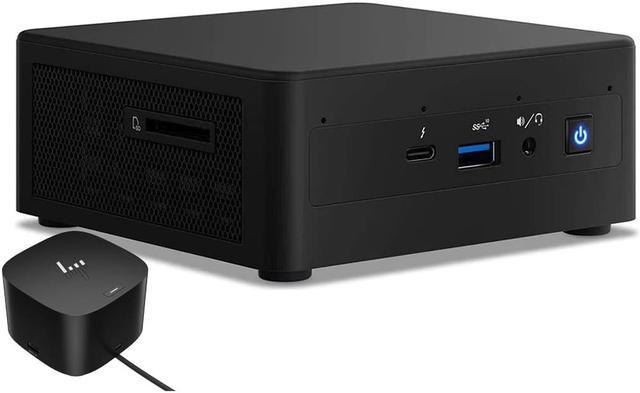
The Intel NUC11PAHi5 is a compact Windows 11 Pro desktop with an 11th Gen Core i5 processor, 8GB RAM, a 256GB NVMe SSD, and a bundled Thunderbolt Dock G4. It suits home-office and business users who want a small PC with expanded connectivity and multi-monitor support.
| Attribute | Value |
|---|---|
| Best For | Compact home or business computing with an integrated-graphics mini PC |
| Processor And Cache | 11th Gen Intel Core i5 quad-core processor with 8 MB L3 cache |
| Graphics | Integrated graphics with integrated video output |
| Memory | 8 GB DDR4 memory |
| Storage | 256 GB SSD; no HDD or optical drive |
| Networking And Expansion | Wi-Fi 6 AX201, Bluetooth 4.2, RJ-45 Ethernet, and a card reader |
| Power | 120 W power supply |
| Design And Included Equipment | Black mini PC; monitor and keyboard not included |
| Operating System | Windows 11 Pro |
| Model Identifiers | Intel NUC11PAHi5 |
Q: Should I choose the Intel NUC11PAHi5 or the NUC 11 Performance i3?
A: Choose the NUC11PAHi5 for its Core i5-1135G7, four cores, and integrated Iris Xe graphics. It is the stronger fit when your everyday work involves several applications at once; the NUC 11 i3 configuration is a lower processor tier.
Q: Intel NUC11PAHi5 vs NUC11PAHi7: which should I get?
A: Choose the NUC11PAHi5 for a four-core, eight-thread 11th Gen system with an i5-1135G7 processor. Choose the NUC11PAHi7 if you prefer the higher-tier i7-1165G7, which has a higher maximum turbo frequency. Both are NUC 11 Performance models, so the choice mainly comes down to processor tier and the configuration included in the specific listing.
Q: How does the NUC11PAHi5 compare with the Intel NUC 10 Performance i5?
A: The NUC11PAHi5 uses an 11th Gen Core i5-1135G7, while the NUC 10 Performance i5 configuration uses a 10th Gen Core i5-10210U. Choose this NUC 11 model if you want the newer processor generation and its Iris Xe integrated graphics. A Notebookcheck comparison of NUC 11 and NUC 10 systems also found an advantage for the tested NUC 11 system in single-thread performance; results vary by exact configuration and workload.
Q: Is this mini desktop suitable for everyday office work and multitasking?
A: Yes. Its 4-core Intel Core i5 and Windows 11 Pro suit routine tasks such as email, web browsing, documents, and spreadsheets. The included 8GB of RAM may feel limiting with many demanding apps open at once, and video calls require an external webcam because none is built in.
Q: Does it include a monitor, keyboard, and mouse?
A: No. This is a mini desktop with no built-in screen; the product information does not list a keyboard or mouse as included. You will need to provide those peripherals separately. The listing includes a 120W G4 dock.
Q: Can I use it with multiple monitors?
A: Yes. The mini PC has HDMI, Mini DisplayPort, and two Thunderbolt 3 ports, and the included dock provides additional display outputs. The number of screens and supported resolutions depend on the monitors, connections, and dock setup, so confirm compatibility for your intended arrangement.
Q: Is it practical to take on work trips?
A: It is compact, but it is not a standalone travel computer: it has no screen, keyboard, webcam, or battery listed. To use it away from a desk, you will need power and separate peripherals, so it is better suited to a fixed workstation than laptop-style travel.
Q: Is it suitable for gaming?
A: It is suited to everyday computing and may handle lighter games, but its integrated graphics are not intended for demanding modern games or graphics-heavy workloads. Check the requirements of specific games before buying it for gaming.
Q: Can this NUC handle 4K 60 fps video playback?
A: Reddit users report that 4K 60 fps playback works on NUC systems, including this model, but one user noted possible frame skipping with HDR. The PC has integrated graphics, so treat HDR playback as a potential limitation rather than a guarantee.
Q: Is the NUC11PAHi5 a straightforward choice for Linux?
A: It can run Linux, but user reports are mixed. Some Reddit users said Ubuntu or Manjaro worked, while others reported audio or display issues with particular distributions and kernels. If Linux is essential, expect to check hardware compatibility and troubleshoot rather than assume everything works out of the box.
Q: Can I use the NUC11PAHi5 with an external graphics card?
A: A Reddit owner reported using a Razer Core X eGPU with this model over Thunderbolt, but described troubleshooting before it worked reliably. The product includes Thunderbolt ports, but eGPU compatibility and setup should be verified for the specific enclosure, graphics card, drivers, and firmware.


