




 here!
I’m your shopping assistant for PC builds, upgrades, and everything tech.
Got questions? Ask away!
Start a conversation
here!
I’m your shopping assistant for PC builds, upgrades, and everything tech.
Got questions? Ask away!
Start a conversation







Any questions? Ask CelesteSM will help you find out quickly.
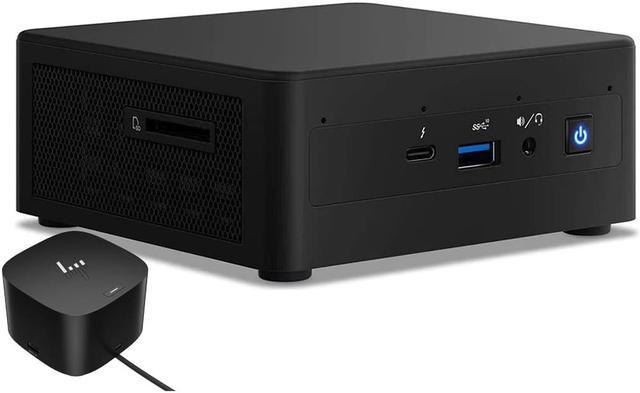
The Intel NUC11PAHi5 is a compact Windows 11 Home mini desktop with an 11th Gen Core i5 processor, 16GB RAM, a 512GB SSD, and an included Thunderbolt 4 dock, suited to home and office users who want a small PC with expanded connectivity for a multi-monitor workspace.
| Attribute | Value |
|---|---|
| Best For | A compact home or business desktop for everyday computing, with a quad-core Intel Core i5, 16GB of memory, and a 512GB SSD |
| Processor And Cache | 11th Gen Intel Core i5 quad-core processor with 8MB L3 cache |
| Graphics | Integrated graphics |
| Memory And Storage | 16GB DDR4 memory and a 512GB SSD; no HDD |
| Networking And Connectivity | Wi-Fi 6 AX201, Bluetooth 4.2, and RJ-45 Ethernet |
| Display And Peripherals | No monitor or screen included; no keyboard or optical drive. Includes a card reader |
| Power And Operating System | 120W power supply and Windows 11 Home |
| Form Factor And Color | Black Mini PC |
| Model Identifiers | Intel NUC11PAHi5 |
Q: Should I get the NUC11PAHi5 or the NUC11PAHi3?
A: Choose the NUC11PAHi5 for more multitasking and integrated-graphics capability: it has a four-core, eight-thread Core i5-1135G7 and Iris Xe graphics, compared with the NUC11PAHi3’s dual-core Core i3-1115G4 and Intel UHD Graphics. The listed NUC11PAHi5 configuration also includes 16GB RAM, a 512GB SSD, and a Thunderbolt dock.
Q: How does the NUC11PAHi5 compare with the NUC11PAHi7?
A: The NUC11PAHi5 is a practical choice for everyday work and multitasking, with a four-core Core i5-1135G7 and Iris Xe graphics. The NUC11PAHi7 keeps the same four-core design but uses a Core i7-1165G7 with a higher maximum turbo frequency and more cache, making it the higher-tier option for workloads that benefit from additional CPU headroom. Notebookcheck’s review of a related Panther Canyon i7 model includes independent performance testing.
Q: Should I choose this NUC 11 or a Core i5 NUC 12 Pro?
A: Choose this NUC11PAHi5 for its preconfigured 16GB RAM, 512GB SSD, and included Thunderbolt dock. Choose a Core i5 NUC 12 Pro when you prioritize its newer 12th Gen Core i5-1240P hybrid processor, with 12 cores and 16 threads, for CPU-intensive multitasking. Independent testing of a NUC 12 Pro with that processor includes Cinebench benchmarks.
Q: Is this mini PC suitable for everyday office work and video meetings?
A: It is configured for everyday office tasks such as email, documents, browsing, and spreadsheets, with an 11th Gen quad-core Core i5, 16GB RAM, and a 512GB SSD. It has no built-in webcam or screen, so video meetings require a separate monitor and webcam.
Q: Can I use more than one monitor with this mini PC?
A: The PC lists HDMI, mini DisplayPort, and two Thunderbolt 3 ports. The included dock is specified for dual 4K displays and up to three monitors. Confirm that your monitors, cables, and chosen connection setup support the display arrangement you need.
Q: Does it come with a monitor, keyboard, or webcam?
A: No. The listing specifies no monitor or webcam, and no keyboard is listed as included. Plan to provide a monitor and keyboard, plus a webcam if you need video calls.
Q: Is this mini PC a good choice for demanding games?
A: It has integrated graphics rather than a dedicated graphics card, so it is better suited to everyday computing and lighter games than demanding graphics-intensive gaming. Game performance will depend on the specific title and settings.
Q: Is the NUC11PAHi5 a good choice for Linux?
A: It can run Linux, but user reports are mixed: some report successful use, while others describe troubleshooting with HDMI or headphone audio and display behavior on Ubuntu. Choose it if you are comfortable checking distro and kernel compatibility; Windows 11 Home is the included OS.
Q: Can the NUC11PAHi5 play 4K YouTube at 60 fps?
A: A Reddit discussion reports that 4K/60 playback worked on less powerful NUCs, but notes that 4K/60 HDR may skip frames for some users. This model has an 11th Gen Core i5 and integrated graphics, but the discussion is anecdotal rather than a guarantee for every display or setup.
Q: Should I choose the NUC11PAHi5 over the NUC11TNHi5?
A: A Reddit comparison describes the models as broadly similar in specs but different in port layout and case options. The PAHi5 may suit buyers who want its Mini DisplayPort and analog audio connection; check the exact ports and case compatibility before choosing, especially if you plan to use an aftermarket case.


