




 here!
I’m your shopping assistant for PC builds, upgrades, and everything tech.
Got questions? Ask away!
Start a conversation
here!
I’m your shopping assistant for PC builds, upgrades, and everything tech.
Got questions? Ask away!
Start a conversation







Any questions? Ask CelesteSM will help you find out quickly.
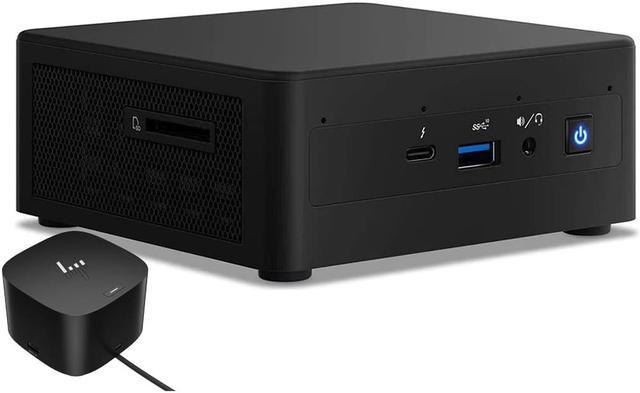
The Intel NUC11PAHi5 is a compact mini desktop with an 11th Gen Core i5-1135G7, 8GB RAM, a 512GB SSD, and Windows 10 Home, suited to everyday home and office computing. Its included 120W G4 dock adds ports for connecting peripherals and displays; a monitor is not included.
| Attribute | Value |
|---|---|
| Best For | Compact desktop computing for home or business use, with an Intel Core i5 processor, 8GB memory, and 512GB SSD |
| Processor And Cache | 11th Gen Intel Core i5 with four cores and 8MB L3 cache |
| Graphics | Integrated graphics with integrated video output |
| Memory Configuration | 8GB DDR4 memory |
| Storage And Expansion | 512GB SSD, no HDD or optical drive; card reader included |
| Networking And Connectivity | Wi-Fi 6 AX201, Bluetooth 4.2, and RJ45 connectivity |
| Display And Included Equipment | No screen or monitor included |
| Operating System | Windows 10 Home |
| Chassis And Power | Mini PC form factor, black, with a 120W power supply |
| Model Identifiers | Intel NUC11PAHi5 |
Q: Intel NUC11PAHi5 vs NUC11PAHi3: which configuration should I choose?
A: Choose the NUC11PAHi5 when you want a four-core Core i5-1135G7 and the listed 8GB RAM, 512GB SSD, and included Thunderbolt dock. The NUC11PAHi3 is the lower-tier Core i3 option in Intel’s NUC 11 Performance lineup.
Q: Should I get the Intel NUC11PAHi5 or the NUC11PAHi7?
A: Choose the NUC11PAHi5 for a Core i5-based NUC 11 Performance system with the listed 8GB RAM, 512GB SSD, and dock bundle. Choose the NUC11PAHi7 if you want the same family’s Core i7-1165G7 processor, positioned above the i5 configuration.
Q: Intel NUC11PAHi5 vs NUC 12 Pro i5: which should I pick?
A: Choose the NUC11PAHi5 when its listed 8GB RAM, 512GB SSD, Windows 10 Home, and included Thunderbolt dock fit your setup. Choose a NUC 12 Pro i5 configuration when you want its newer 12th-generation Core i5-1240P platform; review testing covers that processor in the NUC 12 Pro.
Q: Is this mini PC suitable for everyday office work?
A: Yes. Its 4-core Intel Core i5 processor, 8GB of RAM, and 512GB SSD are suited to everyday tasks such as web browsing, email, documents, and spreadsheets. The 8GB of RAM may be limiting for heavy multitasking, and you will need a separate monitor, keyboard, and mouse.
Q: Can it run multiple monitors?
A: The mini PC has HDMI, mini DisplayPort, and Thunderbolt 3 ports, and the included dock is listed as supporting up to three monitors. Check the dock and monitor connections and resolution requirements before setting up your displays.
Q: Does it come with a monitor, keyboard, or mouse?
A: No. The listing specifies that no monitor or keyboard is included. Plan to provide a monitor, keyboard, and mouse separately.
Q: Is it a good choice for gaming?
A: It is better suited to everyday computing than demanding gaming. It uses integrated graphics rather than a dedicated graphics card, so do not choose it for graphics-intensive games.
Q: Is the NUC11PAHi5 suitable for everyday office work and 24/7 use?
A: It is a reasonable fit for general office tasks such as email, documents, and browsing: it has a quad-core i5-1135G7 and, in this configuration, 8GB RAM and a 512GB SSD. Reddit users reported using NUC 11 systems for everyday work and continuous operation, but those experiences do not guarantee reliability for every unit. The included dock supports up to three monitors; check the exact display setup you need before buying.
Q: Can the NUC11PAHi5 play 4K video at 60 fps, including HDR?
A: Reddit users reported that 4K 60 fps playback worked on NUC systems, while one user noted possible skipped frames with 4K 60 fps HDR. Treat HDR playback as less certain than standard 4K 60 fps, since these are individual user reports rather than controlled tests.
Q: Is the NUC11PAHi5 a good choice for Linux?
A: It may work, but Reddit reports describe mixed Linux experiences, including audio or display issues on older Ubuntu releases; other users reported successful use with Ubuntu or Manjaro. If Linux is essential, check compatibility for your specific distribution, kernel, and audio/display setup before buying. The supplied configuration lists Windows 10 Home.


